TOOL HUNTER

Summary: Ever wondered, can a blocked number leave a voicemail on iPhone? The surprising answer is yes, they often can. This guide will show you exactly how to stop blocked numbers leaving voicemail on iPhone using carrier services and built-in settings. We’ll also cover how to check for these hidden messages and protect your important voicemails.
It’s a common frustration. You block a number on your iPhone, expecting peace and quiet, only to later discover they’ve slipped through a digital backdoor and left a message. Understanding how to block voicemails on iPhone, or at least manage this loophole, is key to truly controlling who can reach you. Let’s dive into the details and reclaim your inbox.
Table of Contents
- Can a Blocked Number Leave a Voicemail on iPhone?
- How to Stop Blocked Numbers Leaving Voicemail with Your Carrier
- How to Block Voicemails on iPhone by Disabling Voicemail
- How to Check for Voicemails from Blocked Numbers
- How to Back Up Important Voicemails from Your iPhone
- Putting It All Together: Mastering Your iPhone’s Privacy
Can a Blocked Number Leave a Voicemail on iPhone?
So, can a blocked number leave a voicemail on iPhone? In most cases, the short and somewhat annoying answer is yes. When you block a contact using your iPhone’s built-in blocking feature—which works across Phone, Messages, and FaceTime—their calls are automatically sent straight to your voicemail. You won’t see their call ring through, and you won’t get a notification. However, if they decide to speak after the beep, that message lands in a special, separate folder within your voicemail inbox labeled Blocked Messages.
This system exists because the iPhone’s native blocking happens at the device level. Your phone simply rejects the active call connection, but the call handling and voicemail service are often managed by your cellular carrier. The carrier’s system doesn’t necessarily know the number is blocked on your device, so it proceeds with its standard routine: no answer? Send to voicemail. This leads many to ask, how to block voicemails from blocked numbers entirely? The solution requires going a step further than just the iPhone’s settings.
How to Stop Blocked Numbers Leaving Voicemail with Your Carrier
The most effective way to prevent a blocked caller from leaving any message is to involve your wireless carrier. This method addresses the issue at the network level. How to block voicemails from blocked numbers often depends on your specific provider and the services they offer. Here’s a breakdown for major U.S. carriers. Remember, features and fees can change, so it’s always good to double-check with your carrier’s customer support.
AT&T Mobility: AT&T offers one of the more robust solutions. Postpaid customers with compatible phones can activate AT&T Call Protect, a free service that can identify and block spam calls. At its highest setting, it can prevent blocked numbers from even reaching your voicemail box. You can manage this through the myAT&T app or website.
Verizon Wireless: Verizon provides basic number blocking, but its ability to stop voicemails is more limited. You can block up to five numbers for 90 days for free through your My Verizon account. For more permanent or advanced call-filtering that might affect voicemail, you may need to look into paid third-party services or inquire about Verizon’s premium call-filtering add-ons.
T-Mobile US: The process with T-Mobile is straightforward. You can request that your voicemail service be completely disabled for certain numbers or in general. Simply dial 611 from your T-Mobile phone for free, or call (800) TMOBILE, and ask a customer service representative to disable voicemail for your line. They handle this request regularly.
Sprint/T-Mobile (Legacy Sprint): For former Sprint customers now on the T-Mobile network, the process is similar to T-Mobile’s. Contact customer service. Historically, Sprint also suggested texting STOP to a number if it was associated with a messaging app to block communications, but for direct carrier-level call and voicemail blocking, customer support is your best route.
Using carrier services is a powerful method to stop blocked numbers leaving voicemail on iPhone, but it’s not universally free or available everywhere. What if you want a device-based solution?
How to Block Voicemails on iPhone by Disabling Voicemail
A more drastic, but completely effective, method is to turn off your voicemail feature entirely. If there’s no voicemail box to receive messages, then obviously, can a blocked number leave a voicemail on iPhone becomes a non-issue. This is a common tactic for travelers wanting to avoid roaming charges for voicemail retrieval. Here’s how you can manage your voicemail settings.
Step 1: Find Your Voicemail Forwarding Number. Open your Phone app, tap the keypad, and dial *#62#. Tap call. This code checks where your calls are forwarded to when your phone is unreachable (often your voicemail). Note down the number that appears.
Step 2: Forward Calls Elsewhere (Optional). Go to Settings > Phone > Call Forwarding. Turn it on and enter a different number (like a landline or a Google Voice number) instead of your voicemail number. This sends all unanswered calls there instead.
Step 3: Disable Voicemail. The direct method is to contact your carrier, as mentioned above. Alternatively, you can try specific deactivation codes. A common one to try is dialing #404# and pressing call. This may reset call forwarding. To be certain, the most reliable way is to call your carrier’s customer service and ask them to disable voicemail on your line.
Step 4: Re-enabling Voicemail. If you want your voicemail back later, you can usually reactivate it by dialing a carrier-specific code:
- AT&T & T-Mobile: ##004#
- Verizon: *73
- US Cellular: *920
After dialing the code, you may need to set up your voicemail greeting again by holding down the ‘1’ key on your phone dial pad.
How to Check for Voicemails from Blocked Numbers
Since blocked messages are siloed, you might be curious about what’s in there. Checking this folder is simple and gives you full control over the messages. Here is how to check for voicemails from blocked numbers on your iPhone.
Step 1: Open the Phone app on your iPhone and tap the Voicemail tab in the bottom right corner.
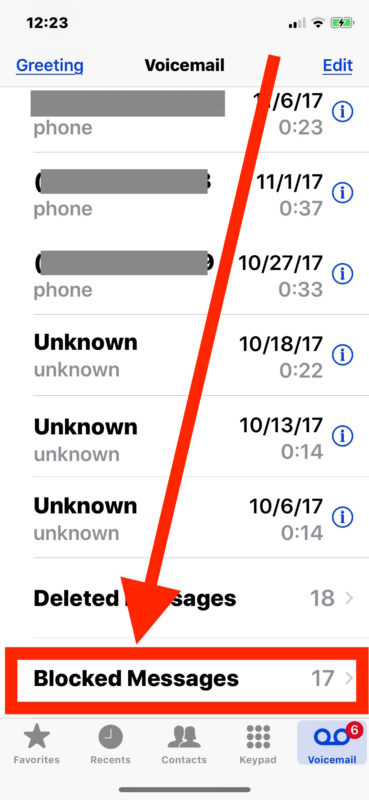
Step 2: Scroll all the way to the very bottom of your voicemail list. Below all your saved and recent messages, you will find a category named Blocked Messages. Tap on it.
Step 3: Inside, you will see any voicemails left by numbers on your block list. You can play them, read the transcript (if available), share them, save them—or finally, delete them with satisfaction. This is your secret audit log of blocked communications.
How to Back Up Important Voicemails from Your iPhone
Sometimes, a voicemail from a blocked number might be important (like a one-time confirmation call), or you might have cherished saved messages from loved ones. If you’ve saved a voicemail to your Voice Memos app, it’s wise to back it up outside your iPhone. While iTunes and iCloud offer general backups, a dedicated tool can give you more control.
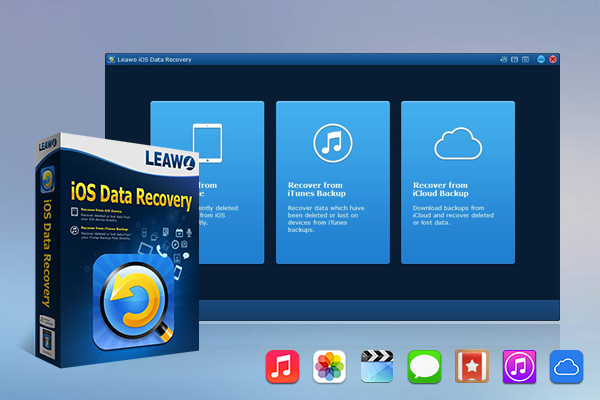
A program like Leawo iOS Data Recovery can help you extract and save these audio files directly to your computer. This kind of software is designed to recover lost data, but its ability to browse and export existing data from your iPhone makes it a useful backup tool.
The process is generally straightforward:
- Connect your iPhone to your computer and launch the backup/recovery software.
- Choose the option to scan your device’s data. Once complete, navigate to the Voice Memos category.
- Preview the memos, select the ones you want to save (including those saved from voicemail), and choose a location on your computer to export them.
This ensures that even if you lose your phone, change your number, or accidentally delete a memo, you have a personal copy saved safely on your hard drive. It’s a great way to preserve important audio snippets without relying solely on your iPhone’s storage.
Try Leawo iOS Data Recovery right now! 100% Recover Deleted or Lost Data from iTunes, iCloud and iOS Devices (iPhone, iPad, and iPod) Safely and Accurately!
Get the Windows version | Get the Mac version | Use the time-limited promotional campaign

Putting It All Together: Mastering Your iPhone’s Privacy
So, can a blocked number leave a voicemail on iPhone? Absolutely. But as we’ve seen, you’re not powerless. You can stop blocked numbers leaving voicemail on iPhone by enlisting your carrier’s help for a network-level fix. If that’s not an option, you can take the direct approach and learn how to block voicemails on iPhone by temporarily disabling the voicemail feature itself. And for those messages that do get through, you now know exactly how to check for voicemails from blocked numbers in that hidden folder.
The key is understanding that device blocking and carrier voicemail are two different systems. By addressing both, you can achieve the level of privacy and control you want. Whether it’s silencing a persistent telemarketer or managing communications during travel, these steps give you the knowledge to tailor your iPhone’s behavior to your needs.
Some images in this article are for illustrative purposes and are sourced from the internet.