TOOL HUNTER

If you’ve been searching for voice changing software, you’ve probably come across Voicemod. It’s one of the most talked-about tools in this space, but there’s also a lot of confusion and concern surrounding it. Many people wonder if Voicemod is safe to use or if it might be some kind of virus. These questions are completely valid since you’re installing software on your personal computer.
In this comprehensive guide, we’ll explore everything you need to know about Voicemod’s safety, address common concerns, and provide practical solutions. We’ll also introduce you to a fantastic alternative that might better suit your needs if you’re hesitant about Voicemod.
Understanding Voicemod Voice Changer
Voicemod is a real-time voice modulation software that has gained significant popularity among gamers, content creators, and people who just want to have fun with their voice. The main appeal is its ability to transform your voice during live conversations, gaming sessions, or streaming. It essentially acts as a digital filter that processes your voice as you speak.
One of Voicemod’s strongest features is its extensive library of voice effects. You can find voices that mimic celebrities, change your age or gender, or even transform you into fictional characters. However, it’s worth noting that many of the more advanced voices require the Pro version. Beyond voice changing, Voicemod also includes sound effects and autotune features that can make anyone sound like a professional singer.
What really sets Voicemod apart from many other voice changers is its Voice Lab feature. This allows users to create custom voice effects by combining different filters and adjustments. It’s like having a professional audio studio for voice modulation at your fingertips.
Another significant advantage is Voicemod’s compatibility with numerous applications and platforms. Whether you’re streaming on Twitch, playing Minecraft, chatting on Discord, or using communication apps like Skype and WhatsApp, Voicemod integrates smoothly with most popular software.
Is Voicemod Safe to Use?
This is probably the most important question for anyone considering downloading Voicemod. With all the rumors circulating online, it’s completely understandable why people would be concerned about whether Voicemod is safe.
After thorough research and examination, we can confidently say that Voicemod is not a virus. The software itself is legitimate and safe when downloaded from official sources. However, like any software, it does have some quirks and behaviors that might raise eyebrows if you’re not familiar with how it operates.
Many users report installation issues, which often stem from compatibility requirements. Voicemod primarily supports Windows 10 and 11, so if you’re running an older version of Windows or using macOS, you might encounter problems. Sometimes, security software like antivirus programs or firewalls might block the installation temporarily, requiring you to disable them during setup.
Another common concern is that Voicemod continues running in the background even after you close its main window. This is by design rather than malicious behavior. The software needs to remain active to continue processing your voice input. You need to properly exit the application using the system tray icon to completely stop it from running.
Some users checking their Task Manager see Voicemod processes still active and mistakenly assume it’s malware. In reality, this is normal operation for voice-changing software that needs to maintain its functionality across different applications.
The most important safety consideration involves where you download Voicemod from. If you download it from unofficial or pirated websites, you absolutely risk exposing your computer to actual viruses and malware. These unauthorized versions often come bundled with unwanted or harmful software. To ensure you’re getting the safe, legitimate version, always download Voicemod directly from their official website.
So, is Voicemod safe? When obtained from official sources and used as intended, yes, Voicemod is safe to use. The concerns about it being a virus are largely misunderstandings about how the software operates.
How to Properly Uninstall Voicemod
Despite being safe to use, you might decide Voicemod isn’t right for you, or perhaps you’re experiencing technical issues and want to remove it. There’s a common misconception that Voicemod is difficult to uninstall, but the process is actually quite straightforward if you’re using the legitimate version.
If you installed Voicemod from the official website, you can remove it like any other Windows application:
Step 1: Click the Start menu and navigate to Settings.
Step 2: Select “Apps” to view all installed applications on your computer. Locate Voicemod in the list.
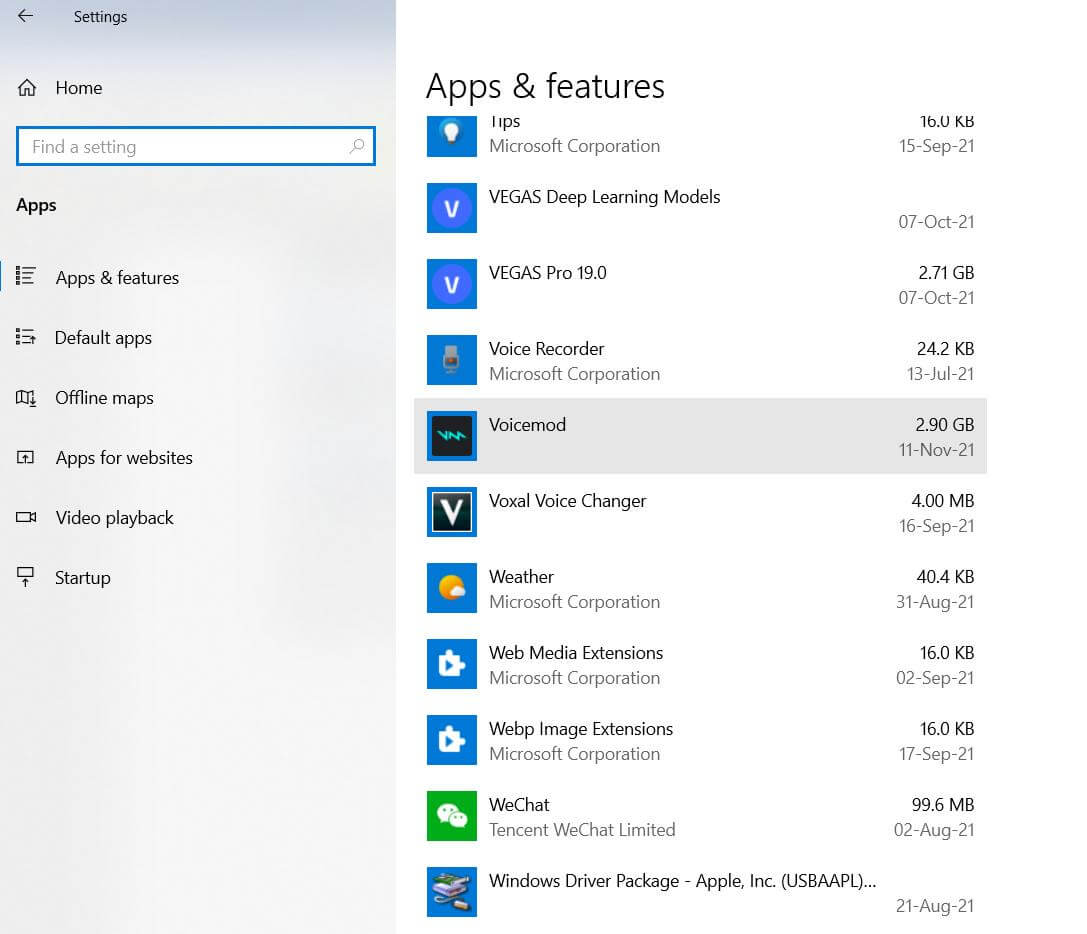
Step 3: Click on Voicemod and select “Uninstall.” Confirm your choice when prompted.
Step 4: Grant administrator permissions if requested. The uninstallation process will begin and typically completes within a few minutes.
The situation becomes more complicated if you installed a cracked or pirated version, as these often don’t follow standard installation procedures. In such cases, you might need to use specialized uninstallation tools or manually remove leftover files.
Common Voicemod Issues and Solutions
Even though Voicemod is generally safe, users frequently encounter specific problems that can be frustrating. Understanding these issues can help you decide whether Voicemod is right for you.
Compatibility problems are among the most common complaints. Voicemod’s system requirements are quite specific, and it doesn’t work well with all hardware configurations. Some sound cards and microphones may not be fully compatible, leading to issues with voice detection or quality.
Driver conflicts represent another frequent problem. Voicemod installs its own audio drivers to function properly, and these can sometimes conflict with existing audio drivers on your system. This might result in no audio output, distorted sound, or other audio glitches.
Performance impact is also a consideration for some users. While Voicemod isn’t particularly resource-intensive, it does consume some system resources. On older computers or systems already running near their limits, this additional load might cause slowdowns or affect gaming performance.
Background operation continues to confuse many users. As mentioned earlier, Voicemod is designed to run in the background to maintain voice changing across different applications. While this is intentional, it can be concerning if you’re not expecting it.
Limited functionality in the free version often disappoints new users. While Voicemod offers a free version, many of the most interesting voice effects and features are locked behind the Pro subscription. This can lead to frustration when users discover the limitations after installation.
The Best Voicemod Alternative: MagicMic
Given the various concerns and issues surrounding Voicemod, many users prefer to explore alternatives. If you’re looking for a reliable, user-friendly voice changer that doesn’t come with the same baggage as Voicemod, iMyFone MagicMic is an excellent choice.
iMyFone MagicMic.Best Real Time AI Voice Changer.MagicMic is a professional real-time AI voice changer that changes your voice while communicating online. It’s easy to use, has extremely low latency, features high quality AI voices and is compatible with all systems. Discover 500+ AI voices and 100K+ meme soundboards with MagicMic today!

Check More Details | Download Now! | Check All Deals
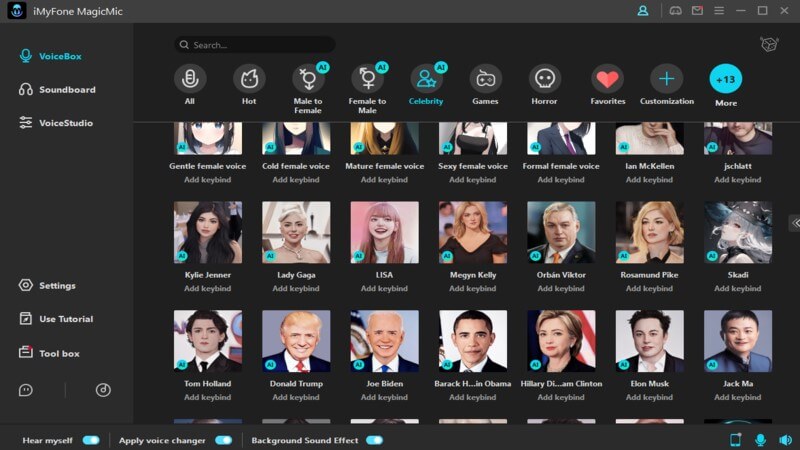
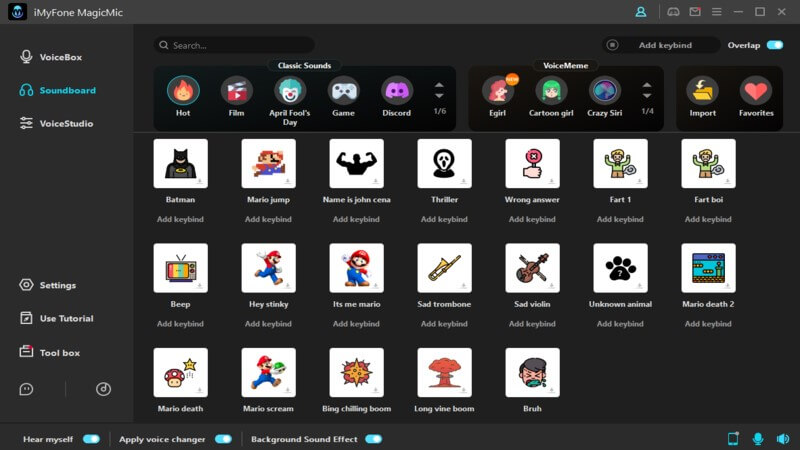
MagicMic stands out for its impressive collection of over 500 AI-powered voice effects and an enormous library of more than 100,000 soundboards and voice memes. Whether you want to sound like a different gender, a robot, a celebrity, or something completely unique, MagicMic has you covered.
The software is designed with user experience in mind. The interface is intuitive and straightforward, making it accessible even for those who aren’t particularly tech-savvy. Unlike Voicemod, MagicMic doesn’t have the same compatibility issues and works reliably across different Windows versions.
One of MagicMic’s strongest advantages is its minimal system impact. The software is lightweight and efficient, meaning it won’t slow down your computer or interfere with other applications. This is particularly important for gamers and streamers who need every bit of performance they can get.
MagicMic also offers broad compatibility with popular applications and games. Whether you’re using Discord, Zoom, Skype, Twitch, or playing games like Fortnite or PUBG, MagicMic integrates seamlessly to transform your voice in real-time.
Getting Started with MagicMic
Using MagicMic is refreshingly straightforward compared to some other voice changers. Here’s how you can begin transforming your voice:
Step 1: Download and install MagicMic from the official website. The installation process is quick and hassle-free, without the compatibility issues that often plague Voicemod.
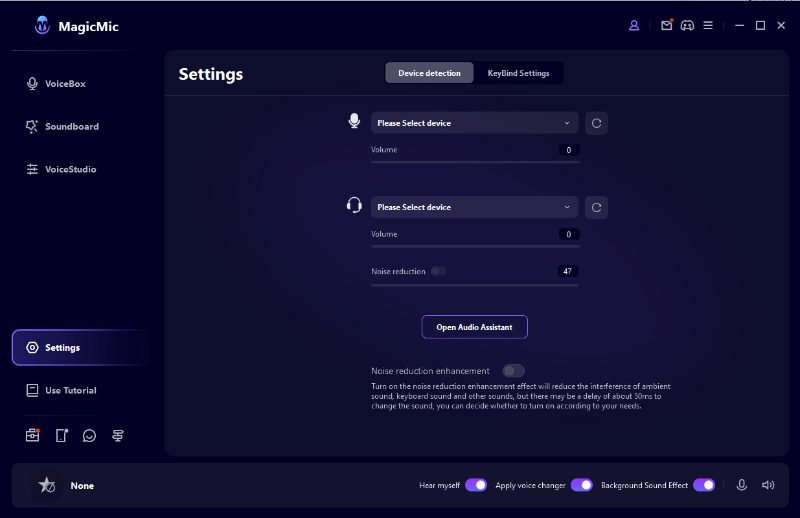
Step 2: Launch the application. Upon first use, MagicMic will guide you through selecting your microphone and headphones. You can always adjust these settings later if needed. The main interface displays various voice effects—simply click on any effect to activate it immediately. Your voice will be transformed in real-time as you speak.
Step 3: Explore the Soundboard section to discover thousands of sound effects and voice memes. These are organized into categories for easy browsing. A single click is all it takes to play any sound effect during your conversations or streams.
Step 4: If you prefer not to hear your modified voice, simply toggle the “Hear Myself” option at the bottom of the interface.
Step 5: When you’re done using MagicMic, you can choose to either close the application completely or minimize it to the system tray. The latter option allows MagicMic to continue running in the background, maintaining your voice effects across different applications.
Why MagicMic is a Superior Choice
When comparing voice changers, several factors make MagicMic stand out as the better option for most users:
Reliability is a key differentiator. MagicMic doesn’t suffer from the same installation and compatibility problems that frequently affect Voicemod users. It works consistently across different system configurations without requiring complicated troubleshooting.
The voice quality in MagicMic is noticeably superior, thanks to its advanced AI technology. The voice transformations sound more natural and convincing compared to many other voice changers, including Voicemod.
MagicMic’s extensive library is another major advantage. With over 500 voice effects and 100,000+ soundboard options, you have virtually unlimited possibilities for voice modification and audio enhancement.
User experience is where MagicMic truly excels. The interface is clean, intuitive, and easy to navigate. Even complete beginners can start using MagicMic effectively within minutes of installation.
Performance optimization ensures that MagicMic runs smoothly without impacting your system’s performance. This is crucial for gamers, streamers, and anyone using resource-intensive applications.
iMyFone MagicMic.Best Real Time AI Voice Changer.MagicMic is a professional real-time AI voice changer that changes your voice while communicating online. It’s easy to use, has extremely low latency, features high quality AI voices and is compatible with all systems. Discover 500+ AI voices and 100K+ meme soundboards with MagicMic today!
Check More Details | Download Now! | Check All Deals
Making the Right Choice for Your Needs
When it comes to voice changing software, your primary concern should always be safety and reliability. While Voicemod is not actually a virus or malicious software, its various technical issues and peculiar behaviors understandably make many users uncomfortable.
If you’re determined to use Voicemod, ensure you download it only from the official website and be prepared to potentially troubleshoot compatibility issues. However, for most users, especially those who value ease of use and reliability, MagicMic represents a significantly better option.
The question of whether Voicemod is safe has a nuanced answer. The software itself isn’t dangerous when obtained legitimately, but the user experience might not be what you’re hoping for. With MagicMic, you get all the voice-changing capabilities without the headaches and concerns associated with Voicemod.
Ultimately, the best voice changer for you depends on your specific needs, technical comfort level, and what you value most in software. If you want a straightforward, reliable solution that just works without complications, MagicMic is undoubtedly the superior choice.
iMyFone MagicMic.Best Real Time AI Voice Changer.MagicMic is a professional real-time AI voice changer that changes your voice while communicating online. It’s easy to use, has extremely low latency, features high quality AI voices and is compatible with all systems. Discover 500+ AI voices and 100K+ meme soundboards with MagicMic today!
Check More Details | Download Now! | Check All Deals
Some images courtesy of iMyFone