TOOL HUNTER

Ever been on a phone call where your friend suddenly sounded like a cartoon character or a robot? That’s the kind of magic that voice changing apps can create, and one of the most popular options out there is the MagicCall voice changer app. In this comprehensive review, we’re going to explore everything about this fascinating application – what it does, how it works, and whether it’s worth your time.
Voice changing technology has come a long way from the bulky hardware devices of the past. Today, apps like MagicCall put incredible voice transformation capabilities right in your pocket. Whether you want to prank your friends, protect your privacy, or just have some fun during calls, this magic call app promises to deliver entertainment at your fingertips.
Table of Contents
What Exactly Is MagicCall?
MagicCall is a mobile application designed specifically for real-time voice modification during phone conversations. This clever piece of software lets you transform your voice into various characters and personas while you’re talking to someone on the phone. Imagine surprising your friend by sounding like a deep-voiced movie character or a high-pitched cartoon figure – that’s the kind of experience MagicCall aims to deliver.
The magic call voice changer operates by processing your voice input through digital filters and effects before it reaches the other person on the call. It’s like having a personal voice actor living inside your phone, ready to transform your ordinary speaking voice into something extraordinary at a moment’s notice.
One of the most appealing aspects of the MagicCall app is its accessibility. You don’t need any special equipment or technical knowledge to start using it. The application is available for both Android and iOS devices, meaning whether you’re team iPhone or team Android, you can join in on the voice-changing fun. The installation process is straightforward, and within minutes, you could be experimenting with different voice personas.
The variety of voices available through this magic call voice changer is quite impressive. You can choose from masculine voices, feminine voices, robotic tones, cartoon characters, and even creature voices. Some users particularly enjoy the baby voice effect for playful pranks, while others prefer the more serious tone changes for professional scenarios where they might want to maintain anonymity.
Is MagicCall Voice Changer App Legitimate?
When it comes to downloading apps that handle something as personal as your voice during phone calls, legitimacy and security are valid concerns. The good news is that MagicCall voice changer app is indeed a legitimate application available through official app stores. You can find it on both the Google Play Store for Android devices and the Apple App Store for iOS users.
The fact that MagicCall is available on these trusted platforms provides a level of assurance about its authenticity. Both Google and Apple have review processes for apps listed in their stores, which helps filter out malicious software. This doesn’t mean every app is perfect, but it does provide a basic level of security screening that you wouldn’t get from third-party app sources.
When considering any magic call app, it’s important to understand how it handles your data. MagicCall does require certain permissions to function properly, primarily access to your microphone since it needs to capture your voice. The application also needs call permissions to integrate with your phone’s calling system. While these permissions might sound concerning, they’re necessary for the core functionality of any voice changer app.
User reviews and ratings can provide additional insight into an app’s legitimacy and performance. MagicCall has been downloaded by thousands of users worldwide, and browsing through the reviews can give you a sense of common experiences. Many users report successful prank calls and enjoyable experiences with the voice effects, while others note occasional technical issues that are common with many mobile applications.
iMyFone MagicMic.Best Real Time AI Voice Changer.MagicMic is a professional real-time AI voice changer that changes your voice while communicating online. It’s easy to use, has extremely low latency, features high quality AI voices and is compatible with all systems. Discover 500+ AI voices and 100K+ meme soundboards with MagicMic today!

Check More Details | Download Now! | Check All Deals
Exploring MagicCall Voice Changer App Features
The MagicCall app comes packed with features designed to make voice changing both fun and functional. Let’s dive into what this application offers and how you can make the most of its capabilities.
The voice library is where MagicCall truly shines. The application provides numerous voice options that cater to different scenarios and preferences. Whether you’re looking for a subtle change to make your voice slightly deeper or a dramatic transformation into a completely different character, the magic call voice changer has options to suit your needs. The voices are categorized intelligently, making it easy to find the perfect effect for your intended use.
Background effects represent another dimension of the MagicCall experience. Beyond just changing your voice, you can add environmental sounds to create the illusion that you’re calling from a specific location. Imagine making it sound like you’re at a busy airport, a crowded restaurant, or even in the middle of a thunderstorm. These background effects can make your prank calls more convincing or simply add an extra layer of fun to your conversations.
The soundboard feature provides quick access to various sound effects that you can play during calls. This means you’re not limited to just voice modification – you can incorporate laughter, applause, animal sounds, or any number of audio cues to enhance your call experience. The soundboard is particularly popular among users who enjoy creating elaborate prank scenarios or who want to add comedic elements to their conversations.
Real-time voice changing is the core functionality that makes MagicCall stand out. Unlike some voice changer apps that only work with recorded audio, this magic call app processes your voice as you speak during active calls. The technology behind this is quite sophisticated, as it needs to modify your voice instantly while maintaining call quality and minimizing latency that could make conversations awkward.
Customization options allow you to fine-tune your voice changing experience. While the preset voices work well for most situations, sometimes you might want to adjust parameters like pitch, tone, or effect intensity. MagicCall provides these customization tools, giving you control over exactly how your modified voice sounds. This is particularly useful for users who have specific character voices in mind that aren’t perfectly matched by the preset options.
Multi-language support makes MagicCall accessible to users across different regions and language backgrounds. The app interface is available in multiple languages, and the voice effects are designed to work with various speech patterns and accents. This international approach means you’re likely to have a consistent experience regardless of your native language.
Regular updates ensure that the MagicCall voice changer app continues to improve over time. The developers frequently add new voices, effects, and features based on user feedback and technological advancements. This commitment to ongoing development is a positive sign for anyone considering long-term use of the application.
How to Use MagicCall Voice Changer
Getting started with MagicCall is a straightforward process, but understanding the steps can help you avoid common pitfalls and ensure the best possible experience with this magic call app.
The first step is downloading and installing the application. Head to your device’s respective app store – Google Play Store for Android or Apple App Store for iOS – and search for “MagicCall.” The official app should appear in the search results. Take a moment to verify that you’re downloading the correct application by checking the developer information and user reviews.

Once installed, open the MagicCall app and follow the initial setup instructions. The application will request necessary permissions, including microphone access and call permissions. These are essential for the magic call voice changer to function properly, so you’ll need to grant them to proceed. The app may also prompt you to create an account, which typically involves providing an email address and creating a password.
After completing the setup, you’ll find yourself in the main interface where you can explore the various voice options and effects. Take some time to familiarize yourself with the layout and available features. The voice selection screen typically displays the different voice categories and individual voice options within each category.
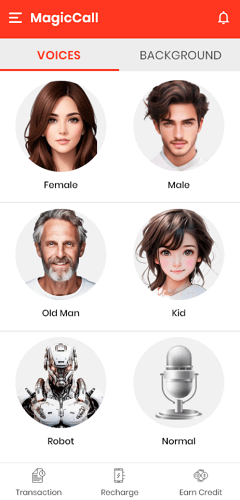
Before making an actual call with voice modification, it’s wise to test your selected voice using the demo feature. Most voice changer apps, including MagicCall, offer a testing function that lets you hear how you’ll sound with a particular effect applied. This allows you to make adjustments and choose the perfect voice before surprising anyone with your transformed vocal cords.
When you’re ready to make a call, select your desired voice effect and keep the MagicCall app running in the background. Then, use your phone’s standard dialer to make a call as you normally would. The magic call voice changer should automatically apply your selected voice effect to the conversation. It’s important to speak clearly and at a consistent volume to ensure the voice modification works effectively.
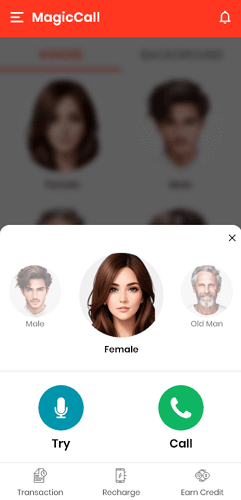
During the call, you can experiment with different effects if you want to switch voices mid-conversation. Simply return to the MagicCall app (your call will continue in the background) and select a different voice or sound effect. This flexibility allows for dynamic conversations where you can surprise the person on the other end with multiple voice transformations.
Remember that voice changing works best when you have a stable internet connection or good cellular service. Poor connectivity can result in lag, audio distortion, or even dropped calls. For the optimal MagicCall experience, ensure you’re in an area with strong signal strength before initiating your voice-modified conversations.
Advantages of Using MagicCall
The MagicCall voice changer app offers several benefits that make it appealing to users looking to add some creativity to their phone conversations.
The application’s ease of use stands out as a significant advantage. You don’t need technical expertise or special equipment to start using MagicCall. The interface is designed to be intuitive, with clear labels and straightforward navigation. This accessibility means virtually anyone can download the app and begin transforming their voice within minutes.
The free trial period allows new users to explore MagicCall’s features without immediate financial commitment. This risk-free introduction helps you determine whether the app meets your needs before deciding on a potential subscription. During the trial period, you typically have access to most, if not all, of the voice effects and features.
Voice testing capability is another valuable feature. Being able to preview how you’ll sound with different effects applied helps you choose the most appropriate voice for your situation. This is particularly useful for prank calls where you might want to ensure your modified voice is convincing before making the actual call.
Regular updates keep the MagicCall app fresh and relevant. The developers frequently add new voices, sound effects, and features based on user feedback and technological advancements. This ongoing improvement means the application continues to evolve rather than becoming stagnant.
Privacy and security measures help protect your conversations and personal information. While any app that handles voice data requires careful consideration regarding privacy, MagicCall has implemented measures to keep your calls secure. The application doesn’t store your call content or share it with third parties without your consent.
The variety of voice options ensures there’s something for every scenario. Whether you’re looking for a subtle voice change or a dramatic transformation, MagicCall likely has an effect that fits your needs. This versatility makes the app suitable for everything from playful pranks to more practical applications like maintaining anonymity.
Limitations of MagicCall
While MagicCall offers many appealing features, it’s important to consider its limitations to set realistic expectations.
The free version of MagicCall comes with restricted access to certain features and voices. While the trial period gives you a taste of what the app can do, you’ll eventually need to subscribe to access the full range of voice effects and capabilities. This freemium model is common among mobile applications but can be disappointing for users hoping for completely free access.
Advertising in the free version can be intrusive at times. Like many free apps, MagicCall may display ads between uses or during certain operations. These advertisements help support the development of the free version but can detract from the user experience for those who prefer an ad-free environment.
Some voice effects may sound artificial or unconvincing. While technology has come a long way in voice modification, certain effects might not sound completely natural to discerning ears. This is particularly true for more extreme voice transformations where the digital processing becomes more apparent.
The application’s performance can vary depending on your device and network conditions. Older smartphones or devices with limited processing power might struggle with real-time voice modification, resulting in lag or reduced audio quality. Similarly, poor network connectivity can impact the smooth operation of the magic call voice changer.
Subscription costs for the premium version might be a consideration for budget-conscious users. While the pricing is generally reasonable compared to similar applications, it’s still an ongoing expense that you’ll need to factor into your decision.
Compatibility issues with certain phone models or operating system versions can occasionally occur. While MagicCall works with most modern smartphones, there might be specific devices or OS versions where the app doesn’t function optimally. Checking recent user reviews for your specific device model can help identify any potential compatibility concerns.
Top Alternatives to MagicCall Voice Changer
While MagicCall is a popular choice for voice modification during calls, it’s not the only option available. Several other applications offer similar functionality with their own unique features and approaches. Let’s explore some noteworthy alternatives to the MagicCall voice changer app.
iMyFone MagicMic
MagicMic stands out as a sophisticated voice changing solution that leverages artificial intelligence to create realistic voice transformations. This application offers an impressive library of voices and sound effects that work across various communication platforms.
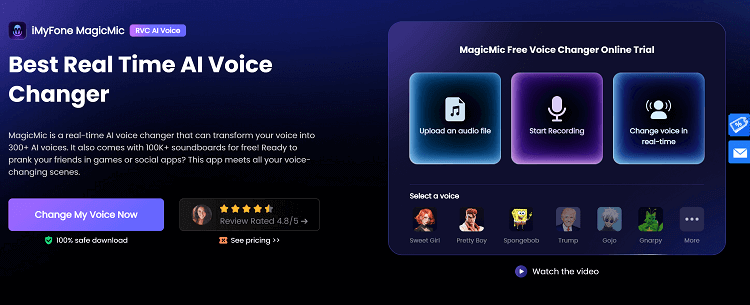
One of MagicMic’s strongest features is its compatibility with popular communication platforms like Discord, Skype, Zoom, and various gaming applications. This versatility makes it useful beyond traditional phone calls, allowing you to modify your voice during online meetings, gaming sessions, or video chats with friends.
The AI voice technology in MagicMic helps create more natural-sounding voice modifications compared to traditional digital signal processing methods. The application analyzes your voice patterns and applies transformations that maintain more of your natural speech characteristics while still achieving the desired vocal effect.
The soundboard feature includes an extensive collection of audio clips and effects that you can trigger during conversations. This adds another dimension to your voice changing experience, allowing you to incorporate sound effects, music clips, or pre-recorded phrases into your interactions.
iMyFone MagicMic.Best Real Time AI Voice Changer.MagicMic is a professional real-time AI voice changer that changes your voice while communicating online. It’s easy to use, has extremely low latency, features high quality AI voices and is compatible with all systems. Discover 500+ AI voices and 100K+ meme soundboards with MagicMic today!
Check More Details | Download Now! | Check All Deals
Voice Changer With Effects
This alternative application focuses on providing a wide range of voice modification options in a user-friendly package. Voice Changer With Effects offers both real-time voice changing during calls and the ability to modify recorded audio files.
The application includes numerous preset voice effects covering various categories like cartoon characters, monsters, robots, and altered human voices. These presets make it easy to achieve specific vocal transformations without needing to adjust individual parameters manually.
A distinctive feature of this voice changer is its integration with social media platforms. You can easily share your modified voice recordings directly to popular social networks or messaging apps, making it simple to show off your voice transformation skills to friends and followers.
The text-to-speech functionality allows you to type messages that the app then converts to speech using selected voice characters. This feature is particularly useful for creating audio content or for situations where you want to communicate without using your actual voice.
Revoice: Change Your Voice
Revoice takes a slightly different approach to voice modification, emphasizing both real-time voice changing and audio content creation capabilities. This application is popular among users who want to create custom audio messages or modify existing recordings in addition to live voice changing during calls.
The voice effects library in Revoice includes both realistic voice alterations and more creative, character-based options. The application uses advanced audio processing to maintain audio quality while applying voice modifications, resulting in clearer output compared to some competing applications.
One of Revoice’s standout features is its integration with content creation platforms. You can directly export modified audio to video editing applications or social media platforms, making it a useful tool for content creators who want to incorporate voice effects into their videos or podcasts.
The user interface is designed with simplicity in mind, featuring large, clearly labeled buttons and intuitive navigation. This makes the application accessible to users of all technical skill levels, from complete beginners to experienced audio editors.
Frequently Asked Questions About MagicCall
How do I cancel my MagicCall subscription?
Managing subscriptions is an important aspect of using any premium application. For MagicCall, the cancellation process varies slightly depending on whether you’re using an Android or iOS device.
Android users need to open the Google Play Store app and tap on their profile icon in the top right corner. From there, select “Payments & subscriptions” then “Subscriptions.” You should see MagicCall listed among your active subscriptions. Tap on it and select “Cancel subscription” to stop future payments.
iOS users should open the Settings app and tap on their Apple ID at the top of the screen. Select “Subscriptions” from the menu that appears, then find MagicCall in your list of active subscriptions. Tap on it and choose “Cancel subscription” to prevent automatic renewal.
It’s important to note that canceling your subscription typically allows you to continue using the premium features until the end of your current billing period. You won’t receive an immediate refund, but you also won’t be charged again when the subscription period renews.
Why doesn’t MagicCall support SMS messaging?
Many users wonder why MagicCall focuses exclusively on voice calls rather than incorporating text messaging capabilities. The answer lies in the fundamental design and purpose of the application.
MagicCall is specifically engineered for real-time voice processing during live conversations. The technology required for voice modification is fundamentally different from what would be needed for text-based communication. Adding SMS functionality would essentially mean creating a completely different application within the same package.
There may also be technical and regulatory considerations that make SMS integration challenging. Messaging systems often have stricter security and privacy requirements, and modifying message content could raise additional legal and ethical questions that voice modification doesn’t necessarily face.
If you’re looking for an application that can modify both your voice during calls and your text messages, you might need to use separate specialized applications for each purpose rather than expecting a single app to handle both functionalities.
Is the MagicCall app safe to use?
Safety is a legitimate concern when using any application that handles personal communications.