TOOL HUNTER

Voice changing technology has completely transformed how we communicate online, whether it’s for gaming, streaming, or just having fun with friends. Among the many options available, the w-okada voice changer stands out as a powerful tool that uses artificial intelligence to modify your voice in real-time. This software has gained quite a following among tech enthusiasts who appreciate its advanced capabilities.
But let’s be honest – not everyone is comfortable with complex software installations and technical configurations. That’s why it’s helpful to explore not just how to use the wokada voice changer, but also some simpler alternatives that might better suit your needs and technical comfort level.
Understanding the W-Okada Voice Changer
So what exactly is this w-okada voice changer everyone’s talking about? Essentially, it’s a sophisticated application that uses AI algorithms to transform your voice as you speak. The “real-time” part means there’s virtually no delay – you speak into your microphone and hear the modified version almost instantly through your speakers or headphones.
The okada voice changer supports several different AI models including so-vits-svc, MMVC, RVC (which stands for Retrieval-based Voice Conversion), and DDSP-SVC. These different models offer various approaches to voice conversion, giving you multiple options depending on what kind of voice transformation you’re looking for.
One of the nice things about the w-okada voice changer is its cross-platform compatibility. It works on Windows, Mac (including the newer Apple Silicon M1 chips), Linux, and even through Google Colaboratory for MMVC models. This broad compatibility means you’re not limited by your operating system choice.
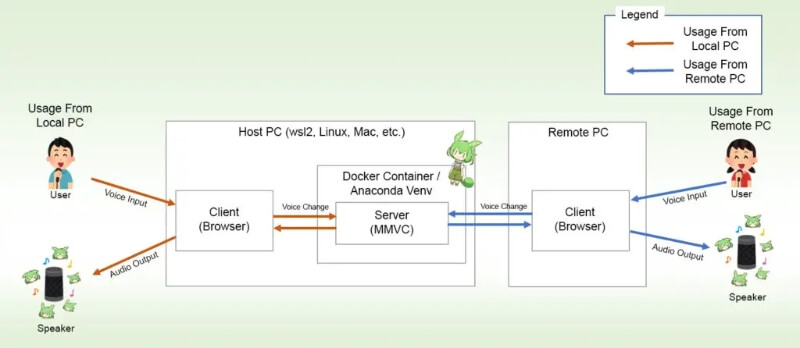
The application uses a server-client setup, which might sound technical but basically means you can run the voice conversion processing on a separate computer if you want. This is particularly useful for gamers who don’t want the voice changer consuming resources on their gaming machine.
How to Install and Set Up W-Okada Voice Changer
If you’ve decided to give the w-okada voice changer a try, you’ll need to go through the installation process. There are a couple of ways to approach this – you can either download pre-built binaries (which are basically ready-to-run versions of the software) or set up the development environment using Docker or Anaconda if you’re more technically inclined.
For most users, the pre-built binary approach is the way to go. Here’s how it works:
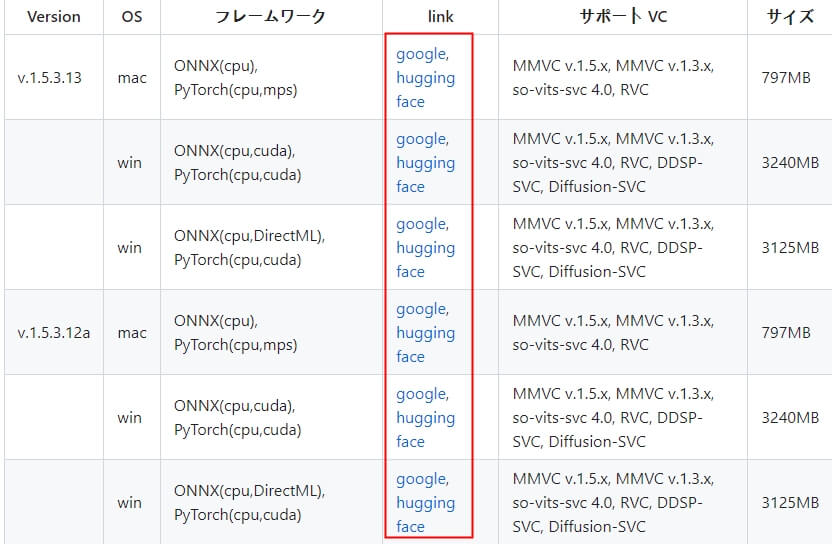
First, you’ll need to visit the official repository for the w-okada voice changer. You’ll find a releases table showing the available versions. Pick the latest one that matches your operating system – Windows, Mac, or Linux.
Once you’ve identified the right version, you’ll typically see either “google” or “huggingface” buttons for downloading. Click the appropriate one to get the w-okada voice changer download process started.
After the download completes, you’ll need to unpack or extract the files from the downloaded archive. Inside, you should find a file called “start_http.bat” – double-click this to begin the installation process.
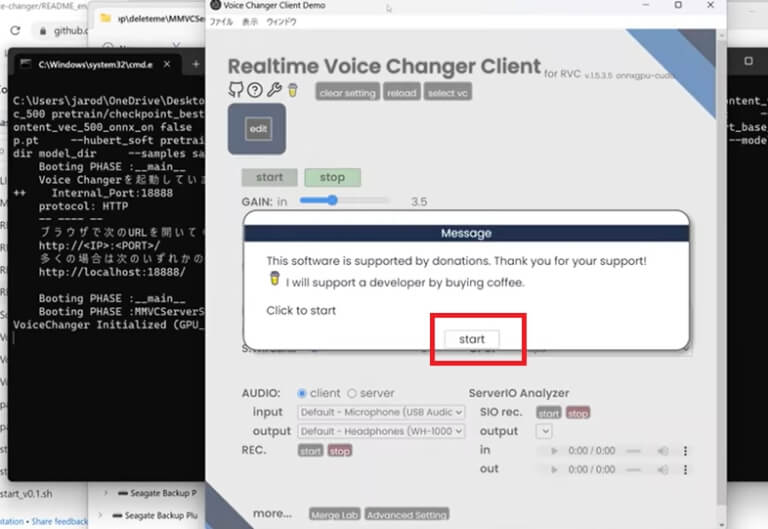
Run the “start_http.bat” file again after the initial setup. Within a few seconds, you should see a console window appear, followed by the main graphical interface of the w okada voice changer program.
Now comes the configuration part. You’ll want to select “VC” from the menu, then choose “RVC” which will take you to a new configuration page. Take your time to adjust the settings to your liking, and don’t forget to save them when you’re done. Finally, click the “Start” button to get things running.
The next step is setting up your audio devices. Choose your microphone and output settings – if you’re unsure, selecting “client” for audio settings is usually a safe bet. Now try speaking into your microphone – you should hear your transformed voice through your speakers or headphones.
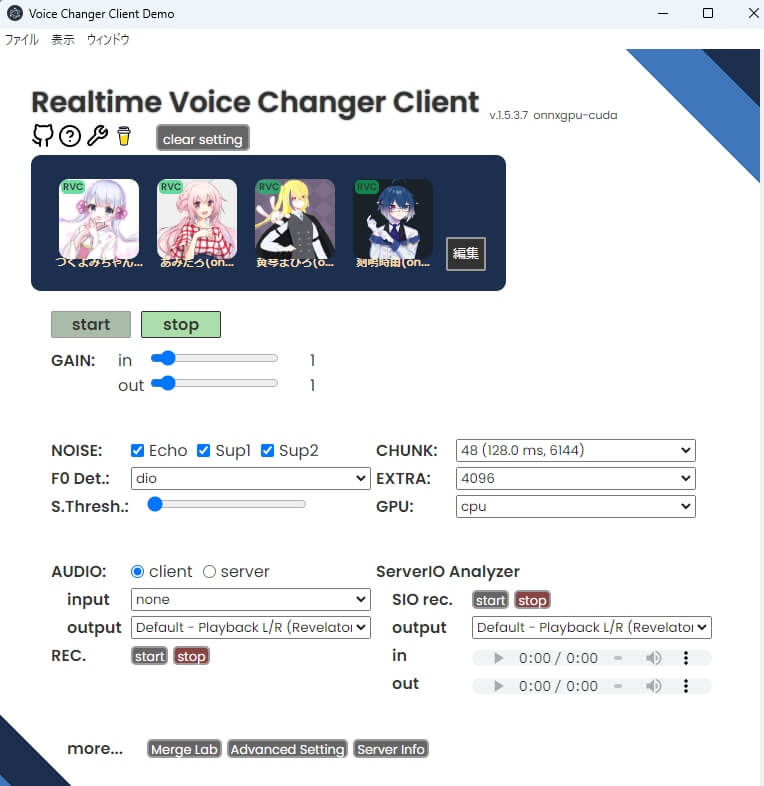
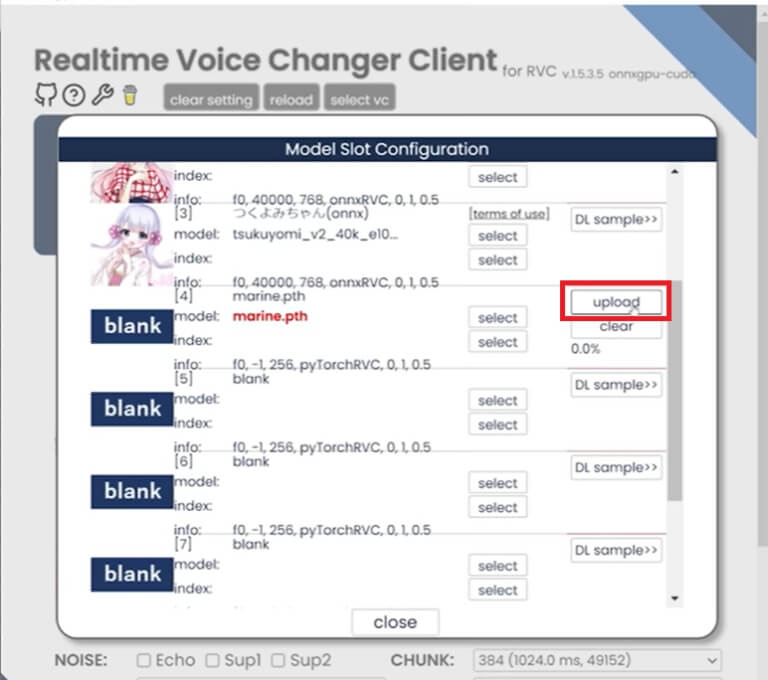
For those who want to use custom models, you can navigate to “Edit,” then select “Logs Folder” where you’ll find “marine.pth” and “total_fea.npy” folders. Click the upload button to use your preferred model, and feel free to customize additional settings to fine-tune your voice transformation experience.
Key Features of W-Okada AI Voice Changer
The w-okada voice changer comes packed with features that explain its popularity among voice modulation enthusiasts. Let’s break down some of its standout capabilities.
The voice transformation itself is obviously the main attraction. Using those AI models we mentioned earlier – MMVC, so-vits-svc, RVC, and DDSP-SVC – the software can mimic different voices while keeping your original speech content intact. This means you can sound like a different person or character without changing what you’re actually saying.
Platform flexibility is another strong point. Being able to run on Windows, Mac (including M1 chips), Linux, and Google Colab means you’re not locked into a specific ecosystem. This is particularly valuable if you use multiple devices or plan to upgrade your computer in the future.
The network connectivity feature is worth noting too. The w-okada voice changer supports remote voice conversion processing, meaning you can use the service from a different computer than the one running the actual conversion algorithms. This opens up possibilities like using multiple servers with different conversion models or settings.
For those with powerful graphics cards, GPU acceleration can significantly boost performance. The software supports Nvidia, AMD, or Intel GPUs, which can make the voice conversion process faster and more efficient, especially when working with more complex models.
Finally, the pitch and speed customization options give you fine control over your transformed voice. Adjustable sliders let you tailor the pitch and speed to your specific preferences, allowing for higher or lower pitches and faster or slower speech as needed.
iMyFone MagicMic.Best Real Time AI Voice Changer.MagicMic is a professional real-time AI voice changer that changes your voice while communicating online. It’s easy to use, has extremely low latency, features high quality AI voices and is compatible with all systems. Discover 500+ AI voices and 100K+ meme soundboards with MagicMic today!

Check More Details | Download Now! | Check All Deals
Alternatives to W-Okada Voice Changer
While the w-okada voice changer is undoubtedly powerful, its setup process and technical requirements might be intimidating for some users. If you’re looking for something more straightforward or with a different feature set, there are several excellent alternatives worth considering.
iMyFone MagicMic AI Voice Changer
For users who want professional-grade voice changing without the technical complexity, iMyFone MagicMic presents an attractive alternative to the okada voice changer. This software specializes in real-time voice transformation with an emphasis on user-friendliness and immediate usability.
What sets MagicMic apart is its massive library of voice options and sound effects. With over 500 AI voice filters and more than 100,000 meme soundboards, the creative possibilities are virtually endless. Whether you’re looking to sound like a cartoon character, a robot, or anything in between, you’ll likely find a preset that matches your vision.
The software works seamlessly with popular communication platforms like Discord, Skype, Zoom, and Twitch, as well as with most online games. This means you can use your transformed voice exactly where you need it – during gaming sessions, streaming broadcasts, or video calls with friends.
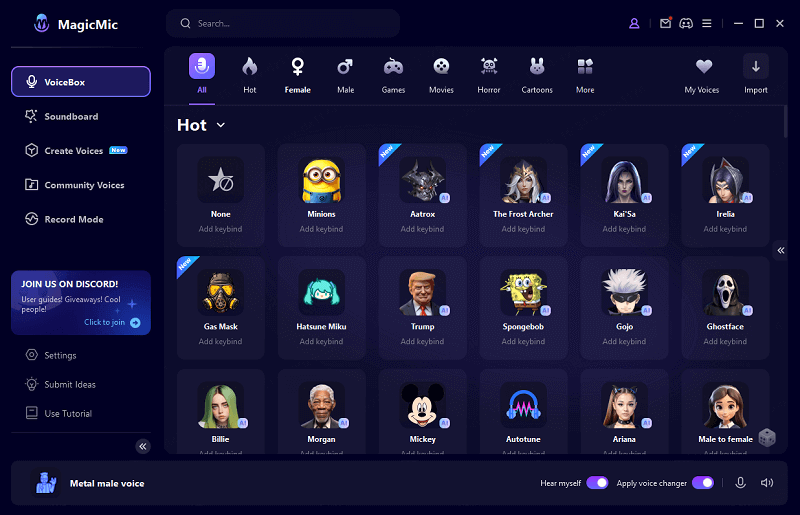
Using MagicMic is refreshingly straightforward. After downloading and installing the software, you simply launch it and select your microphone and headphone devices. The “Hear Myself” feature lets you monitor your transformed voice in real-time, which is crucial for making adjustments and ensuring you sound exactly how you want.
The VoiceBox section contains all the available voice options, organized in a way that makes browsing and selection intuitive. For voices you can’t find in the built-in library, there’s an import function that lets you bring in your own audio clips.
One particularly handy feature for gamers is the customizable hotkey system. You can assign specific keys to trigger sound effects or voice changes instantly, without having to alt-tab out of your game. This level of convenience is something that even the sophisticated w-okada voice changer doesn’t offer out of the box.
The noise reduction technology in MagicMic also deserves mention. It does an excellent job of filtering out background noise, ensuring that your transformed voice comes through clearly even if you’re in a less-than-ideal audio environment.
iMyFone MagicMic.Best Real Time AI Voice Changer.MagicMic is a professional real-time AI voice changer that changes your voice while communicating online. It’s easy to use, has extremely low latency, features high quality AI voices and is compatible with all systems. Discover 500+ AI voices and 100K+ meme soundboards with MagicMic today!
Check More Details | Download Now! | Check All Deals
Voicemod Voice Changer
Voicemod has established itself as another popular choice in the voice changer landscape. Like the w-okada voice changer, it offers real-time voice transformation, but with a focus on accessibility and immediate fun.
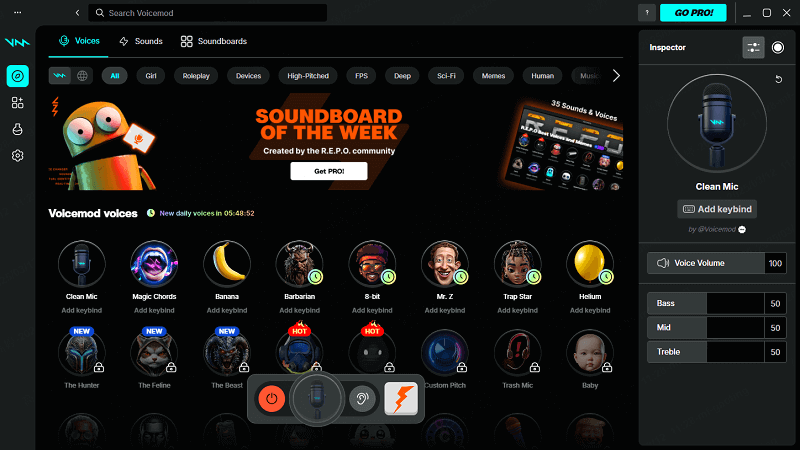
The software comes with a wide selection of voice effects that range from subtle modifications to completely transformative changes. Whether you want to sound like a demon, a chipmunk, or a famous character, Voicemod likely has a preset that fits the bill.
Integration is one of Voicemod’s strong suits. It works seamlessly with popular platforms like Discord, TeamSpeak, and Zoom, making it easy to use your transformed voice where it matters most. It also supports many popular online games including PUBG, Fortnite, League of Legends, and Call of Duty.
The interface is designed with usability in mind. Even if you’re completely new to voice changers, you’ll likely find Voicemod intuitive and straightforward to operate. The effects are organized logically, and applying them is as simple as clicking on your chosen voice preset.
Voice.ai Voice Changer
Voice.ai takes a slightly different approach to voice changing. As a web-based platform, it offers voice modification through your browser, which means no software installation is required. This can be appealing if you’re hesitant about downloading and installing programs on your computer.
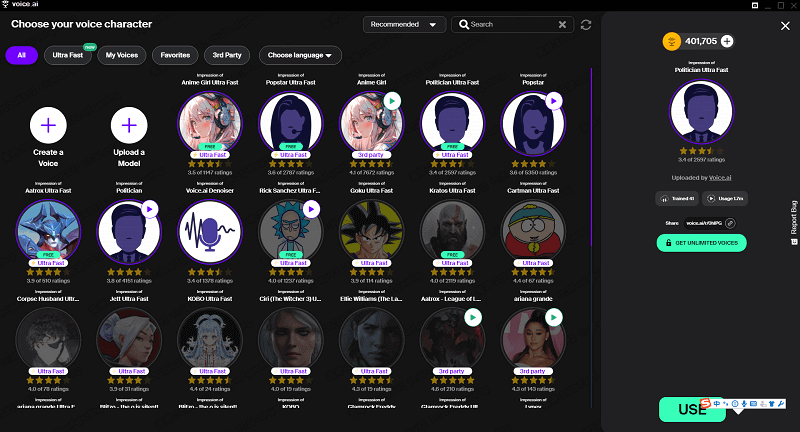
The platform features Voice Universe, an extensive collection of user-generated voices. This community-driven aspect means there’s constantly new content being added, giving you access to an ever-expanding library of voice options.
The AI technology behind Voice.ai is capable of generating distinctive voices across the gender spectrum and beyond. Whether you’re looking for a male-to-female voice transformation, a celebrity impression, or something entirely unique, the platform offers plenty of creative possibilities.
Like other voice changers, Voice.ai works with popular games and communication platforms. The web-based nature does mean you’ll need a stable internet connection for it to work properly, but the convenience of not having to install software might outweigh that limitation for some users.
Advanced Usage and Customization
For those who stick with the w-okada voice changer and want to explore its more advanced capabilities, there are several customization options worth exploring.
Loading custom audio models is one of the more powerful features. By clicking the “Edit” button in the model list, you can access a menu that allows you to upload your own .pth or .onnx files. After uploading a model, you can even set a custom image to represent it, making your model library more visually organized.
The choice between ONNX and PTH files is something advanced users might want to experiment with. Some testing suggests that ONNX versions of RVC audio models may offer better speed for real-time voice conversion compared to PTH files. If you have a PTH file that you’d like to convert, the w-okada voice changer includes an “Export to .onnx” function that makes the conversion process straightforward.
For Windows users looking to optimize performance, there’s a technique involving the audiodg.exe process that might help. Through Task Manager, you can set the priority of audiodg.exe to “High” and limit its affinity to specific CPU cores. This kind of technical optimization is typical of the w-okada voice changer experience – powerful for those who know how to use it, but potentially overwhelming for beginners.
Making the Right Choice for Your Needs
When deciding between the w-okada voice changer and its alternatives, it really comes down to your specific needs, technical comfort level, and intended use cases.
The w-okada voice changer excels in its flexibility, advanced features, and customization options. If you’re technically inclined, enjoy tinkering with settings, and want maximum control over your voice transformation experience, investing time in learning the w-okada voice changer could be worthwhile. The ability to use custom models and the software’s open-source nature are significant advantages for the right user.
However, if you prioritize ease of use, immediate functionality, and a more polished user experience, alternatives like MagicMic, Voicemod, or Voice.ai might be better suited to your needs. These options typically offer quicker setup processes, more intuitive interfaces, and extensive libraries of pre-made voices and effects.
For gaming and streaming purposes specifically, features like customizable hotkeys, extensive soundboard libraries, and seamless integration with popular platforms can make a significant difference in your experience. This is where solutions like MagicMic really shine, offering convenience features that the more technically-focused w-okada voice changer doesn’t emphasize.
It’s also worth considering your hardware setup. The w-okada voice changer’s ability to offload processing to a separate computer can be valuable if you have multiple machines available. However, if you’re working with a single computer, the efficiency and optimization of commercial alternatives might deliver better performance with less configuration.
iMyFone MagicMic.Best Real Time AI Voice Changer.MagicMic is a professional real-time AI voice changer that changes your voice while communicating online. It’s easy to use, has extremely low latency, features high quality AI voices and is compatible with all systems. Discover 500+ AI voices and 100K+ meme soundboards with MagicMic today!
Check More Details | Download Now! | Check All Deals
Final Thoughts
The world of voice changing technology offers options for every type of user, from casual entertainers to serious content creators. The w-okada voice changer represents the powerful, customizable end of the spectrum – a tool that rewards technical proficiency with unparalleled control and flexibility.
At the same time, the availability of user-friendly alternatives ensures that you don’t need to be a tech expert to enjoy high-quality voice transformation. Whether you choose to master the w-okada voice changer or opt for a more approachable solution, the important thing is finding the tool that best fits your specific needs and comfort level.
The good news is that most voice changers offer free trials or basic free versions, so you can experiment before committing. Why not download a couple of options and see which one feels right for you? The perfect voice changer is out there – it just might take a little exploration to find it.
Some images in this article are sourced from iMyFone.