TOOL HUNTER

Ever wondered what it would be like to have the voice of Peter Griffin from Family Guy? That distinctive, slightly nasal tone combined with his hilarious catchphrases has made him one of the most recognizable animated characters ever. Whether you want to prank your friends, create funny content, or just have some laughs during online chats, there are now tools that can help you achieve the perfect Peter Griffin voice change.
The good news is that you don’t need to be a voice actor like Seth MacFarlane to sound like Peter. With modern technology, you can use specialized software to transform your voice in real-time or generate Peter Griffin’s voice from text. This opens up a world of comedic possibilities for fans of the show.
Table of Contents
- Getting to Know Peter Griffin from Family Guy
- Why Would You Want a Peter Griffin Voice Change?
- Tools for Peter Griffin Voice Transformation
- MagicMic: Your Go-To Peter Griffin Voice Changer
- Key Features of MagicMic for Peter Griffin Voice
- How to Set Up MagicMic for Peter Griffin Voice
- VoxBox: Generating Peter Griffin AI Voice from Text
- Using VoxBox for Peter Griffin Text-to-Speech
- Comparing Real-Time Voice Changing vs Text-to-Speech
- Technical Requirements for Peter Griffin Voice Tools
- Creative Uses for Peter Griffin Voice Change
- Tips for Perfecting Your Peter Griffin Voice
- Common Challenges and Solutions
- Community and Support Resources
- The Evolution of Voice Changing Technology
- Ethical Considerations for Voice Changing
Getting to Know Peter Griffin from Family Guy
Peter Griffin stands as the main character in the long-running animated series Family Guy. He lives in the fictional town of Quahog, Rhode Island, with his wife Lois and their three children: Chris, Meg, and Stewie. What makes Peter so memorable isn’t just his outrageous antics and often questionable decision-making – it’s that unique voice that has become iconic in pop culture.
The character of Peter represents the lovable but often clueless American dad. He means well most of the time, but his schemes and ideas frequently go completely off the rails, leading to the show’s signature humor. His voice, brought to life by Seth MacFarlane, combines a higher pitch with a distinct New England accent that’s instantly recognizable to fans.

Peter’s personality shines through in his voice – you can hear the excitement when he comes up with one of his famously bad ideas, the frustration when things don’t go his way, and the genuine affection he has for his family (even if he doesn’t always show it in conventional ways). This combination of vocal qualities makes replicating his voice such an appealing prospect for fans.
Why Would You Want a Peter Griffin Voice Change?
The applications for a Peter Griffin voice changer are surprisingly diverse. Many people initially think of pranking friends, which is definitely one of the more popular uses. Imagine calling someone and having them think they’re talking to Peter Griffin himself – the confusion and eventual laughter can create memorable moments.
Content creators find tremendous value in these tools too. Whether you’re making YouTube videos, streaming on platforms like Twitch, or creating social media content, having access to Peter Griffin’s voice can add a layer of humor and entertainment that viewers love. The familiar sound immediately connects with Family Guy fans and can make your content more engaging.
Gamers have discovered the fun of using voice changers during online gameplay. Picture playing your favorite multiplayer game and communicating with teammates using Peter Griffin’s voice – it adds a whole new dimension to the gaming experience and can lighten the mood during intense sessions.
Then there’s the pure entertainment factor. Sometimes you just want to have fun and make yourself laugh. Being able to switch your voice to sound like one of television’s most beloved animated characters can turn an ordinary conversation into something special.
Tools for Peter Griffin Voice Transformation
When it comes to achieving that perfect Peter Griffin voice, you have several options depending on your needs. The main categories are real-time voice changers that work during live conversations, and voice generators that create Peter Griffin’s voice from text.
Real-time voice changers are perfect when you want immediate results during conversations, gaming sessions, or streaming. These tools process your voice as you speak and transform it into Peter Griffin’s voice with minimal delay. The best ones offer customizable settings so you can fine-tune the sound to match Peter’s voice as closely as possible.
Voice generators work differently – you input text, and the software generates an audio file of Peter Griffin speaking those words. This is ideal for creating content when you don’t need real-time transformation but want high-quality results. You can take your time perfecting the text and generate multiple versions until you get exactly what you want.
Some tools combine both approaches, giving you the flexibility to use Peter Griffin’s voice in different situations. The key is finding the right tool for your specific needs and technical comfort level.
MagicMic: Your Go-To Peter Griffin Voice Changer
When it comes to real-time voice transformation, MagicMic stands out as a comprehensive solution for achieving the perfect Peter Griffin voice change. This software doesn’t just offer a simple voice filter – it provides a complete package that includes both voice changing capabilities and an extensive soundboard filled with Peter Griffin’s most famous lines and sounds.

iMyFone MagicMic.Best Real Time AI Voice Changer.MagicMic is a professional real-time AI voice changer that changes your voice while communicating online. It’s easy to use, has extremely low latency, features high quality AI voices and is compatible with all systems. Discover 500+ AI voices and 100K+ meme soundboards with MagicMic today!

Check More Details | Download Now! | Check All Deals
What makes MagicMic particularly effective for Peter Griffin voice transformation is its AI-powered technology. Instead of just applying basic pitch changes, it uses advanced algorithms to capture the nuances that make Peter’s voice so distinctive. This includes his specific accent patterns, speech rhythms, and that unique nasal quality that Seth MacFarlane brings to the character.
The software works seamlessly with popular communication platforms like Discord, Skype, Zoom, and various gaming applications. This means you can start using your Peter Griffin voice immediately in the environments where you most want to have fun or create entertaining moments.
Key Features of MagicMic for Peter Griffin Voice
MagicMic offers several features specifically beneficial for anyone looking to achieve an authentic Peter Griffin voice change. The voice library includes specialized presets designed to mimic Peter’s voice accurately. These aren’t generic high-pitched filters – they’re carefully tuned to capture the essence of the character’s vocal qualities.
The soundboard component is equally impressive. With hundreds of Peter Griffin sound clips available, you can instantly play his most famous quotes and catchphrases with a single click. This is perfect for those moments when you want to emphasize a point with one of Peter’s classic lines without having to speak yourself.
Customization options let you fine-tune the voice to your liking. You can adjust parameters like pitch, tone, and resonance to get closer to your ideal version of Peter Griffin’s voice. This is particularly useful because everyone’s natural voice is different, and having adjustable settings helps compensate for individual vocal variations.
The real-time processing works with remarkably low latency, meaning there’s almost no delay between when you speak and when others hear your transformed voice. This is crucial for natural conversations and gaming situations where timing matters.
How to Set Up MagicMic for Peter Griffin Voice
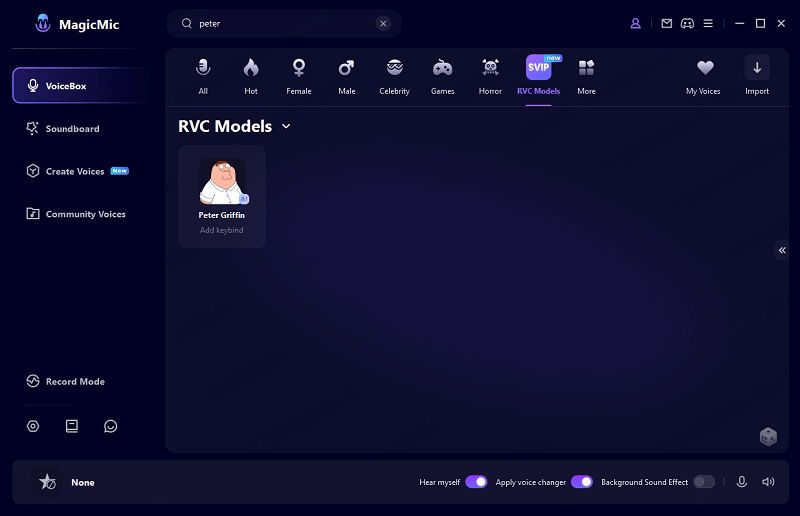
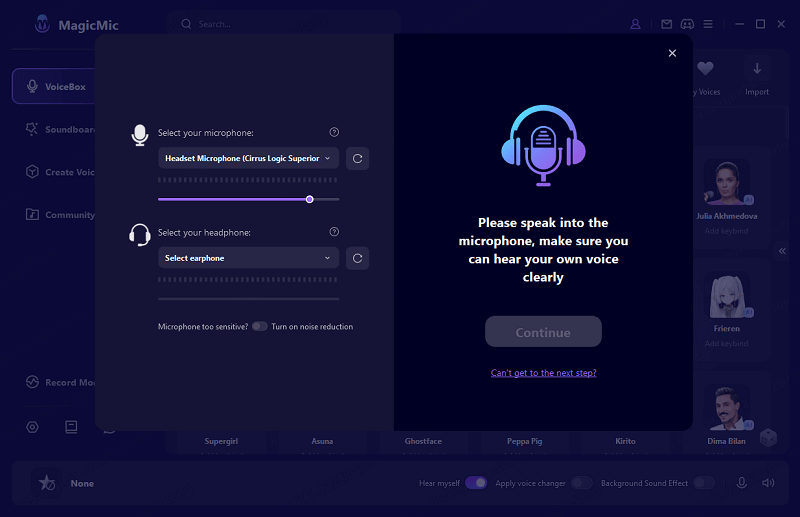
Getting started with MagicMic for your Peter Griffin voice change is straightforward. After downloading and installing the software, you’ll need to configure your audio settings to ensure everything works properly across your preferred applications.
The setup process involves selecting MagicMic’s virtual audio device as both your input and output in the software’s settings. This creates the pathway for your voice to be processed and transformed before it reaches whatever communication platform you’re using. The interface guides you through this process with clear instructions.
Once the basic setup is complete, accessing the Peter Griffin voice is as simple as navigating to the voice library and selecting the appropriate preset. The software organizes its voices intuitively, making it easy to find exactly what you’re looking for without digging through complicated menus.
For those who want to use the soundboard features, these are equally accessible. The sound clips are categorized and searchable, so you can quickly find the perfect Peter Griffin quote for any situation. Many users find that having both the voice changer and soundboard available gives them maximum flexibility for different types of interactions.
VoxBox: Generating Peter Griffin AI Voice from Text
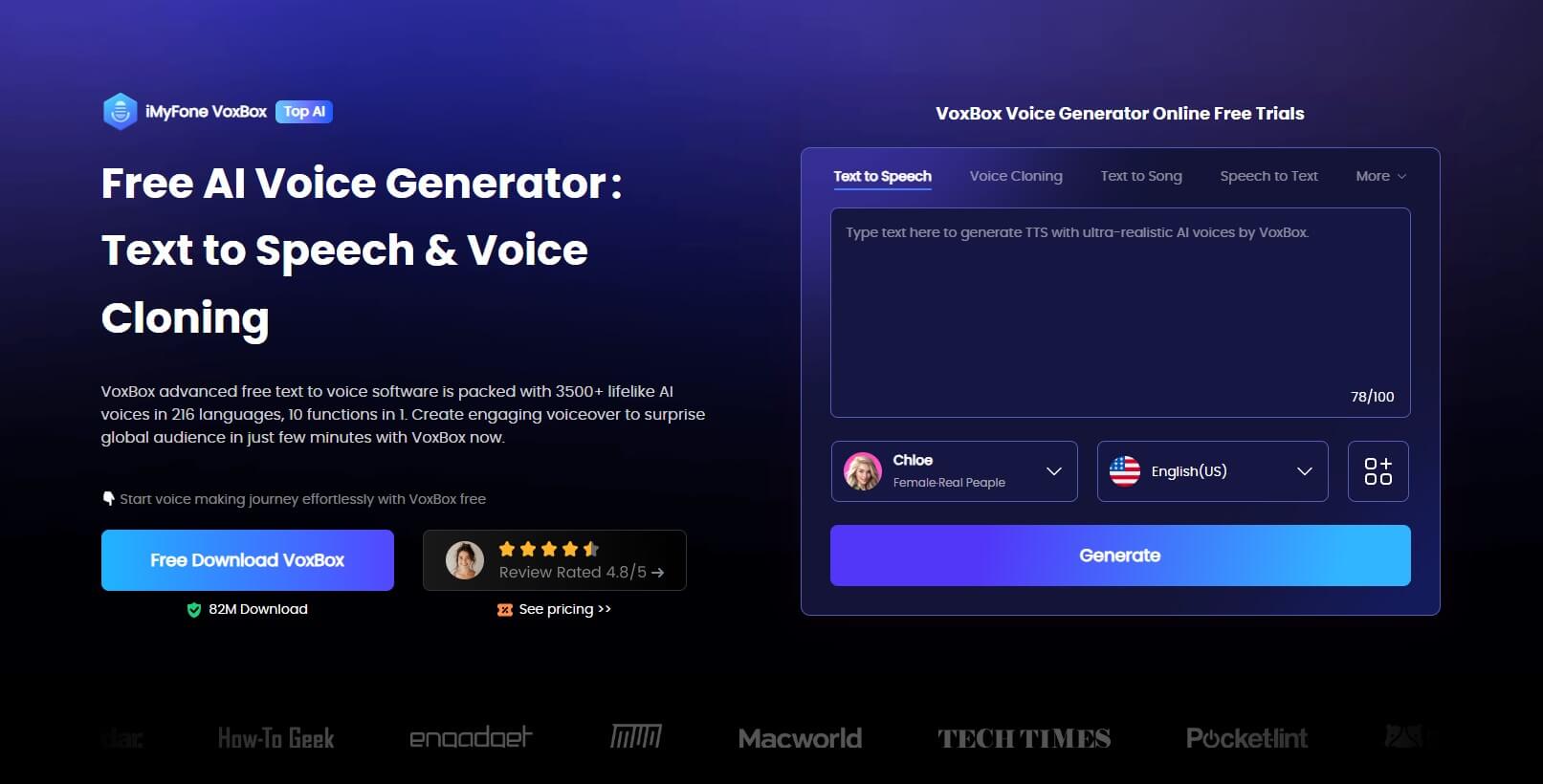
While real-time voice changers like MagicMic are perfect for live interactions, sometimes you need a different approach for creating content. VoxBox serves as an excellent Peter Griffin AI voice generator that specializes in converting text into high-quality audio using Peter’s distinctive voice.
This type of tool is ideal when you’re creating videos, podcasts, or other content where you want Peter Griffin to “speak” specific lines but don’t need real-time transformation. The generated audio files can be saved and used in various projects, giving you complete creative control over the final product.
VoxBox’s text-to-speech technology has advanced significantly in recent years. The generated Peter Griffin voice sounds remarkably natural, capturing not just the basic sound but also the rhythm and intonation patterns that make the character’s speech so distinctive. This results in audio that feels authentic rather than robotic or artificial.
The software offers extensive customization options for the generated voice. You can adjust speaking rate, pitch, and emphasis to match different contexts – whether you want Peter sounding excited, confused, angry, or any other emotion appropriate for your content.
Using VoxBox for Peter Griffin Text-to-Speech
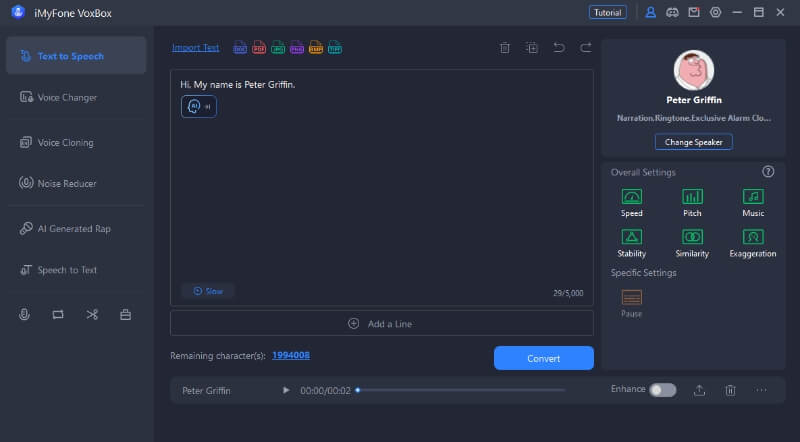
The process of generating Peter Griffin’s voice with VoxBox follows a logical workflow that’s accessible even for users with limited technical experience. After installing the software, you’ll find the text-to-speech functionality clearly labeled in the main interface.
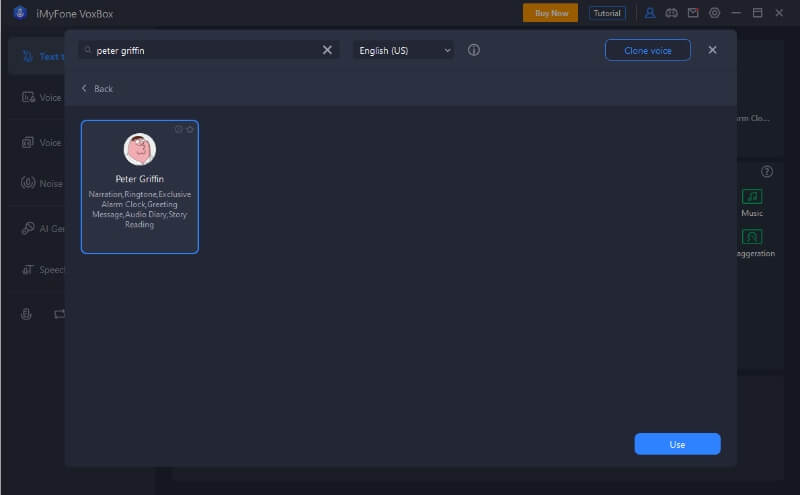
When you access the text-to-speech section, you can either type the text you want converted or import it from a file. The software supports various text formats, making it convenient to work with scripts or other prepared content. Once your text is in place, selecting the Peter Griffin voice preset is just a matter of choosing it from the available options.
Before generating the final audio, you have the opportunity to preview how it will sound and make any necessary adjustments. This might involve tweaking the pronunciation of certain words, adding pauses for dramatic effect, or modifying the speech rate to better match Peter’s typical delivery style.
The conversion process itself is quick, and once completed, you can save the audio in your preferred format. VoxBox supports multiple output formats suitable for different platforms and uses, ensuring compatibility with whatever project you’re working on.
Comparing Real-Time Voice Changing vs Text-to-Speech
Understanding the differences between real-time voice changers like MagicMic and text-to-speech generators like VoxBox helps you choose the right tool for your specific needs. Each approach has distinct advantages depending on what you’re trying to accomplish.
Real-time voice changing excels in interactive situations. If you want to sound like Peter Griffin during live conversations, gaming sessions, or streaming, this is the way to go. The immediate transformation allows for spontaneous interactions and reactions, which is essential for creating authentic and entertaining moments.
Text-to-speech generation shines when you need precision and quality. Since you’re working with pre-written text, you can perfect the wording and delivery before generating the audio. This results in cleaner, more polished output that’s ideal for content creation where you want everything to be just right.
Some users find value in both approaches, using real-time changing for live interactions and text-to-speech for prepared content. The good news is that tools like MagicMic often incorporate elements of both, giving you flexibility in how you create and use your Peter Griffin voice.
Technical Requirements for Peter Griffin Voice Tools
Before diving into Peter Griffin voice transformation, it’s helpful to understand the technical requirements. Most modern voice changing software is designed to be accessible rather than demanding high-end hardware.
For basic voice changing functionality, you’ll need a reasonable quality microphone. This doesn’t mean you need professional recording equipment – most headset microphones or standalone USB mics provide sufficient quality for the software to work effectively. The key is having a clear audio signal for the software to process.
Your computer’s specifications matter to some extent, but again, the requirements are generally modest. Most voice changing applications run smoothly on computers that are a few years old, as long as they meet the basic system requirements outlined by the software developers.
Internet connectivity requirements vary between applications. Some tools process audio locally on your device, while others may use cloud processing for more advanced features. Understanding whether your chosen software requires an internet connection helps you plan for different usage scenarios.
iMyFone MagicMic.Best Real Time AI Voice Changer.MagicMic is a professional real-time AI voice changer that changes your voice while communicating online. It’s easy to use, has extremely low latency, features high quality AI voices and is compatible with all systems. Discover 500+ AI voices and 100K+ meme soundboards with MagicMic today!
Check More Details | Download Now! | Check All Deals
Creative Uses for Peter Griffin Voice Change
The applications for Peter Griffin voice technology extend far beyond simple pranks. Content creators have discovered numerous innovative ways to incorporate Peter’s voice into their work, often with highly entertaining results.
YouTube creators frequently use Peter Griffin voice generators to add comedic commentary to their videos. Whether they’re reacting to content, providing humorous narration, or creating parody segments, the familiar voice immediately establishes a comedic tone that resonates with viewers.
Streamers on platforms like Twitch find that incorporating Peter Griffin’s voice into their broadcasts adds an element of variety and entertainment. Using both the real-time voice changer for live interactions and pre-generated audio for specific segments creates a dynamic viewing experience that keeps audiences engaged.
Podcasters sometimes use Peter Griffin voice clips as comedic interludes or to emphasize particular points. The recognizable sound serves as an audio cue that something funny or absurd is happening, enhancing the entertainment value of the content.
Even in more professional contexts, a well-timed Peter Griffin soundboard clip can lighten the mood during presentations or team meetings (assuming appropriate context and audience, of course). The key is understanding your audience and using the voice in ways that enhance rather than distract from your message.
Tips for Perfecting Your Peter Griffin Voice
While software can do most of the work in achieving a Peter Griffin voice change, there are techniques you can use to make the result even more convincing. Understanding Peter’s speech patterns and mannerisms helps you work with the technology rather than relying on it completely.
Peter Griffin typically speaks with a particular rhythm that includes sudden changes in volume and pitch. Paying attention to these patterns in the actual show and trying to mimic them in your own speech makes the voice changer’s job easier and produces more authentic-sounding results.
His accent is specifically rooted in New England, particularly Rhode Island where the show is set. While the voice changer software will handle much of this automatically, being aware of the accent characteristics helps you anticipate how certain words might sound when transformed.
Peter’s emotional range is quite broad – he can go from excited to confused to angry in quick succession. Matching your own emotional delivery to what you’re trying to convey helps the voice changer produce more appropriate results for different situations.
Practice is valuable too. The more you use the voice changer, the more comfortable you’ll become with how it transforms your speech. You’ll naturally start to adapt your speaking style to work better with the technology, resulting in increasingly convincing Peter Griffin voice performances.
Common Challenges and Solutions
Like any technology, Peter Griffin voice changers can occasionally present challenges. Understanding these potential issues and how to address them ensures a smoother experience when you’re trying to sound like everyone’s favorite animated dad.
Audio latency, or delay, can sometimes be an issue with real-time voice changers. If there’s too much delay between when you speak and when others hear the transformed voice, conversations become difficult. This is usually addressable by adjusting buffer settings or ensuring your computer isn’t overloaded with other applications.
Background noise can interfere with voice processing. Most quality voice changers include noise reduction features, but using a decent microphone and speaking in a reasonably quiet environment significantly improves results.
Compatibility with specific applications occasionally requires additional configuration. Most modern voice changers work seamlessly with popular platforms, but if you encounter issues, checking the software’s documentation for application-specific settings usually provides solutions.
The learning curve for new users varies between applications. Some voice changers prioritize simplicity while others offer more advanced features that take time to master. Starting with basic functionality and gradually exploring more complex features helps build confidence with the software.
Community and Support Resources
Many users find value in connecting with others who share their interest in voice changing technology. Online communities dedicated to voice modification often include sections specifically focused on achieving particular character voices like Peter Griffin.
These communities can be excellent sources of tips, custom voice presets, and troubleshooting advice. Experienced users frequently share their techniques for getting the most convincing results, which can be particularly helpful when you’re new to voice changing technology.
Most commercial voice changing applications offer official support channels as well. These might include knowledge bases, tutorial videos, or direct customer support options. Taking advantage of these resources can help you overcome any technical challenges more quickly.
Social media platforms often have groups or hashtags dedicated to specific voice changing applications or techniques. These can be good places to see examples of what others are creating and get inspiration for your own Peter Griffin voice projects.
The Evolution of Voice Changing Technology
Voice changing technology has come a long way from the simple pitch shifters of the past. Modern applications use sophisticated AI and machine learning algorithms to create transformations that are far more convincing and nuanced than what was previously possible.
The shift from basic parameter-based changes to AI-driven voice conversion represents a significant advancement. Instead of just adjusting pitch and tone, contemporary systems can analyze the characteristics of a target voice (like Peter Griffin’s) and apply those patterns to the user’s speech while preserving natural speech rhythms.
This technological progress means that achieving a believable Peter Griffin voice change is more accessible than ever. What once required studio equipment and extensive audio engineering knowledge can now be accomplished with consumer-level software and a basic understanding of the tools.
As the technology continues to evolve, we can expect even more realistic voice transformations and expanded capabilities. The gap between human voice acting and AI-generated voices continues to narrow, opening up new creative possibilities for entertainment and communication.
Ethical Considerations for Voice Changing
While Peter Griffin voice changers are primarily used for entertainment, it’s worth considering the ethical dimensions of voice modification technology. As with any tool, the responsible use matters more than the technology itself.
The most important consideration is consent and context. Using a voice changer to prank friends who will appreciate the humor is very different from using it to deceive people in ways