TOOL HUNTER

Remember the robotic voice that used to read text on old computers? That iconic sound was Microsoft Sam, one of the earliest text-to-speech systems that paved the way for modern voice technology. While it’s a nostalgic piece of tech history, today’s text-to-speech tools have evolved far beyond those robotic beginnings.
Whether you’re creating content, need accessibility features, or just want to have some fun with voice generation, understanding the legacy of Microsoft Sam and discovering modern alternatives can open up a world of possibilities. Let’s explore everything about this classic TTS system and what makes contemporary options so much better.
Table of Contents
- Understanding Microsoft Sam Text to Speech
- Exploring Online Microsoft Sam TTS Generator
- Limitations of Microsoft Sam TTS Technology
- Modern Alternative to Microsoft Sam TTS
- Getting Started with Modern TTS Technology
- Advantages of Modern TTS Over Legacy Systems
- Practical Applications for Modern TTS Technology
- Addressing Common Questions About TTS Technology
- The Evolution Continues: From Sam to Modern TTS
Understanding Microsoft Sam Text to Speech
Microsoft Sam, which stands for “Software Automatic Mouth,” was originally a Java-based program that performed text-to-speech conversion. The technology traces its roots back to SAM software first introduced on Commodore 64 systems in 1982, making it one of the pioneering voice synthesizers that influenced many modern TTS technologies we use today.
The Microsoft Sam text to speech system represented a significant step forward in computer speech synthesis during its time. It operated through a two-step process: first converting text into phonemes (the smallest units of sound in language) using what was called the “reciter” routine, then transforming those phonemes into actual speech through the phoneme-to-speech routine. This technical approach, while primitive by today’s standards, laid the groundwork for how many subsequent TTS systems would operate.
What made Microsoft Sam particularly notable was its integration into the Windows operating system, making text-to-speech capabilities accessible to millions of users without requiring additional software installations. This accessibility feature proved valuable for users with visual impairments or reading difficulties, though the robotic quality of the voice limited its practical applications.
The technology behind this sam tts system has been adapted and recreated in various forms over the years, including versions written in C programming language that can run on multiple platforms. These modern recreations maintain the distinctive robotic quality that made the original Microsoft Sam so recognizable while making the technology accessible through web browsers and mobile applications.
Exploring Online Microsoft Sam TTS Generator
For those feeling nostalgic or curious about experiencing the classic Microsoft Sam voice, several online platforms offer access to this vintage text-to-speech technology. These web-based tools recreate the distinctive robotic speech that many computer users from the 1990s and early 2000s will remember fondly.
Safety Considerations for Online TTS Tools
When using any online sam generator, security should be a primary concern. The popular online Microsoft Sam TTS generator utilizes the Microsoft Speech Interface API 4.0 from the 1998 version, which is generally considered safe from a technical standpoint. However, as with any online service, it’s important to review the platform’s privacy policy regarding data collection.
Most legitimate online TTS services collect minimal data, typically for service improvement purposes, but it’s always wise to avoid entering sensitive or personal information into these text fields. The online microsoft sam tts generator platforms that have maintained popularity generally have transparent privacy policies and don’t pose significant security risks for basic text-to-speech conversion needs.
How to Use Online Microsoft Sam TTS
Using the online microsoft sam tts generator is straightforward and doesn’t require technical expertise. Here’s how you can experience this classic text-to-speech technology:
Start by navigating to a website that hosts the Microsoft Sam TTS generator. Once there, you’ll typically find a dropdown menu containing various voice options, including the classic Microsoft Sam voice alongside other vintage synthesized voices.
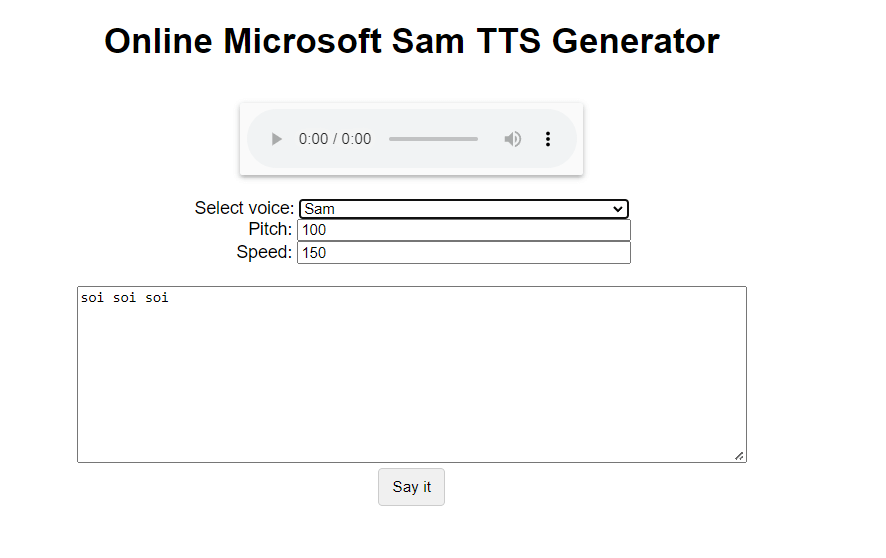
Most platforms allow you to adjust basic parameters like pitch and speed for each voice. While the customization options are limited compared to modern TTS systems, you can still make slight modifications to how the voice sounds.
After selecting your preferred voice and adjusting settings, simply type or paste the text you want to hear spoken into the provided text field. Click the “Say it” or equivalent button, and the system will generate the audio using the classic Microsoft Sam text to speech engine.
If you’re satisfied with the generated audio, you can save it to your device. Typically, this involves right-clicking on the audio player interface and selecting the option to save the audio file, usually in WAV format. This allows you to preserve your generated speech clips for various purposes.
User Experiences and Community Reception
The user-created Android versions of Microsoft Sam text to speech have generally received positive feedback, often rated around 4 stars by users who appreciate the nostalgic value. The older, original versions didn’t feature formal rating systems, but they’ve developed a cult following among technology enthusiasts and those who remember them from earlier computing days.
The appeal of these sam generator tools lies largely in their nostalgic value and distinctive robotic quality that some users find charming or amusing. However, for practical, everyday use, most users recognize the limitations of this decades-old technology compared to modern alternatives.
Limitations of Microsoft Sam TTS Technology
While Microsoft Sam holds an important place in the history of text-to-speech technology, it comes with significant limitations that become apparent when compared to contemporary TTS systems. Understanding these constraints helps explain why most users eventually seek more advanced alternatives.
The most noticeable limitation is the voice quality itself. The robotic, monotone delivery lacks the natural cadence, emotion, and variation of human speech. This makes extended listening uncomfortable and reduces comprehension compared to modern neural voice systems. The pronunciation accuracy is also considerably lower, often stumbling over uncommon words, names, or complex sentence structures.
Another significant constraint is the limited language support. While modern TTS systems support dozens of languages with various accents, the Microsoft Sam text to speech technology was primarily designed for English, with limited capabilities for other languages. This restricts its utility for international users or multilingual projects.
The technology also shows its age in terms of processing requirements and efficiency. While it might seem simple by today’s standards, the original Microsoft Sam TTS consumed considerable processing power for its time, and even modern recreations aren’t always optimized for efficiency compared to contemporary alternatives.
Background noise handling presents another challenge. The system lacks sophisticated algorithms for filtering out background noise or enhancing speech clarity in less-than-ideal audio environments, which limits its usefulness for production applications where audio quality matters.
Despite these limitations, the Microsoft Sam voice generator remains historically significant and occasionally useful for specific applications where its distinctive robotic quality is desirable, such as in artistic projects, retro gaming, or comedic content.
Modern Alternative to Microsoft Sam TTS
As text-to-speech technology has advanced dramatically since the days of Microsoft Sam, modern alternatives offer significantly improved voice quality, naturalness, and features. These contemporary solutions maintain the core functionality of converting text to speech while delivering experiences that are light-years ahead of the robotic voices of the past.
iMyFone VoxBox.Best AI Voice Generator & AI Voice Cloner: Create Custom Voices Instantly.iMyFone VoxBox is a powerful free text-to-speech software offering 3,500+ lifelike AI voices in 250+ languages, all with 10 features in one tool. Create professional voiceovers and captivate audiences worldwide in just minutes with VoxBox AI.

Check More Details | Download Now! | Check All Deals
Among the standout options in today’s TTS landscape is iMyFone VoxBox, which represents the evolution of technology that began with systems like Microsoft Sam. This comprehensive audio tool combines text-to-speech capabilities with a range of other audio processing features in a single, user-friendly package.
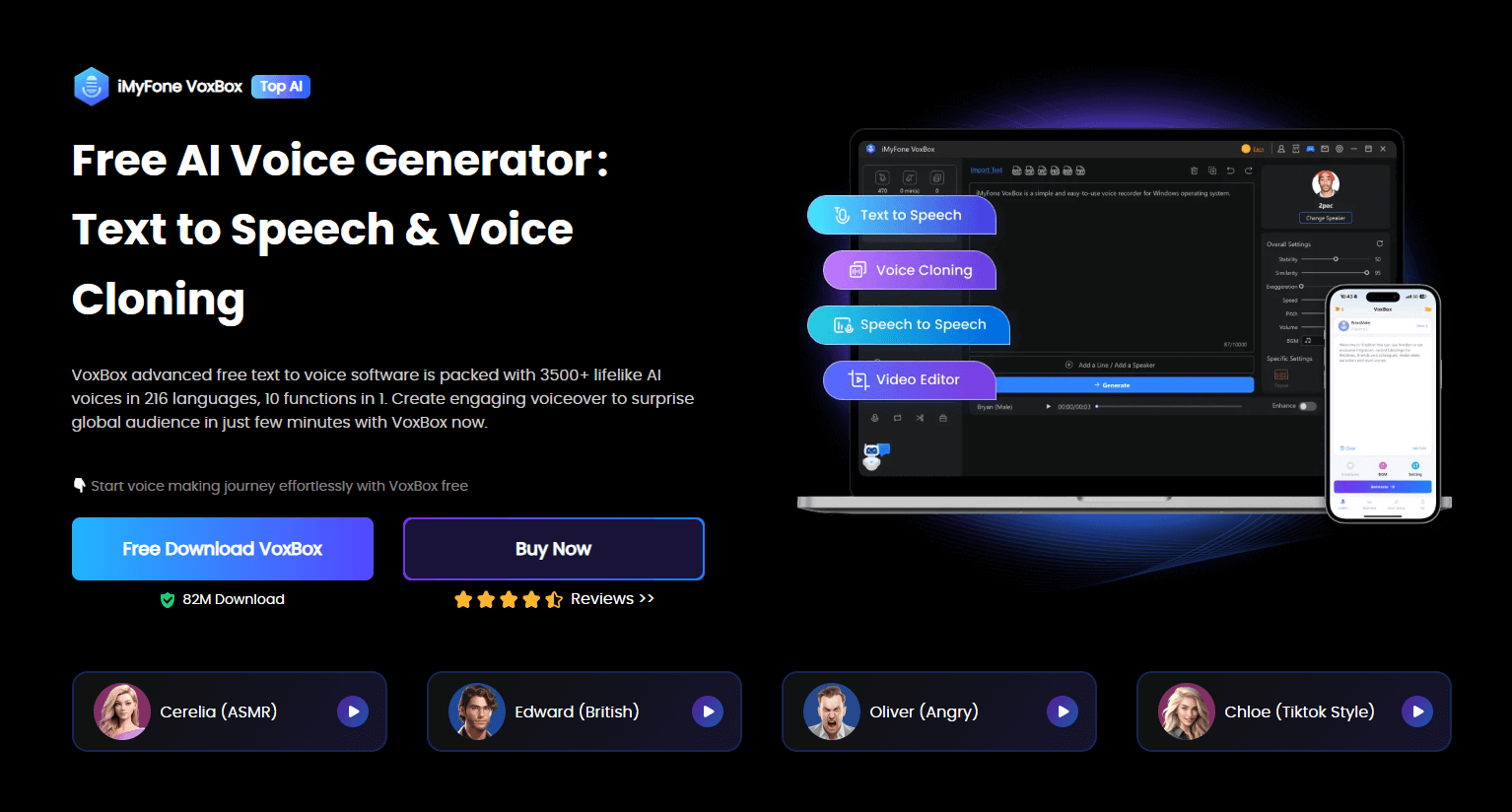
Unlike the basic functionality of the original Microsoft Sam text to speech system, VoxBox offers an extensive library of over 3,200 voice types across 77+ languages, with support for more than 100 regional accents. This diversity dwarfs what was possible with early TTS systems and enables creators to find the perfect voice for any project.
The voice quality itself represents perhaps the most significant advancement. Instead of the robotic, synthetic sound characteristic of Microsoft Sam, VoxBox utilizes advanced AI and neural network technologies to generate voices that sound remarkably human. These voices include natural pauses, emotional inflections, and conversational rhythms that make listening comfortable and engaging.
Beyond basic text-to-speech conversion, VoxBox functions as a comprehensive audio toolkit. It includes features for voice cloning, rap generation, speech-to-text transcription, voice recording and editing, and video conversion. This multifunctional approach makes it valuable for content creators, educators, professionals, and anyone needing audio processing capabilities.
The software also provides extensive control over voice parameters, allowing users to adjust speed, volume, pitch, and emphasis to fine-tune the audio output. This level of customization was unimaginable in the early days of Microsoft Sam TTS and enables users to create precisely the vocal delivery they envision.
Getting Started with Modern TTS Technology
Transitioning from basic online sam tts tools to comprehensive software like VoxBox is straightforward, and the improved results are immediately apparent. Here’s how to begin creating high-quality voiceovers with modern text-to-speech technology.
After downloading and installing the software, launch the application to access the main interface. The user-friendly layout makes navigation intuitive even for those new to text-to-speech software.
Locate and select the text-to-speech function within the application. This will typically open a text input field where you can type or paste the content you want to convert to speech. The platform generally supports extensive character counts, far exceeding what most online sam generator tools allow.
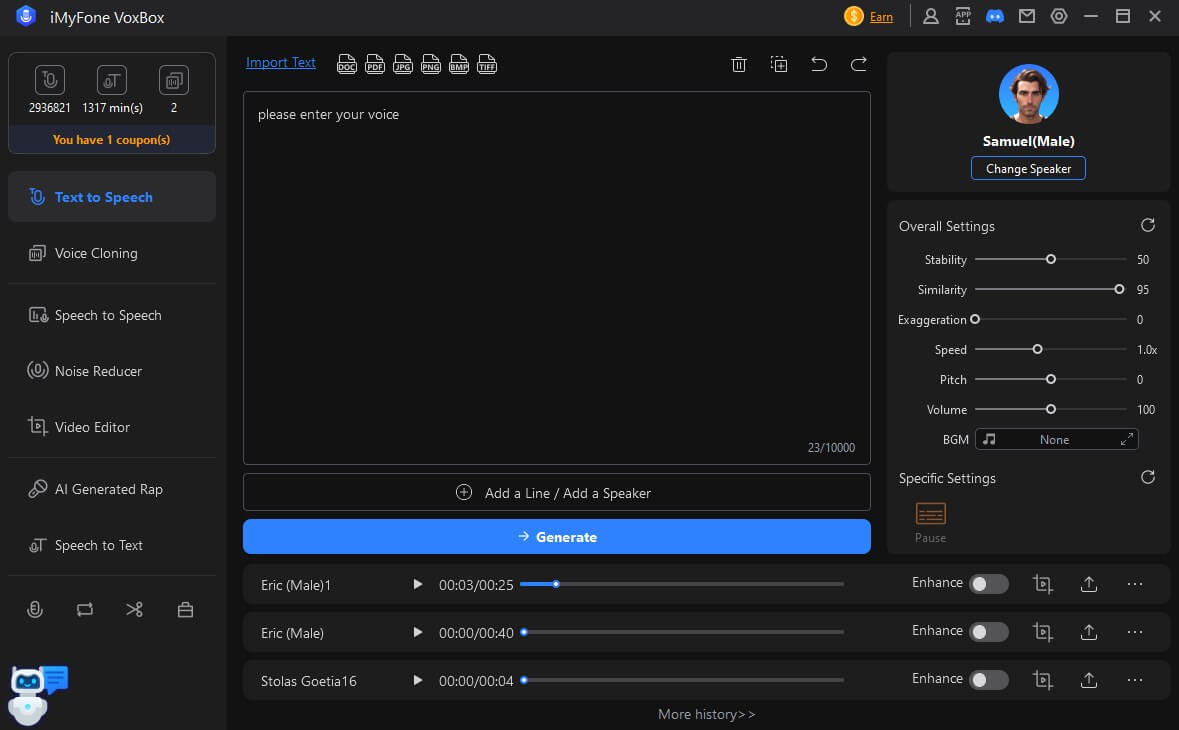
One of the key advantages of modern TTS systems is the ability to choose from numerous voice types and languages. Click the option to change speakers or voice settings to explore the available options. You’ll typically find voices categorized by gender, age, language, and sometimes even specific use cases like narration, character voices, or professional presentations.
Once you’ve entered your text and selected your preferred voice, you can further customize the output using parameters like speaking speed, pitch, volume, and emphasis. These adjustments allow you to create a delivery that matches your specific needs, whether you want a slow, clear narration or a quick, energetic presentation.
After configuring your settings, initiate the conversion process. The software will process your text and generate the corresponding audio file. Most modern TTS systems like VoxBox complete this process quickly, even for longer texts, thanks to optimized algorithms and processing efficiency.
The final audio output can typically be saved in various formats suitable for your intended use, whether that’s MP3 for general playback, WAV for higher quality, or formats optimized for video integration. This flexibility makes modern TTS tools practical for real-world applications rather than just novelty uses.
Advantages of Modern TTS Over Legacy Systems
The evolution from basic systems like Microsoft Sam text to speech to contemporary solutions represents more than just incremental improvements—it’s a fundamental transformation in what text-to-speech technology can accomplish. Understanding these advantages helps justify transitioning to modern tools.
The most immediately noticeable difference is voice quality and naturalness. While Microsoft Sam and similar early systems produced distinctly robotic, synthetic speech that was difficult to listen to for extended periods, modern AI-powered voices feature natural cadence, appropriate emotional inflection, and human-like pronunciation that makes extended listening comfortable and engaging.
Today’s sam tts alternatives also offer vastly expanded language and voice options. Where early systems were typically limited to one or two languages with single voice options, tools like VoxBox provide thousands of voice options across dozens of languages and hundreds of regional accents. This diversity enables truly global applications and allows users to match voices specifically to their content and audience.
Modern systems also provide extensive customization capabilities that simply weren’t available in early TTS technology. Users can adjust speaking rate, pitch, emphasis, and volume with precision, enabling them to create exactly the vocal delivery they envision rather than being limited to a single, fixed output style.
The processing efficiency of contemporary TTS systems represents another significant advantage. Despite producing far superior output, modern algorithms are optimized to work efficiently even on standard hardware, making high-quality text-to-speech accessible without specialized equipment.
Integration capabilities have also expanded dramatically. While Microsoft Sam was essentially a standalone feature, modern TTS tools often include complementary features like voice cloning, speech-to-text, audio editing, and video processing, creating comprehensive media production environments rather than single-function tools.
Accessibility has improved alongside technological advancements. While early TTS systems provided basic accessibility functions, modern solutions offer more natural, pleasant listening experiences for users who rely on text-to-speech for reading assistance, making the technology genuinely useful rather than merely functional.
Practical Applications for Modern TTS Technology
Understanding the practical uses for contemporary text-to-speech technology helps illustrate why upgrading from basic systems like Microsoft Sam TTS is worthwhile for many users. The applications extend far beyond the novelty uses that often characterized early TTS systems.
Content creation represents one of the most significant applications for modern TTS tools. Video producers, podcasters, and social media creators use high-quality voice synthesis to generate narration, character voices, and audio content without needing recording equipment or voice actors. The natural-sounding results integrate seamlessly into professional productions.
Accessibility applications have also evolved considerably. While early systems like Microsoft Sam text to speech provided basic reading assistance, modern TTS offers pleasant, natural voices that make extended reading comfortable for users with visual impairments, reading difficulties, or learning differences like dyslexia. The ability to adjust speaking pace and choose from multiple voices further enhances accessibility.
Educational uses have expanded with improved TTS technology. Language learners benefit from hearing proper pronunciation in multiple accents, while educational content creators can generate consistent, clear narration for instructional materials without repeated recording sessions.
Business applications include generating professional voiceovers for presentations, training materials, and automated systems. The ability to quickly produce clear, consistent voice content without scheduling recording sessions or hiring voice talent streamlines many business processes.
Entertainment and gaming represent another growing application area. Modern TTS enables dynamic dialogue generation, character voice creation, and interactive audio experiences that would have been impossible with the limited capabilities of early systems like the Microsoft Sam voice generator.
Personal use cases include everything from reading articles aloud while multitasking to creating custom audio content for personal projects. The ease of use and high-quality output make modern TTS practical for everyday applications rather than just specialized professional uses.
Addressing Common Questions About TTS Technology
As text-to-speech technology continues to evolve, users often have questions about functionality, accessibility, and practical considerations. Here are answers to some frequently asked questions about TTS systems, including the legacy Microsoft Sam and contemporary alternatives.
Is Microsoft Sam Text to Speech Free?
Yes, the online Microsoft Sam TTS generator is typically available at no cost. These web-based tools allow users to generate speech using the classic Microsoft Sam voice without payment requirements. However, it’s worth noting that while the service itself is free, the capabilities are limited compared to modern premium TTS solutions.
What Exactly is Microsoft Sam?
Microsoft Sam refers to a text-to-speech voice and engine that was included in older versions of the Windows operating system, utilizing the Microsoft Speech Interface API 4.0 from 1998. The voice became iconic for its distinctive robotic quality and represents an early implementation of consumer-grade text-to-speech technology. Modern online versions recreate this experience using the same underlying technology.
Are There Free TTS Software Options Available?
Many contemporary TTS tools offer free versions or trial periods that provide substantial functionality. For example, VoxBox includes a free trial that allows users to generate audio from text with a character limit that’s sufficient for testing and basic use. These free tiers typically provide access to a selection of voices and basic features, with premium options available for users needing advanced capabilities or higher usage limits.
iMyFone VoxBox.Best AI Voice Generator & AI Voice Cloner: Create Custom Voices Instantly.iMyFone VoxBox is a powerful free text-to-speech software offering 3,500+ lifelike AI voices in 250+ languages, all with 10 features in one tool. Create professional voiceovers and captivate audiences worldwide in just minutes with VoxBox AI.
Check More Details | Download Now! | Check All Deals
How Can I Access Sam Text-to-Speech Today?
Accessing the classic Microsoft Sam voice today typically involves using online recreation tools, as the original technology is no longer included in modern Windows versions. For those interested in the nostalgic experience, web-based sam generator platforms provide the easiest access. For practical applications, however, modern alternatives like VoxBox offer significantly improved quality and features while maintaining the core text-to-speech functionality.
What’s the Difference Between Online and Software TTS Tools?
Online TTS tools like the web-based Microsoft Sam TTS generator operate through your web browser and typically have limitations on text length, voice options, and customization. Software-based solutions like VoxBox are installed directly on your computer, offering more voices, greater customization, better processing efficiency, and typically no usage limitations beyond what your hardware can handle.
Can Modern TTS Systems Replicate the Classic Microsoft Sam Voice?
While most contemporary TTS systems focus on creating natural, human-like voices, some do include options that replicate the robotic quality of early synthesized speech like Microsoft Sam. These are typically included as novelty voices or for specific applications where that distinctive sound is desirable. However, the primary development focus for modern TTS is understandably on creating increasingly natural and expressive voices.
The Evolution Continues: From Sam to Modern TTS
The journey from Microsoft Sam to today’s advanced text-to-speech systems illustrates the remarkable progress of voice synthesis technology. What began as a robotic, monotone reader has evolved into sophisticated AI capable of generating expressive, natural-sounding speech that’s increasingly indistinguishable from human voices.
Microsoft Sam text to speech represented an important milestone in making speech synthesis accessible to everyday computer users. While limited by today’s standards, it demonstrated the potential of technology to convert written text into audible speech, paving the way for the sophisticated systems we have today.
The legacy of this early sam tts technology lives on in several ways. The basic concept of converting text to speech remains unchanged, even as the methods have become vastly more sophisticated. The accessibility applications that began with these early systems have expanded and improved, making digital content more accessible to diverse users. Perhaps most importantly, Microsoft Sam created cultural awareness of text-to-speech technology, familiarizing millions with the concept of computer-generated speech.
Modern alternatives like VoxBox build upon this foundation while addressing the limitations of early systems. The expanded voice libraries, improved naturalness, multilingual support, and additional features represent the evolution of technology that began with pioneers like Microsoft Sam.
For users today, this evolution means access to practical, high-quality text-to-speech tools suitable for professional, educational, and personal applications. While the nostalgic appeal of the original Microsoft Sam voice remains, contemporary needs typically benefit from the advanced capabilities of modern TTS systems.
As technology continues to advance, text-to-speech systems will likely become even more natural, expressive, and versatile. The progress from the basic robotic output of