TOOL HUNTER

Ever thought about how much fun it would be to change your voice on WhatsApp during a call? Maybe you want to sound like a cartoon character, deepen your voice to sound more authoritative, or just have a good laugh with friends. The good news is, it’s totally possible and easier than you might think. All you need is the right WhatsApp voice changer app.
With so many options out there, choosing the best one can be tricky. You want something that’s reliable, offers good voice quality, and is simple to use. Whether you’re looking to prank a friend or just experiment with different voices, we’ve got you covered. In this guide, we’ll walk you through the top apps that let you change voice in WhatsApp seamlessly.
Why Use a WhatsApp Voice Changer?
Using a voice changer during WhatsApp calls can be a blast. It’s not just for pranks—though that’s definitely a big part of the fun. Imagine calling a friend and sounding like a robot, a giant, or even a celebrity. It’s a great way to break the ice, lighten the mood, or make your conversations more entertaining.
Plus, if you’re someone who uses WhatsApp for work or group projects, changing your voice can add a creative twist to presentations or team meetings. And let’s be honest, who wouldn’t want to surprise their loved ones with a funny magic sms for WhatsApp?
Top Apps to Change Voice in WhatsApp
Ready to dive in? Here are some of the best apps that allow you to change your voice during WhatsApp calls. These tools are user-friendly and packed with cool features.
1. FunCalls
If you’re looking for a straightforward way to change voice WhatsApp style, FunCalls is a solid choice. It’s available for both iOS and Android and lets you apply various voice effects in real-time during calls.
Key Details:
- Developer: BNG Mobile
- Version: 5.1.10
- Size: 36 MB
- Downloads: Over 1 million
What Makes It Great?
- Real-time voice changing during calls
- Fun animal sound effects
- Ability to download and share your recorded calls
How to Use FunCalls:
- Open the app and grant the necessary permissions.
- Use the dialer at the bottom to enter your friend’s number.
- Pick a voice effect before placing the call.
- After the call, you can save the recording and share it.
2. Call Voice Changer-IntCall
This app is perfect for iOS users who want to change voice on call with ease. It offers a range of voice pitches and effects to make your WhatsApp conversations more dynamic.

Key Details:
- Developer: Astra Communication LTD
- Version: 15.0
- Size: 32.9 MB
- Downloads: Over 10 million
What Makes It Great?
- Free calling minutes for new users
- Multiple voice-changing effects
- Simple and intuitive interface
How to Use Call Voice Changer-IntCall:
- Launch the app and enter the phone number you want to call.
- Select your desired voice pitch (highest, high, lowest, low).
- Add a sound effect and start your call.
3. Prank Dial
Prank Dial is one of the most popular apps for those who love a good prank. It’s available on both Android and iOS and comes with a variety of pre-set scenarios to make your WhatsApp calls hilarious.

Key Details:
- Developer: Kickback Inc.
- Version: 6.4.1
- Size: 23 MB
- Downloads: Over 1 million
What Makes It Great?
- Save and share your prank call recordings
- Free calls every day
- Regular updates with new content
How to Use Prank Dial:
- Download the app and allow access to your contacts and storage.
- Browse through the prank scenarios and pick your favorite.
- Choose a friend to call and enjoy the reaction.
4. Voice Changer Prank Call
This app is another great option for adding fun to your WhatsApp calls. It lets you change your voice anytime during a call and even add background sounds.

Key Details:
- Developer: ACETELECOM
- Version: 2.9.5
- Size: 13 MB
- Downloads: Over 1 million
What Makes It Great?
- Background sound effects
- Free credits for calling
- Change your voice mid-call
How to Use Voice Changer Prank Call:
- Open the app and grant the required permissions.
- Tap the call button at the bottom of the screen.
- Enter the number and select “call with voice effect.”
- During the call, you can toggle background sounds and record the conversation.
5. Voice Changer with Effects
This versatile app not only lets you change your voice but also offers additional features like creating voice from text and setting custom ringtones. It’s perfect for sending funny voice messages on WhatsApp.
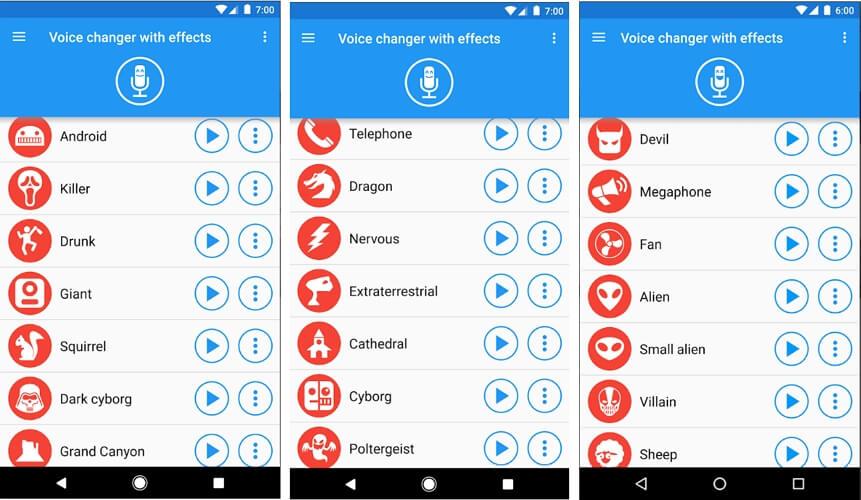
Key Details:
- Developer: Baviux
- Version: 3.7.7
- Size: 9.6 MB
- Downloads: Over 100 million
What Makes It Great?
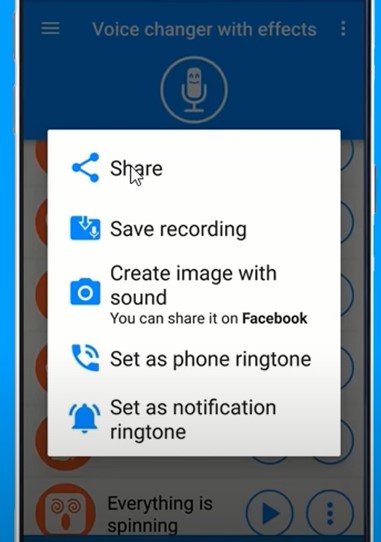
- Create images with sound
- Generate voice from typed text
- Set custom notification sounds and ringtones
How to Use Voice Changer with Effects:
- After installing, grant the necessary permissions.
- Tap the microphone icon and record your voice.
- Apply your chosen voice effects.
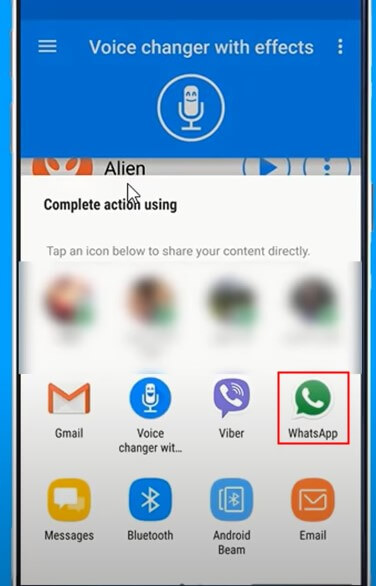
- Share the edited audio directly to WhatsApp.
6. Narrator’s Voice
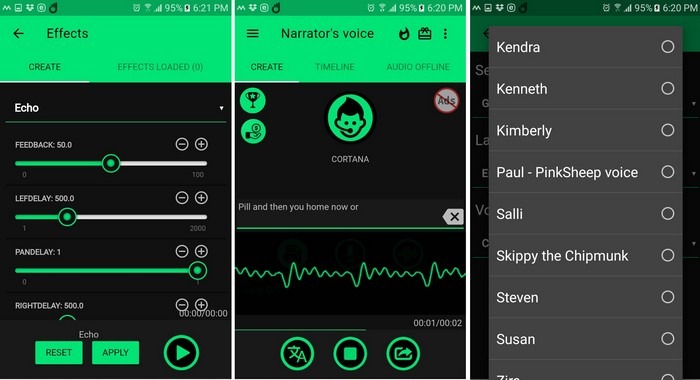
Narrator’s Voice is unique because it focuses on text-to-speech functionality. You can type anything, and the app will convert it into speech using a variety of voices and effects—perfect for sending creative WhatsApp messages.
Key Details:
- Developer: Escoliha
- Version: 9.5.11
- Size: 13 MB
- Downloads: Over 10 million
What Makes It Great?
- Type-to-speech feature
- Great for content creators
- Natural and expressive voice options
How to Use Narrator’s Voice:
- Download and open the app.
- Grant permissions and tap the microphone icon to record.
- Add effects and apply them.
- Share the final audio with your WhatsApp contacts.
7. MagicCall
MagicCall rounds out our list with its user-friendly interface and multiple voice-changing options. It’s available for both iOS and Android and is ideal for those who want to add background sounds during calls.
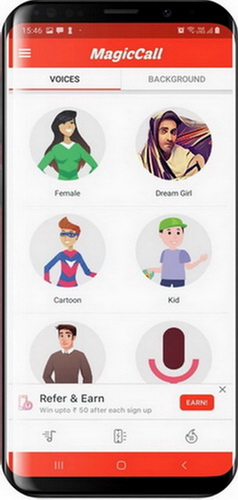
Key Details:
- Developer: BNG Mobile
- Version: 1.5.6
- Size: 35 MB
- Downloads: Over 10 million
What Makes It Great?
- Multiple voice-changing options
- Background sound effects (traffic, birthday, rain, etc.)
- Simple and easy to navigate
How to Use MagicCall:
- Register within the app and grant permissions.
- Select a contact from your home menu.
- During the call, choose a voice effect and add background music if desired.
- Record and share the call.
How to Change Voice in WhatsApp on PC
Using WhatsApp on your computer? You can still change your voice during calls! Here’s how to set up WhatsApp Web and use a voice changer on your PC.
Setting Up WhatsApp Web
- Open WhatsApp on your phone.
- For Android: Tap the menu (three dots). For iPhone: Tap “Settings.”
- Select “Linked Devices” and then “Link a Device.”
- Point your phone at the QR code on the WhatsApp Web page to sync.
Using a WhatsApp Voice Changer on PC
When it comes to changing your voice on WhatsApp Web, you’ll need a dedicated PC voice changer. That’s where iMyFone MagicMic comes in—it’s a powerful tool designed for real-time voice modulation on desktop platforms.
iMyFone MagicMic.Best Real Time AI Voice Changer.MagicMic is a professional real-time AI voice changer that changes your voice while communicating online. It’s easy to use, has extremely low latency, features high quality AI voices and is compatible with all systems. Discover 500+ AI voices and 100K+ meme soundboards with MagicMic today!

Check More Details | Download Now! | Check All Deals

MagicMic stands out as a top-tier WhatsApp voice changer for PC. It’s compatible with both Windows and Mac and offers an impressive array of features.
Key Details:
- Developer: iMyFone LTD
- Version: 3.5.0
- Size: 2.92 MB
- Downloads: Over 3 million
What Makes MagicMic Great?
- Real-time voice changing with 300+ voices and 100K+ sound effects
- Works with popular platforms like Discord, Twitch, PUBG, and more
- High-quality, stable output
- Voice customization options
- Available for PC and mobile devices
How to Use MagicMic for WhatsApp Calls:
- Download and install MagicMic on your computer.
- Open the app and select your desired voice effect.
- Set MagicMic as your default microphone in your system settings.
- Start a call on WhatsApp Web—your voice will be modified in real-time.
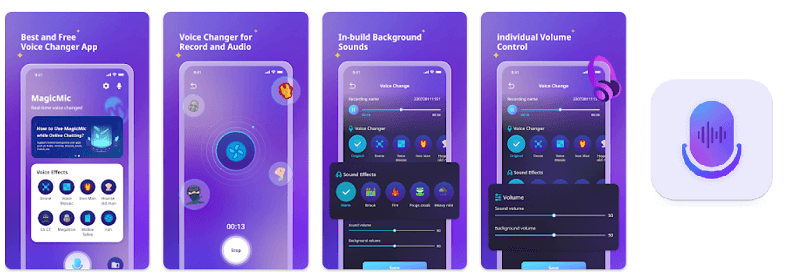
For a visual guide, check out this tutorial on how to change voice in WhatsApp using MagicMic:
iMyFone MagicMic.Best Real Time AI Voice Changer.MagicMic is a professional real-time AI voice changer that changes your voice while communicating online. It’s easy to use, has extremely low latency, features high quality AI voices and is compatible with all systems. Discover 500+ AI voices and 100K+ meme soundboards with MagicMic today!
Check More Details | Download Now! | Check All Deals
Frequently Asked Questions
How can I change my voice from male to female on WhatsApp?
To change your voice from male to female during a WhatsApp call, you can use any of the voice changer apps mentioned above. These apps typically have preset options for gender swapping. For instance, MagicMic offers specific male-to-female voice filters that you can apply in real-time.
Is it possible to change my voice during a call?
Absolutely! Most voice changer apps allow you to modify your voice while you’re on a call. They come with built-in effects that can be toggled on and off during the conversation. This means you can start with your normal voice and switch to a funny or altered voice whenever you want.
How do I make my voice deeper during a call?
Making your voice deeper is simple with a voice changer app. After downloading the app, look for effects labeled “deep voice,” “low pitch,” or similar. Both Android and iPhone users can find these options in most voice-changing applications.
Can I add fake background sounds to my WhatsApp voice messages?
Yes, many voice changer apps include background sound effects. To add these to your WhatsApp voice messages:
- Choose a background sound from the app’s library.
- Adjust the volume so it’s audible but not overwhelming.
- Record your voice message while the background sound is playing.
- Send the message as you normally would.
How can I speed up my WhatsApp voice notes?
To speed up a WhatsApp voice note:
- Open the chat containing the voice message.
- Tap on the voice note to start playing it.
- Look for the “1x” speed indicator and tap it to switch to “1.5x” for faster playback.
Conclusion
Changing your voice on WhatsApp calls is a fun and easy way to spice up your conversations. Whether you’re using a mobile app like FunCalls or Prank Dial, or a PC tool like MagicMic, there are plenty of options to suit your needs. Remember to choose an app that offers good voice quality and stability for the best experience.
So why not give it a try? Download one of these WhatsApp voice changer apps today and start surprising your friends with your new voices!
Some images courtesy of iMyFone.