TOOL HUNTER

Ever wondered how your favorite streamers and gamers manage to sound like robots, aliens, or even celebrities during their live sessions? The secret lies in real-time voice changing technology that’s taking the online world by storm. Whether you’re looking to spice up your Discord chats, add some flair to your TikTok LIVE streams, or just have fun with friends, having the right voice changer can make all the difference.
The challenge is finding software that actually works well, doesn’t eat up your computer’s resources, and offers enough variety to keep things interesting. With so many options available, it’s easy to get overwhelmed trying to figure out which one is right for your needs and budget.
Table of Contents
What Makes a Great Voice Modulator?
When you’re searching for the perfect voice modulator, there are several key factors to consider. The best voice changing programs should offer more than just basic pitch adjustments – they should provide realistic voice transformations that sound natural and convincing.
Compatibility is crucial – you need software that works with your specific operating system and the applications you use regularly. Performance matters too – the last thing you want is lag or audio glitches during an important gaming session or live stream. The variety of available voices and effects determines how creative you can get with your audio transformations.
Ease of use is another important consideration. Some voice changers require technical knowledge to set up properly, while others are designed for immediate use right out of the box. Customization options allow you to fine-tune voices to your exact preferences, creating unique audio personas that stand out from the crowd.
Comprehensive Comparison of Top Voice Changing Programs
Let’s examine how the leading voice modification tools stack up against each other. This comparison table gives you a quick overview of the key features, compatibility, and pricing of the most popular options available today.
| Software Name | Supported Platforms | Voice Options | Sound Effects | Quick Access Keys | Voice Adjustment | Cost |
|---|---|---|---|---|---|---|
| MagicMic | Windows, Mac, Android, iOS | 225+ | 600+ | Available | Extensive | $9.99 monthly, $29.99 annually, $49.99 permanent |
| Voicemod | Windows | 65+ | 300+ | Available | Comprehensive | $14 quarterly, $18 yearly, $45 permanent |
| RoboVox | Android | 32 | Not available | Not available | Basic | $1.49 |
| NCH Voxal | Windows & Mac | 35+ | 30+ | Available | Moderate | $14.99 commercial, $12.99 personal |
| VoiceMeeter | Windows | None built-in | None built-in | Not available | Advanced | Free with optional purchases |
| Clownfish | Windows | 14+ | 30+ | Not available | Basic | Free |
| Voice Changer with Effects | Android | 55+ | 50+ | Not available | Moderate | Free with in-app purchases |
| MorphVox | Windows & Mac | Voice pack selection | 50+ | Not available | Advanced | $39.99 |
| MasqVox | Windows | 10+ | 5+ | Not available | Basic | Free with in-app purchases |
| SuperVoiceChanger | Windows | 20+ | Not available | Not available | None | Free with in-app purchases |
| AV Voice Changer Diamond | Windows | 60+ | 50+ | Not available | Advanced | $99.95 |
Based on this comprehensive feature analysis, platform support, and voice transformation capabilities, MagicMic emerges as the leading choice for most users seeking a reliable and versatile voice modulator.
Detailed Look at the Best Voice Changer Options
Now let’s dive deeper into each of these voice transformation tools to help you understand their unique strengths, limitations, and ideal use cases.
MagicMic Voice Transformation Software
MagicMic stands out as a comprehensive voice modification solution that works across multiple platforms. This versatile tool serves as an excellent voice changer for PC users while also supporting Mac, Android, and iOS devices. Its broad compatibility makes it suitable for various applications including live streaming, online meetings, gaming communications, and content creation.
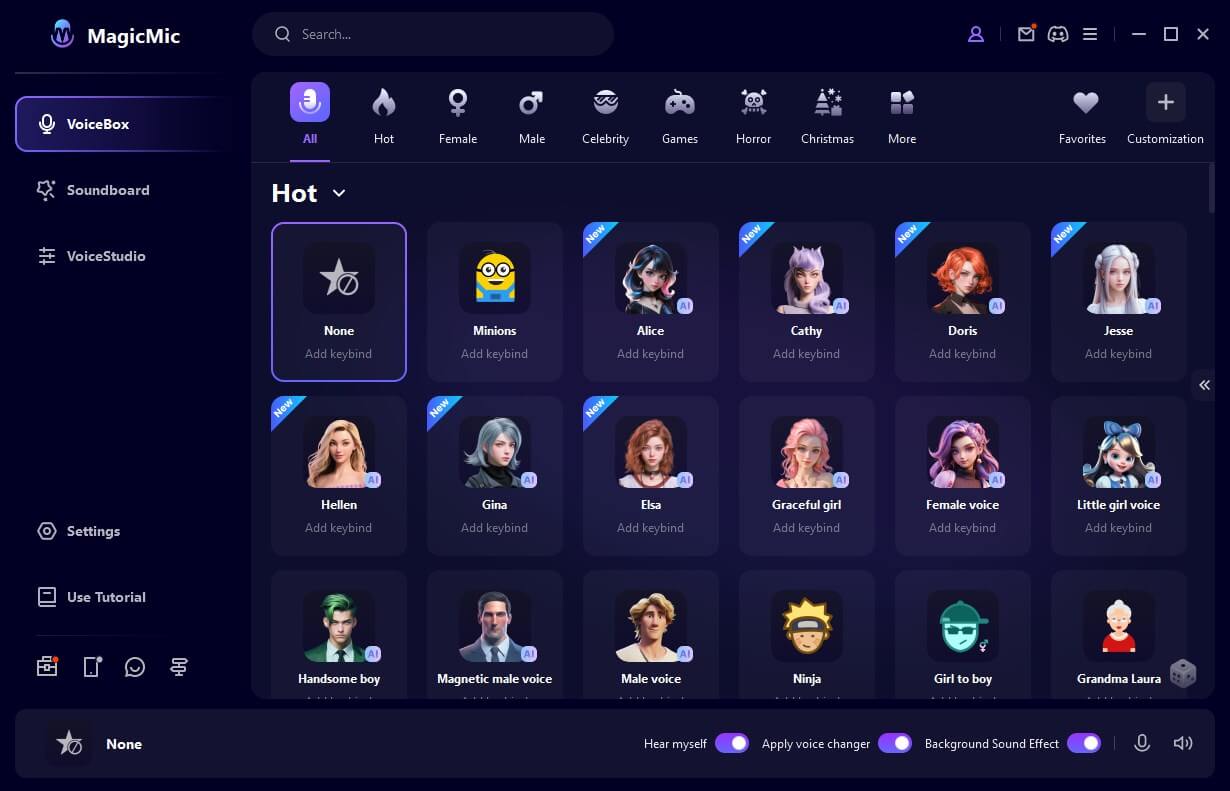
What makes this voice modulator particularly impressive is its extensive library of over 225 voice filters and 600 sound effects. The AI voice technology provides remarkably realistic transformations that can make you sound like completely different people – or even non-human characters. The background sounds included with many voice effects add an extra layer of immersion to your audio transformations.
Advantages:
- Massive selection of voice modification options including AI-powered transformations
- Compatible with popular platforms like Discord, Skype, PUBG, Fortnite, and many others
- Extensive soundboard functionality with hundreds of meme sounds and audio effects
- Background audio elements that enhance the realism of voice changes
- Customizable hotkeys for instant voice effect activation during gaming or streaming
- Celebrity voice impressions including famous actors, musicians, and public figures
- Support for importing custom audio files to expand your sound library
- Offline voice transformation for pre-recorded audio content
Limitations:
- Less brand recognition compared to some established competitors
- Some advanced features may require experimentation to master
Platform Support:MagicMic works seamlessly on Windows, macOS, Android, and iOS devices, making it one of the most versatile voice changing programs available.
Pricing Structure:Free basic version available. Premium plans include monthly ($9.99), annual ($29.99), and lifetime ($49.99) options.
iMyFone MagicMic.Best Real Time AI Voice Changer.MagicMic is a professional real-time AI voice changer that changes your voice while communicating online. It’s easy to use, has extremely low latency, features high quality AI voices and is compatible with all systems. Discover 500+ AI voices and 100K+ meme soundboards with MagicMic today!

Voicemod Voice Alteration Tool
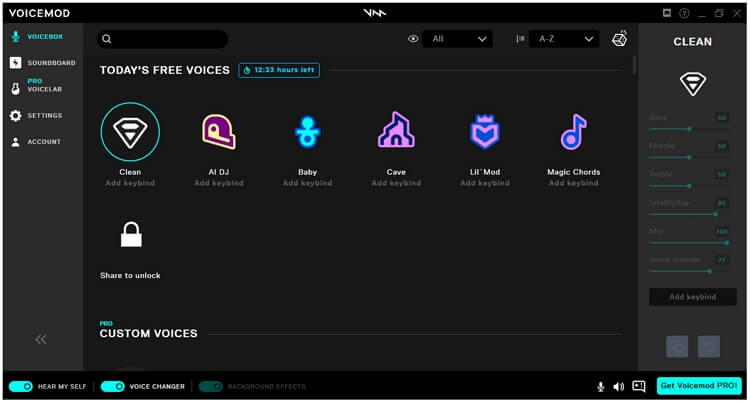
Voicemod has established itself as a popular choice among Windows users looking for real-time voice modification. This software specializes in quick and smooth voice conversions that work well during live streaming and gaming sessions. Its intuitive interface makes it accessible even for those new to voice changing technology.
Advantages:
- Integration with various communication platforms including lesser-known applications
- Multiple voice effect layers for creating unique audio combinations
- Beginner-friendly design that requires minimal technical knowledge
- Custom sound effect library that supports user uploads
- Regular updates with new voices and features
Limitations:
- Occasionally prompts installation of additional software
- Larger download size compared to some alternatives
- Performance can be inconsistent with slower internet connections
Platform Support:Exclusively designed for Windows operating systems.
Pricing Structure:Free version available with limited features. Voicemod Pro offers quarterly ($14), annual ($18), and lifetime ($45) subscription plans.
RoboVox Voice Changer Pro
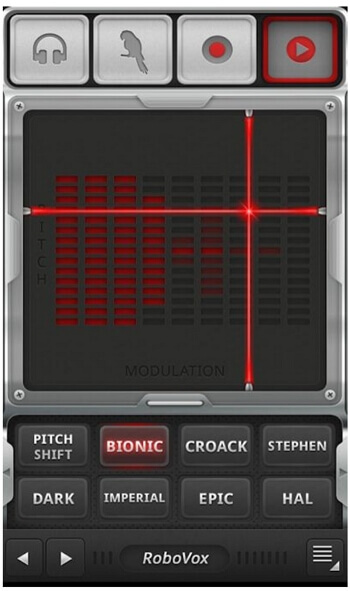
RoboVox provides a straightforward voice changing experience tailored for mobile users. This Android application focuses on pitch modification with a selection of 32 different voice styles. Its simplicity makes it appealing for quick voice transformations on the go.
Advantages:
- Multiple operation modes including real-time and recording options
- Real-time audio analysis with visual feedback
- Cross-platform mobile support for both Android and iOS
- Voice recording capability for saving modified audio
- Audio file management for creating custom ringtones
Limitations:
- Limited sound effect library
- Basic user interface design
- Fewer advanced features compared to desktop solutions
Platform Support:Optimized for Android and iOS mobile devices.
Pricing Structure:One-time purchase price of $1.49.
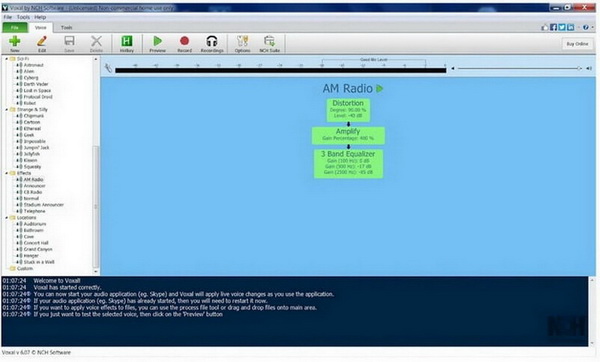
NCH Voxal Voice Changer
NCH Voxal offers a lightweight yet capable voice modification solution for both Windows and Mac users. This software focuses on instant voice transformation during various online activities while maintaining system performance.
Advantages:
- Diverse voice options including robotic, alien, and atmospheric effects
- Effect preservation for consistent audio modification
- Audiobook creation capabilities
- Customizable shortcut keys for efficient workflow
- Real-time voice processing during live conversations
Limitations:
- Modest built-in voice and sound effect collection
- Outdated visual design elements
- Limited advanced customization options
Platform Support:Compatible with Windows 10, 8, 7, Vista, XP and macOS.
Pricing Structure:Commercial license ($14.99), personal use license ($12.99), and subscription options starting at $1.11 monthly.
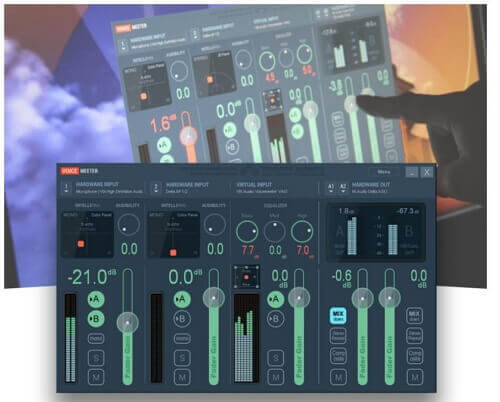
VoiceMeeter Audio Mixing Solution
VoiceMeeter takes a different approach to voice modification by functioning as a sophisticated audio mixer rather than a traditional voice changer. This powerful tool gives users extensive control over audio routing and processing, making it popular among audio professionals and enthusiasts.
Advantages:
- Comprehensive audio parameter adjustments
- Professional-grade audio manipulation capabilities
- Flexible audio source mixing from both hardware and applications
- Advanced routing options for complex audio setups
- No cost barrier for basic functionality
Limitations:
- Significant learning curve for new users
- Not designed specifically for voice changing purposes
- Requires technical audio knowledge for optimal use
Platform Support:Windows 10, 8, 7, XP, and Vista.
Pricing Structure:Completely free with optional premium features available for purchase.
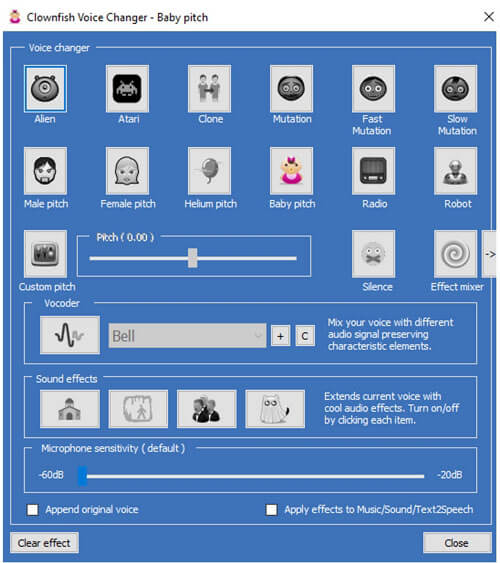
Clownfish Voice Changer
Clownfish provides a no-cost solution for basic voice modification needs. This lightweight application integrates directly into your system to provide voice transformation across various applications without complicated setup procedures.
Advantages:
- Integrated audio player for media management
- Text-to-speech functionality
- System-wide audio control features
- VST plugin compatibility
- Background music playback capability
Limitations:
- Limited voice selection compared to premium alternatives
- Basic feature set with few advanced options
- Occasional compatibility issues with newer applications
Platform Support:Windows exclusive application.
Pricing Structure:Completely free with no premium tiers.
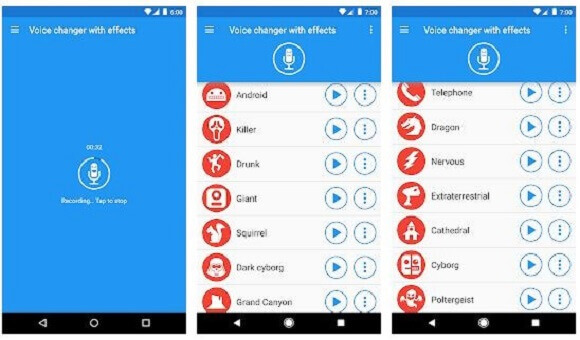
Voice Changer with Effects App
This mobile application brings voice modification capabilities to Android devices with an emphasis on creative audio effects. While not designed for real-time use, it offers substantial post-processing options for recorded audio.
Advantages:
- Popular download choice with thousands of installations
- Straightforward voice recording customization
- Audio-visual content creation with sound-picture combinations
- Extensive filter collection for a mobile application
- Creative tools for social media content
Limitations:
- Not suitable for live voice transformation
- Lacks professional editing capabilities
- Mobile-only functionality
Platform Support:Android devices exclusively.
Pricing Structure:Free download and use with optional in-app purchases.
MorphVOX Pro Voice Modification Software
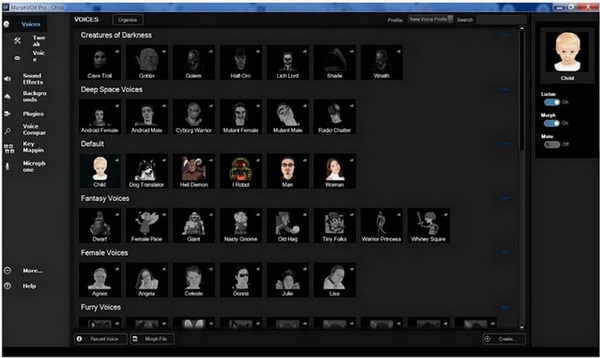
MorphVOX Pro delivers advanced voice transformation capabilities for users willing to invest time in learning its features. This software emphasizes voice quality and customization options for creating believable voice alterations.
Advantages:
- Extensive built-in voice and sound collection
- High-quality voice transformation output
- Detailed voice editing and customization tools
- Multiple voice parameter adjustments
- Background noise reduction features
Limitations:
- Complex interface with steep learning curve
- Inconsistent performance between Windows and Mac versions
- Requires time investment to master advanced features
Platform Support:Windows and macOS compatibility.
Pricing Structure:Free version with limited features. Full version available for $39.99.
MasqVox Voice Changer
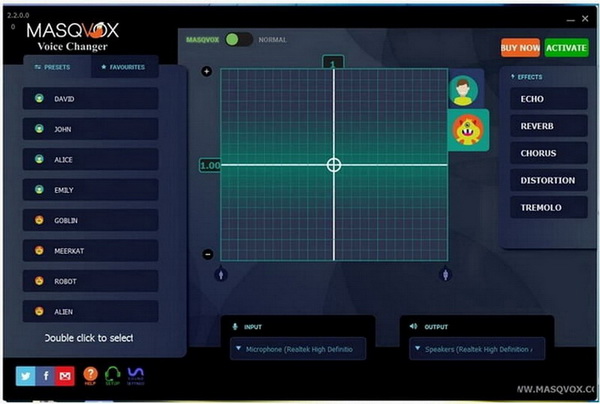
MasqVox offers real-time voice modification specifically optimized for voice chat applications. Its lightweight design ensures minimal system impact while providing essential voice changing functionality.
Advantages:
- Cartoon and character voice options
- Lightweight application with fast performance
- Multiple voice effects for chat application compatibility
- Real-time processing capabilities
- Simple, organized interface
Limitations:
- Premium features require subscription
- Limited functionality compared to comprehensive solutions
- Small voice effect library
Platform Support:Windows operating systems.
Pricing Structure:Free base application with optional premium features.
SuperVoiceChanger
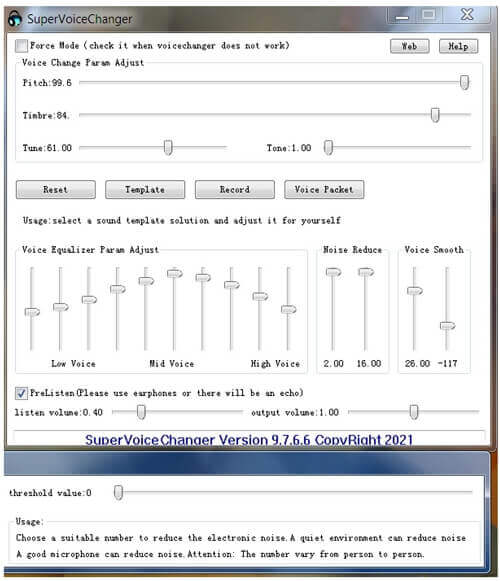
SuperVoiceChanger provides automated voice modification with minimal user configuration required. This software aims to simplify the voice changing process by handling technical aspects automatically.
Advantages:
- Automatic configuration and setup
- Background operation during chats and calls
- Advanced customization options for experienced users
- Continuous operation without manual intervention
- Compatibility with multiple communication platforms
Limitations:
- Complex functionality requires learning curve
- Challenging installation process
- Basic visual interface design
Platform Support:Windows 7, 8, and 10.
Pricing Structure:Free to use with optional in-app purchases.
AV Voice Changer Software Diamond
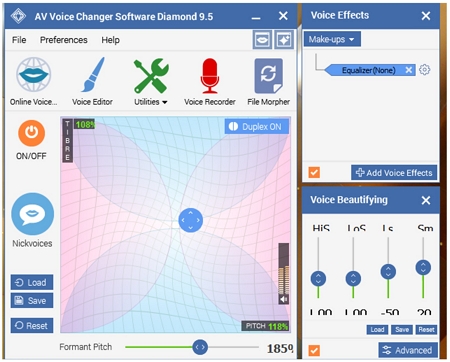
AV Voice Changer Software Diamond represents a premium option for users seeking extensive voice modification capabilities. This software focuses on creating completely unrecognizable voice outputs through advanced audio processing techniques.
Advantages:
- Comprehensive sound effect creation tools
- Audio recording and editing functionality
- High-quality processed audio output
- Keyboard shortcut support for efficient workflow
- Extensive voice manipulation options
Limitations:
- Frequent advertisement interruptions
- Compatibility issues with newer Windows versions
- Higher price point than most alternatives
Platform Support:Windows XP through Windows 8.
Pricing Structure:Free trial version available. Complete license costs $99.95.
Finding Your Ideal Voice Changer App for Computer
Choosing the right voice modification software depends largely on your specific needs, technical comfort level, and budget. For most users, MagicMic represents the optimal balance of features, ease of use, and cross-platform compatibility. Its extensive voice library and real-time processing capabilities make it suitable for everything from professional streaming to casual gaming with friends.
If you’re specifically looking for a voice changer for PC gaming, options like Voicemod and Clownfish provide solid functionality with gaming-oriented features. Mobile users will find RoboVox and Voice Changer with Effects adequate for basic voice modification on the go.
For audio professionals or enthusiasts seeking maximum control over their voice processing, VoiceMeeter and AV Voice Changer Software Diamond offer professional-grade capabilities, though they require more technical knowledge to operate effectively.
iMyFone MagicMic.Best Real Time AI Voice Changer.MagicMic is a professional real-time AI voice changer that changes your voice while communicating online. It’s easy to use, has extremely low latency, features high quality AI voices and is compatible with all systems. Discover 500+ AI voices and 100K+ meme soundboards with MagicMic today!
Common Questions About Voice Modification Software
What practical applications do real-time voice changers have?
Real-time voice modification technology serves numerous purposes beyond just entertainment. Content creators use these tools to protect their identity while maintaining engaging commentary. Online gamers employ voice changers to role-play as characters or maintain privacy during multiplayer sessions. Customer service representatives sometimes use mild voice modification to maintain consistency across shifts or protect their personal identity. The technology also has applications in voice rehabilitation, helping individuals with speech impairments achieve more natural-sounding communication.
How can I identify a quality voice changer app for computer use?
Evaluating voice modification software involves considering several key factors. First, verify compatibility with your operating system and the applications you plan to use. Examine the voice filter selection – both quantity and quality matter. Check if the software offers hotkey support for convenient effect activation during activities like gaming. Assess the sound effect library for variety and usability. Look for voice filters that include background sounds for more convincing transformations. Finally, consider system resource usage – efficient software shouldn’t significantly impact your computer’s performance.
Are free voice changers as effective as paid versions?
Free voice changing programs can provide satisfactory results for basic needs, but typically come with limitations. These might include fewer voice options, watermarks on output, usage restrictions, or advertisements. Paid versions generally offer superior voice quality, more customization options, priority support, and regular updates with new content. The best approach is often to start with free trials or basic versions to evaluate whether the software meets your needs before committing to a purchase.
Can voice changers be used for professional purposes?
Absolutely. Beyond entertainment uses, voice modification technology has legitimate professional applications. Voice actors use these tools to expand their character range or create temporary demos. Content creators employ voice changers for animated content or to create multiple character voices single-handedly. Privacy-conscious professionals use mild voice alteration during client communications. However, for commercial projects, it’s important to ensure you have appropriate licensing and that the final output meets quality standards for your industry.
What technical requirements should I consider?
When selecting a voice changer for PC use, consider both minimum and recommended system specifications. Ensure your computer has adequate processing power and RAM to handle real-time audio processing without lag or distortion. Check audio interface compatibility – some software works best with specific sound cards or audio interfaces. Verify that the software supports your microphone type and connection method. For streaming or recording applications, confirm that the software can integrate with your preferred broadcasting or recording setup without creating technical conflicts.
Final Thoughts on Voice Modification Technology
The world of voice changing technology offers something for everyone, from casual users