TOOL HUNTER

Have you ever wanted to spice up your online conversations with some fun voice effects? Maybe you’re looking to prank your friends during a gaming session or add some entertainment to your live streams. Voice changers and soundboards have become incredibly popular tools for exactly these purposes. They allow you to modify your voice in real-time, making you sound like a robot, an alien, or even a cartoon character.
Two of the most talked-about tools in this space are Clownfish Voice Changer and iMyFone MagicMic. Both offer unique features for voice modification, but they cater to slightly different needs and preferences. In this comprehensive guide, we’ll explore everything you need to know about these tools, from their basic functionality to step-by-step instructions on how to use them effectively.
Table of Contents
- Understanding Voice Changer Soundboards
- Exploring Clownfish Voice Changer Soundboard
- How to Set Up and Use Clownfish Voice Changer
- Limitations and Considerations with Clownfish
- Introducing iMyFone MagicMic: A Modern Alternative
- How to Use MagicMic Voice Changer
- Comparing Clownfish and MagicMic
- Creative Uses for Voice Changer Soundboards
- Troubleshooting Common Issues
- The Future of Voice Modification Technology
- Making Your Choice: Which Voice Changer
Understanding Voice Changer Soundboards
Before diving into specific software, it’s important to understand what voice changer soundboards actually do. Many people confuse voice messaging apps with soundboard applications, but they serve different purposes.
Voice messaging applications like Discord, TeamSpeak, Skype, and Viber are platforms that facilitate communication. They’re the medium through which you connect with others. Soundboard apps, on the other hand, are tools that work alongside these communication platforms to modify your audio output.
Think of it this way: if voice messaging apps are the highway, soundboard apps are the custom cars you drive on that highway. They enhance your experience but don’t replace the underlying infrastructure.
Soundboard applications manipulate your voice by applying various digital effects and filters. They intercept your microphone input, process it with the selected effects, and then send the modified audio to your communication software. Many soundboards also allow you to assign hotkeys to specific voice effects or sound clips, making it easy to switch between different voices during conversations.
The fish voice changer category has become particularly popular among gamers and content creators looking to add personality to their audio communications.
Exploring Clownfish Voice Changer Soundboard
Clownfish Voice Changer is one of the most well-known soundboard applications available today. What makes it particularly appealing to many users is that it’s completely free to download and use. The application has gained a loyal following among gamers and online communicators who want to add some fun to their voice chats without spending money.
The Clownfish voice changer soundboard works with virtually any application that uses a microphone. Once installed, it integrates itself into your system’s audio processing, meaning you don’t need to configure it separately for each program. Whether you’re using Discord for gaming, Skype for business calls, or any other voice communication software, Clownfish will modify your audio output consistently across all platforms.
One of the standout features of the Clownfish soundboard is its simplicity. There are no complicated settings or steep learning curves. You simply install the software, select your desired voice effect, and start talking. The changes happen in real-time, so you can hear how you sound and adjust accordingly.
Voice Effects Available in Clownfish
The Clownfish voice changer offers a variety of preset voice modifications that you can apply with a single click. These include:
- Alien: Gives your voice an extraterrestrial quality with metallic echoes
- Atari: Creates a retro video game-style voice effect
- Clone: Produces multiple overlapping versions of your voice
- Mutation: Distorts your voice with various modulation effects
- Fast Mutation and Slow Mutation: Control the speed of voice mutations
- Male Pitch and Female Pitch: Shift your voice gender characteristics
- Helium Pitch: Creates that classic high-pitched helium voice effect
- Baby Pitch: Makes you sound much younger
- Radio: Adds broadcast-style compression and filtering
- Robot: Creates mechanical, synthetic voice effects
- Custom Pitch: Allows manual adjustment of voice characteristics
Beyond these voice-changing presets, Clownfish also includes several sound effects that can be triggered during conversations. These include applause, laughter, and various other audio cues that can enhance your interactions.
The software also provides microphone sensitivity controls, allowing you to adjust input levels between -60dB and -20dB. This ensures that your modified voice comes through clearly without distortion or background noise interference.
For those who want even more control, the custom pitch option lets you manually adjust voice characteristics by dragging sliders until you achieve exactly the sound you’re looking for. This flexibility makes the Clownfish soundboard appealing to both casual users and those who want more precise control over their audio modifications.
How to Set Up and Use Clownfish Voice Changer
Getting started with Clownfish Voice Changer is relatively straightforward, though the installation process differs slightly from typical applications. Here’s a step-by-step guide to help you get up and running:
Download and Installation
The first step is to download the Clownfish Voice Changer software. It’s important to download the correct version for your Windows operating system (32-bit or 64-bit) to avoid compatibility issues. The application is currently only available for Windows and doesn’t have macOS support.
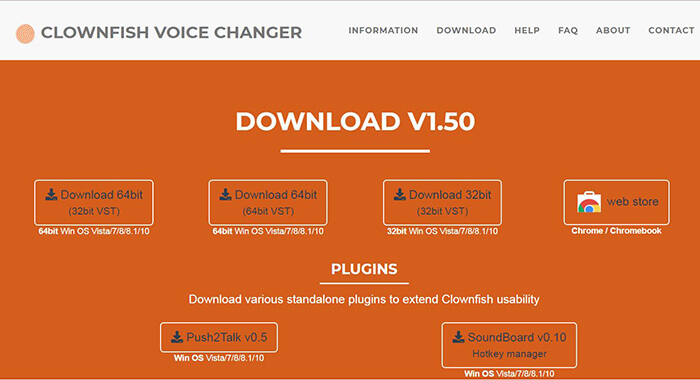
Once downloaded, run the installer and follow the on-screen instructions. The installation process is similar to most Windows applications, though you may need to allow the installer to make changes to your system.
Configuration and Setup
After installation, you’ll notice that Clownfish doesn’t open like a traditional application with a main window. Instead, it runs in your system tray. To access its features, you’ll need to right-click on the Clownfish icon in your system tray.
From the context menu that appears, select “Set Voice Changer” to open the voice selection panel. This is where you’ll choose which voice effect you want to apply to your microphone input.
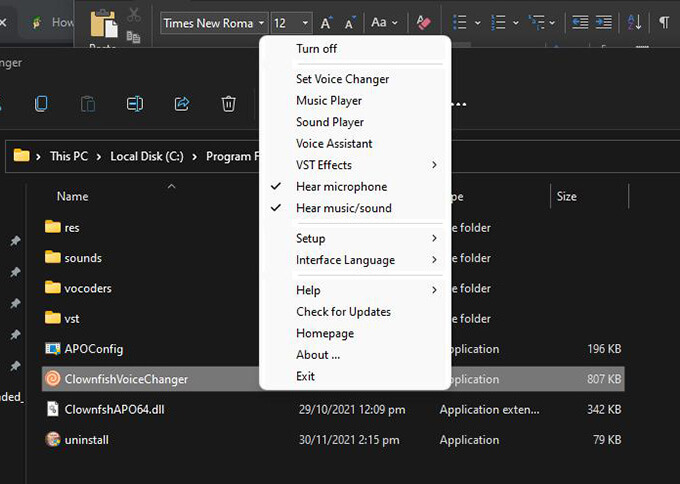
At this point, it’s a good idea to open your preferred voice communication application (such as Discord) so you can test the effects in real-time. Most communication apps have a feature that lets you hear your own voice, which is perfect for testing different Clownfish voice effects.
Selecting and Testing Voice Effects
With the voice changer panel open, you can now browse through the available voice effects. Click on any effect to activate it immediately. The change happens in real-time, so you can speak into your microphone and hear the modified output through your communication software.
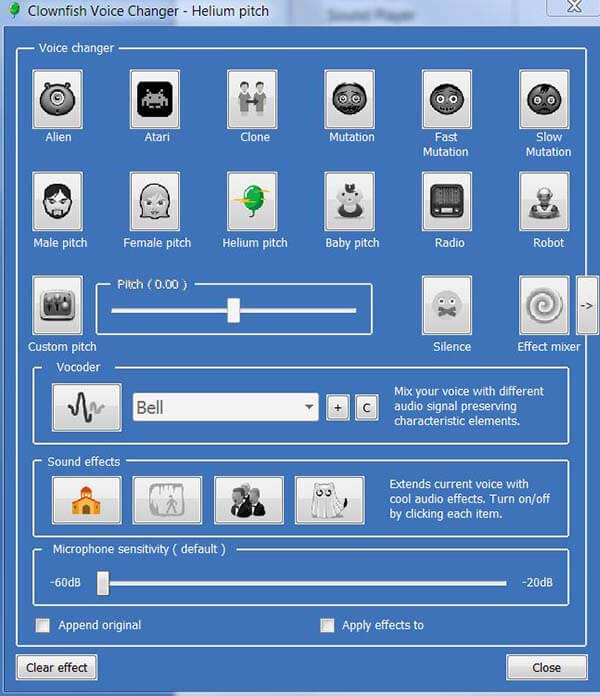
Take some time to experiment with different effects to find the ones you like best. Some effects work better with certain voice types than others, so testing is important. The custom pitch option is particularly useful if you want to fine-tune an effect to better suit your natural voice.
Using Clownfish in Conversations
Once you’ve selected your desired voice effect, you’re ready to use it in actual conversations. The beauty of Clownfish is that it works system-wide, meaning any application that uses your microphone will receive the modified audio.
Whether you’re joining a Discord server with friends, participating in a TeamSpeak channel, or making a Skype call, your voice will come through with the selected effect applied. You can switch between different effects during conversations by simply selecting a new option from the voice changer panel.
The clownfish voice changer discord combination has become particularly popular among gaming communities, where voice modification adds an extra layer of fun to group activities.
Limitations and Considerations with Clownfish
While Clownfish Voice Changer is a powerful and popular tool, it does have some limitations that users should be aware of:
The application is only available for Windows operating systems. Mac users will need to look for alternative solutions. Additionally, while the basic voice effects are quite good, the overall selection is more limited compared to some premium alternatives.
Some users have reported issues with specific applications or games where the voice modification doesn’t work correctly. These cases are relatively rare but worth noting if you plan to use Clownfish with specialized software.
The interface, while simple, isn’t as polished or intuitive as some newer voice changers. Users accustomed to modern application design might find the system-tray-based approach somewhat dated.
Despite these limitations, Clownfish remains an excellent choice for those looking for a free, reliable voice modification tool that gets the job done without unnecessary complexity.
Introducing iMyFone MagicMic: A Modern Alternative
For those seeking more advanced features and a wider variety of voice effects, iMyFone MagicMic presents a compelling alternative to Clownfish. This relatively new entrant to the voice changer market has quickly gained popularity thanks to its extensive effect library and user-friendly interface.
iMyFone MagicMic.Best Real Time AI Voice Changer.MagicMic is a professional real-time AI voice changer that changes your voice while communicating online. It’s easy to use, has extremely low latency, features high quality AI voices and is compatible with all systems. Discover 500+ AI voices and 100K+ meme soundboards with MagicMic today!

Check More Details | Download Now! | Check All Deals
MagicMic positions itself as a premium voice modification tool with capabilities that extend far beyond basic voice changing. It’s designed for serious content creators, streamers, and gamers who want professional-grade voice effects and extensive customization options.
One of MagicMic’s standout features is its massive library of voice effects and soundboards. While Clownfish offers a handful of voice modifications, MagicMic provides access to hundreds of different effects, including AI-powered voice transformations that can make you sound like specific characters or celebrities.
The application also includes an extensive soundboard feature with thousands of sound effects organized into categories. This makes it easy to find and trigger appropriate sounds during streams or conversations, adding another layer of entertainment to your communications.
Key Features of MagicMic Voice Changer
MagicMic distinguishes itself from simpler voice changers through several advanced features:
The application offers real-time voice changing with minimal latency. This is crucial for natural conversations where even slight delays can be disruptive. The AI-powered voice effects provide more natural-sounding modifications compared to traditional pitch-shifting algorithms.
MagicMic includes voice customization tools that allow you to fine-tune effects to match your preferences. You can adjust parameters like pitch, tone, resonance, and add effects like reverb or echo to create truly unique voice profiles.
The soundboard functionality is significantly more advanced than what’s available in Clownfish. With categories ranging from memes to atmospheric sounds to character voices, you’ll have an extensive library of audio cues at your fingertips.
Voice modulation effects in MagicMic go beyond simple pitch shifting. The software can add various distortions, robotic effects, and environmental simulations to make your voice sound like it’s coming from different spaces or through various devices.
The application includes background voice effects that can play continuously while you speak. These can simulate environments like rain, crowds, or machinery, adding atmospheric context to your conversations.
Compatibility and System Requirements
MagicMic is designed to work with all major voice communication platforms, including Discord, TeamSpeak, Skype, Zoom, and various gaming platforms. It’s compatible with Windows 7, 8, 10, and 11, though like Clownfish, it’s not currently available for macOS.
The software is optimized for performance, with minimal impact on system resources even when using multiple effects simultaneously. This ensures that your games or other applications continue to run smoothly while MagicMic is active.
How to Use MagicMic Voice Changer
Getting started with MagicMic involves a straightforward process:
Download and Installation
The first step is to download the MagicMic application from the official website. The software offers both free trial and paid versions. The trial version includes limited functionality but provides enough features to evaluate whether the software meets your needs.
After downloading, run the installer and follow the setup wizard. The installation process is standard for Windows applications and should only take a few minutes.
Interface Overview
Upon launching MagicMic, you’re presented with a clean, modern interface divided into several sections. The main area displays the available voice effects, while sidebar navigation provides access to different features like the soundboard and settings.
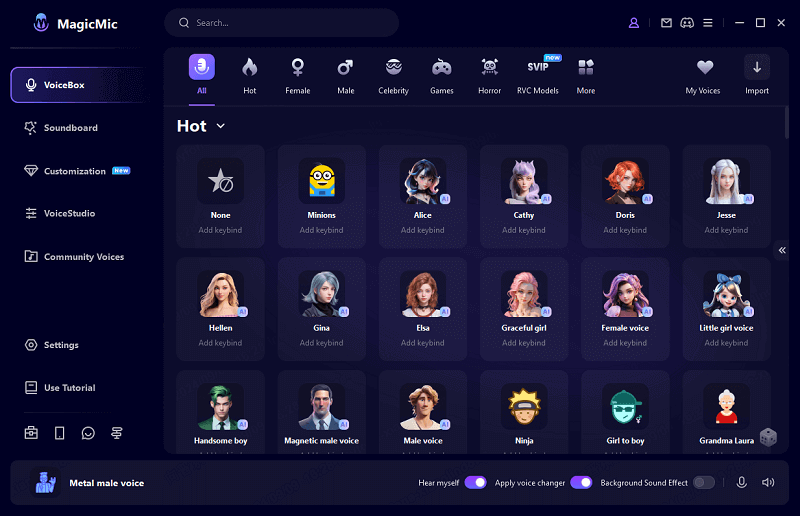
The voice changer tab shows all available voice effects organized into categories. You can preview each effect by clicking on it and speaking into your microphone. The changes happen in real-time, allowing you to quickly find effects that work well with your voice.
Applying Voice Effects
Selecting a voice effect in MagicMic is as simple as clicking on it. The application immediately applies the effect to your microphone input, and you can start using it in any communication software.
The free version of MagicMic includes a limited selection of voice effects, while the premium version unlocks the full library of 20+ voice changers and 190+ sound effects. This extensive collection ensures you’ll find the perfect voice for any situation, whether you want to sound like a cartoon character, a demon, or a celebrity.
Using the Soundboard Features
MagicMic’s soundboard functionality is accessed through a separate tab in the interface. Here, you’ll find hundreds of sound effects organized into categories like animals, atmosphere, nature, memes, and more.
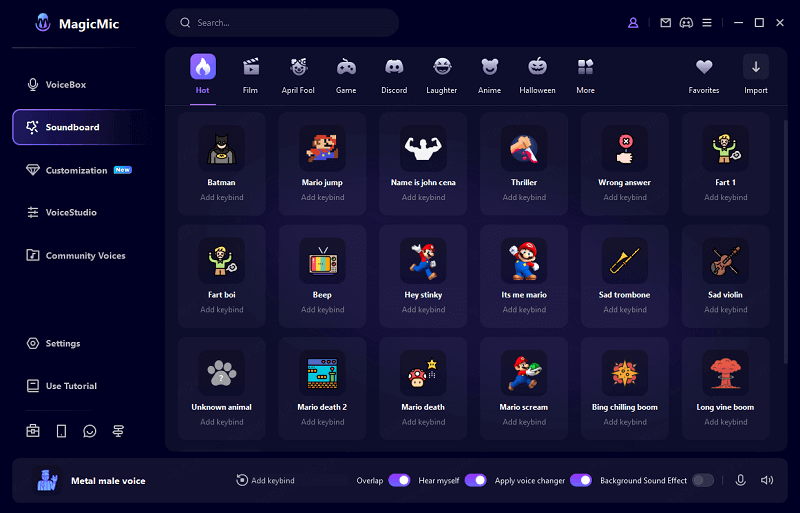
To use a sound effect, simply click on it. The sound will play through your virtual microphone, allowing others in your voice chat to hear it. You can assign hotkeys to frequently used sounds for quick access during conversations or streams.
The soundboard is particularly useful for content creators who want to add comedic timing to their streams or highlight specific moments with appropriate sound cues.
Advanced Configuration
For users who want more control over their audio experience, MagicMic includes various advanced settings. You can adjust microphone sensitivity, configure output devices, set up hotkeys for specific effects, and create custom voice profiles.
The application also allows you to save favorite effects and create profiles for different use cases. For example, you might have one profile for gaming with friends that includes humorous voice effects, and another for professional meetings with more subtle modifications.
Comparing Clownfish and MagicMic
When deciding between Clownfish Voice Changer and iMyFone MagicMic, several factors come into play:
Cost is a significant differentiator. Clownfish is completely free, while MagicMic requires a paid subscription for full functionality. The MagicMic subscription costs approximately $19.95 per year or $39.95 for a lifetime license.
The scope of features varies considerably between the two applications. Clownfish provides basic voice changing capabilities with a limited selection of effects. MagicMic offers a much broader range of voice modifications, extensive soundboard functionality, and more advanced customization options.
User interface design is another area where the two applications differ. Clownfish uses a minimal, system-tray-based interface that some users might find dated or confusing. MagicMic features a modern, application-style interface with intuitive navigation and visual feedback.
The quality of voice effects is generally higher in MagicMic, particularly for the AI-powered transformations. While Clownfish effects are serviceable for casual use, MagicMic provides more natural-sounding modifications that are better suited for content creation or professional use.
Both applications work with popular communication platforms like Discord, but MagicMic offers broader compatibility with streaming software and games. The clownfish voice changer discord integration is reliable, but MagicMic provides additional features specifically designed for streamers.
Creative Uses for Voice Changer Soundboards
Voice modification tools like Clownfish and MagicMic have applications beyond simple entertainment. Here are some creative ways people use these tools:
Content creators and streamers use voice changers to create distinctive character voices or add comedic elements to their broadcasts. The ability to quickly switch between different voices allows for more dynamic and engaging content.
Role-playing gamers often use voice modifiers to better embody their characters. Whether playing a fantasy RPG with friends or participating in online role-playing communities, voice effects can enhance immersion and character differentiation.
Language learners sometimes use pitch modification tools to practice pronunciation without the distraction of their natural voice characteristics. This can make practice sessions less self-conscious and more productive.
People with voice dysphoria or those exploring gender presentation may use voice changers to experiment with different vocal characteristics in a low-pressure environment before working on their natural voice.
Customer service representatives in informal settings sometimes use subtle voice modifications to maintain privacy while still providing personalized service. This is particularly common in gaming communities and other informal support contexts.
The clownfish soundboard and similar tools have become valuable assets in these and many other scenarios where voice modification serves practical or creative purposes.
Troubleshooting Common Issues
Like any software, voice changers can sometimes encounter issues. Here are some common problems and their solutions:
If your voice changer isn’t working with a specific application, check that application’s audio settings. Most communication software allows you to select input devices, and you may need to explicitly choose the virtual microphone created by your voice changer.
Audio latency or delay can sometimes occur with voice modification software. This is usually addressed by adjusting buffer settings in either the voice changer or your communication software. Reducing buffer sizes typically decreases latency but may increase CPU usage.
If your modified voice sounds distorted or robotic, try adjusting the microphone sensitivity settings in your voice changer. Too high sensitivity can cause clipping, while too low sensitivity may make your voice quiet or unclear.
Some antivirus software may flag voice changer applications as potentially unwanted programs. This is typically a false positive, but you may need to add an exception for your voice changer in your antivirus settings.
If you’re experiencing compatibility issues with specific games or applications, check the voice changer’s documentation for known issues or workarounds. In some cases, running either the game or the voice changer as administrator can resolve compatibility problems.
For Clownfish-specific issues, the clownfish voice changer discord community can be a valuable resource for troubleshooting advice and user experiences.
The Future of Voice Modification Technology
Voice changer technology continues to evolve rapidly, with several emerging trends likely to shape future developments:
AI-powered voice synthesis is becoming increasingly sophisticated, allowing for more natural-sounding modifications and even complete voice replacement. Instead of simply altering pitch or adding effects, future voice changers may be able to transform your voice to sound like specific people or characters while preserving your speech patterns and cadence.
Real-time language translation integrated with voice modification could break down language barriers in international gaming communities and other cross-cultural communications. Imagine speaking in English but having your voice output in Japanese with your preferred voice characteristics preserved.
Emotion detection and modulation may become features in advanced voice changers, allowing your voice to automatically convey specific emotions regardless of your actual tone. This could be particularly useful for content creators looking to maintain consistent character personalities.
Hardware integration is another area of potential development. Dedicated soundboard controllers with physical buttons could make triggering sound effects more intuitive for streamers and performers.
Cloud-based voice processing may offload the computational burden from local systems, enabling more complex voice modifications on less powerful hardware. This could make advanced voice changing accessible to users with budget computers or mobile devices.
As these technologies mature, tools like Clownfish and MagicMic will likely incorporate increasingly sophisticated capabilities while maintaining the ease of use that makes them appealing to casual users.