TOOL HUNTER

Ever been stuck in a Ren’Py game, wishing you could just tweak that one decision or unlock that special scene without replaying hours of content? You’re definitely not alone. Many visual novel enthusiasts find themselves in exactly this situation, and that’s where the magic of a renpy save editor comes into play.
These handy tools let you dive deep into your saved game files and modify pretty much anything you want – from character relationships and inventory items to story flags and variables. It’s like having a backstage pass to your favorite game!
Table of Contents
- Understanding Ren’Py and Save Editing
- Top Renpy Save Editors You Should Know About
- Step-by-Step Guide to Using Renpy Save Editors
- Enhancing Your Visual Novel Experience with AI Tools
- Common Questions About Renpy Save Editing
- Getting the Most Out of Your Renpy Save Editor
- The Future of Ren’Py and Save Editing
- Final Thoughts on Renpy Save Editors
Understanding Ren’Py and Save Editing
Before we jump into how to use these editors, let’s quickly cover what Ren’Py actually is. Ren’Py is this amazing open-source visual novel engine that’s completely free to use. It’s become super popular among game developers and storytellers because it makes creating interactive stories with branching paths and multiple endings surprisingly accessible.
The engine uses a pretty straightforward scripting language that lets creators define characters, write dialogue, create scenes, and program player choices that actually matter to the story. What’s really cool is how flexible it is – beginners can make simple visual novels while experienced developers can create incredibly complex, choice-driven narratives.

Now, here’s where the renpy save editor becomes your best friend. Since Ren’Py games track your progress through save files that store all your choices, relationships, and story flags, being able to edit these files means you can essentially reshape your entire gaming experience without starting over.
Top Renpy Save Editors You Should Know About
When it comes to actually editing your Ren’Py save files, you’ve got several solid options. I’ve spent time testing different tools, and two really stand out for their reliability and user-friendliness.
Saveeditonline – Web-Based Renpy Save Editing
Saveeditonline is probably the most popular web-based renpy save editor out there, and for good reason. It’s completely free, requires no installation, and works right in your browser. The interface is clean and intuitive, which makes it great for beginners who might be nervous about messing with game files.
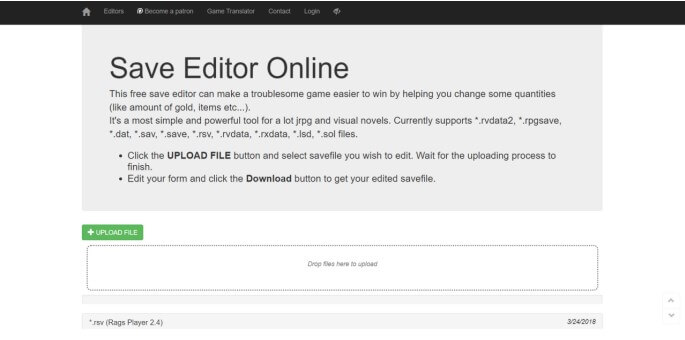
What I really appreciate about this renpy save editor is how it displays your save file data in an organized table format. You can easily see all your variables, flags, and inventory items, and editing them is as simple as clicking and typing new values. It supports most Ren’Py games and can handle different types of data without much fuss.
The process is straightforward: upload your save file, make your changes, download the modified file, and replace the original in your game’s save folder. The whole thing takes just a few minutes once you get the hang of it.
One thing to keep in mind – while this renpy save editor is powerful, it’s always smart to back up your original save files before making changes. Sometimes editing values that weren’t meant to be changed can cause unexpected issues, though I’ve rarely encountered problems with careful editing.
Griviewer Renpy Save Editor
Griviewer is another excellent option for your renpy save editing needs. This web-based tool takes a slightly different approach but achieves the same goal – giving you control over your game progress.
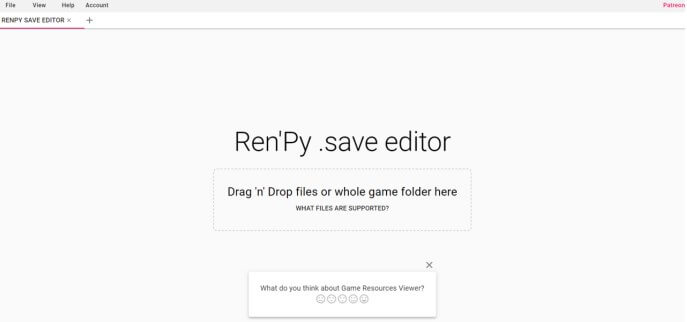
What sets Griviewer apart is how it handles the file loading process. You simply drag and drop your save file directly onto the webpage, and it quickly parses all the data into an editable format. I’ve found it particularly useful for locating specific variables quickly, which is handy when you’re trying to modify something very specific like relationship points or story flags.
This renpy save editor makes it easy to adjust things like in-game currency, character stats, or unlock hidden content. The interface is clean, and the editing process feels very responsive. It’s accessible enough for beginners but has the depth that more advanced users will appreciate.
Both of these renpy save editor options demonstrate why having the right tools can completely transform your gaming experience. Whether you’re looking to fix a bug, experiment with different story paths, or just make the game more enjoyable for your personal preferences, these editors put the power in your hands.
Step-by-Step Guide to Using Renpy Save Editors
Now that you know about the top tools, let’s walk through exactly how to use a renpy save editor. I’ll cover both of our recommended options so you can choose which one works best for you.
Editing with Saveeditonline
Using Saveeditonline as your renpy save editor is incredibly straightforward. Here’s the detailed process:
First, you need to locate your save files. These are typically found in the game folder under something like “renpy/common” or in your computer’s app data folder depending on the game. The files usually have names like “1-LT1.save” or similar.
Once you’ve found your save file, head to the Saveeditonline website. Click the “Upload File” button and select your save file. The renpy save editor will process it and display all your game data in a neat table format.
Now comes the fun part – editing! You can click on any value you want to change and type in your new value. Maybe you want to increase your character’s money, change relationship points with another character, or modify story flags to unlock different paths. The renpy save editor makes all this possible.
After making your changes, click the “Save” button to download your modified save file. Then you’ll need to replace the original save file in your game folder with this new edited version. When you launch the game and load that save, you’ll see all your changes reflected immediately.
Editing with Griviewer
The process for using Griviewer as your renpy save editor is quite similar but with a slightly different interface:
Navigate to the Griviewer website and simply drag and drop your Ren’Py save file directly onto the webpage. The renpy save editor will quickly load and display your data.
You’ll see all your game variables organized in a way that’s easy to browse through. Click on any value you want to modify and enter your new value. I particularly like how this renpy save editor handles larger sets of variables – the search and filter functions can be really helpful.
Once you’ve made all your desired changes, click the “Save” button to download your modified file. Replace the original save file in your game directory, and you’re all set! The next time you load that save in your game, you’ll experience the game with your customized parameters.
Enhancing Your Visual Novel Experience with AI Tools
While having a reliable renpy save editor is fantastic for modifying your game progress, there are other ways to enhance your visual novel experience too. Recent advances in AI technology have created some really cool tools that can add new dimensions to how you enjoy Ren’Py games.
VoxBox – AI-Powered Voice Generation
Imagine being able to give voices to characters in your favorite visual novels, or creating custom narration for scenes you particularly love. That’s exactly what VoxBox enables you to do.

VoxBox is this incredible AI voice generator that can convert text to speech using surprisingly realistic voices. What’s amazing is the variety available – there are thousands of voice models across dozens of languages, including celebrity and character voices that can really bring your visual novel experience to life.
iMyFone VoxBox.Best AI Voice Generator & AI Voice Cloner: Create Custom Voices Instantly.iMyFone VoxBox is a powerful free text-to-speech software offering 3,500+ lifelike AI voices in 250+ languages, all with 10 features in one tool. Create professional voiceovers and captivate audiences worldwide in just minutes with VoxBox AI.

I’ve used it to create custom voice-overs for scenes I wished had voice acting, and the results can be genuinely impressive. The ability to adjust speech rate, pitch, and add emotional tones means you can really match the voice to the character’s personality.
MagicMic – Real-Time Voice Changing
If you’re looking to add some fun to your gaming sessions or create hilarious content with your visual novels, MagicMic is worth checking out. This voice changer lets you transform your voice in real-time with all sorts of creative effects.

What’s cool about MagicMic is how it can spice up your Ren’Py visual novel experience. You can use it to role-play characters with different voices, create funny content for streaming, or just have fun with friends. The real-time voice changing works with surprisingly low latency, and there are tons of effects to choose from – robot, alien, baby, celebrity impressions, and much more.
The software also supports live streaming on platforms like Twitch and YouTube, so if you’re someone who enjoys sharing your gaming experiences, this can add a whole new layer of entertainment to your content.
Common Questions About Renpy Save Editing
I get a lot of questions about using renpy save editor tools, so let me address some of the most common ones:
Is using a renpy save editor considered cheating?
This really depends on your perspective and how you use it. Some people feel that using a renpy save editor to give yourself advantages or skip challenging parts goes against the spirit of the game. Others see it as a way to enhance their personal enjoyment, especially if they’ve already played through the game normally and want to explore different content.
Many developers actually understand that players might want to use these tools and don’t actively prevent it. That said, if you’re playing for achievement hunting or competitive reasons, you might want to check community guidelines.
Can using a renpy save editor damage my game?
When used carefully, a renpy save editor is generally safe. The key is to only modify values you understand and to always back up your original save files before making changes. I’ve rarely encountered situations where careful editing caused permanent issues, but having backups means you can always restore if something goes wrong.
Most problems occur when players edit values that are interconnected in ways they don’t understand, or when they input values outside expected ranges. Stick to reasonable modifications and you’ll likely be fine.
What’s the difference between online and offline renpy save editors?
Online renpy save editor tools like Saveeditonline and Griviewer are convenient because they work directly in your browser with no installation required. They’re regularly updated to support new games and formats.
Offline renpy save editor tools need to be downloaded and installed but can work without an internet connection. Some players prefer these for privacy reasons or because they offer more advanced features.
Both types can be effective – it really comes down to personal preference and what you’re comfortable with.
Getting the Most Out of Your Renpy Save Editor
After spending considerable time with various renpy save editor options, I’ve gathered some tips that might help you have a better experience:
Start small when you’re new to using a renpy save editor. Make one or two simple changes first to get comfortable with the process before attempting more complex modifications.
Always, always back up your save files before editing. I can’t stress this enough. It takes seconds to make a copy of your save folder, and it can save you from frustration if an edit doesn’t work as expected.
Take notes about what different variables control if you’re planning multiple editing sessions. This is especially helpful for games with complex relationship systems or multiple story flags.
Join community forums or Discord servers for the specific games you’re playing. Often, other players have already figured out what different variables do and can save you a lot of trial and error.
Remember that the goal of using a renpy save editor is to enhance your enjoyment of the game. If you find yourself spending more time editing than actually playing, it might be worth stepping back and considering what you really want from the experience.
The Future of Ren’Py and Save Editing
As Ren’Py continues to evolve and more amazing visual novels are created, the role of renpy save editor tools is likely to grow too. We’re already seeing more sophisticated games with complex variables and interwoven storylines, which means more opportunities for creative editing.
Some developers are even beginning to incorporate official tools or console commands that provide similar functionality to what renpy save editor tools offer. This recognition that players enjoy having some control over their gaming experience is a positive trend.
The AI tools I mentioned earlier also represent an exciting frontier. Imagine future renpy save editor tools that not only let you modify variables but also use AI to generate new content or dialogue options. The possibilities are pretty fascinating to think about.
Final Thoughts on Renpy Save Editors
Whether you’re looking to fix a frustrating bug, experiment with different story outcomes, or just customize your gaming experience to better suit your preferences, having a reliable renpy save editor in your toolkit can be incredibly valuable.
The tools we’ve discussed – particularly Saveeditonline and Griviewer – make the process accessible even if you’re not particularly tech-savvy. With the step-by-step guides I’ve provided, you should feel confident diving in and trying them for yourself.
Remember that gaming should ultimately be about enjoyment. If using a renpy save editor makes your experience with Ren’Py visual novels more fun and engaging, then it’s serving its purpose perfectly. Just be mindful of how your use might affect your overall enjoyment, and don’t be afraid to experiment to find what works best for you.
The world of Ren’Py games is rich with amazing stories and characters, and having the ability to shape your journey through these narratives in new ways can breathe fresh life into games you love. So why not give one of these renpy save editor tools a try? You might discover new aspects of your favorite games that you never knew existed.
iMyFone VoxBox.Best AI Voice Generator & AI Voice Cloner: Create Custom Voices Instantly.iMyFone VoxBox is a powerful free text-to-speech software offering 3,500+ lifelike AI voices in 250+ languages, all with 10 features in one tool. Create professional voiceovers and captivate audiences worldwide in just minutes with VoxBox AI.
Some images courtesy of iMyFone