TOOL HUNTER

Ever dreamed of making your favorite Project Sekai characters speak your words? Imagine creating custom voice lines with Hatsune Miku or having Kagamine Rin narrate your stories. With today’s AI technology, this isn’t just possible—it’s surprisingly easy to do.
Whether you’re a content creator looking to spice up your videos, a game developer wanting unique character voices, or just a fan who wants to have some fun, Project Sekai text to speech tools can bring your creative visions to life. The best part? You don’t need any technical expertise or expensive equipment to get started.
Table of Contents
- Understanding Project Sekai TTS Technology
- Creating Project Sekai AI Voices
- Real-Time Project Sekai Voice Changing
- Popular Project Sekai Characters for TTS
- Technical Considerations for Quality Results
- Creative Project Ideas Using PJSK TTS
- Troubleshooting Common PJSK TTS Issues
- Future of Project Sekai Voice Technology
- Getting Started with Your First Project
Understanding Project Sekai TTS Technology
What Exactly is Project Sekai Text to Speech?
Project Sekai Colorful Stage! feat. Hatsune Miku took the gaming world by storm when SEGA released it in September 2020. This rhythm game combines catchy vocaloid tunes with an engaging storyline that has captured hearts worldwide. But what really makes it special are the characters—from the iconic Hatsune Miku to the twin siblings Kagamine Rin and Len.
Project Sekai TTS (text-to-speech) technology takes these beloved characters and turns written words into spoken dialogue using their distinct voices. It’s like having your own personal vocaloid cast ready to voice whatever you type. The technology analyzes the unique vocal characteristics of each character and recreates them through artificial intelligence.
The appeal of using a Project Sekai voice generator goes beyond mere novelty. Each character brings their own personality to the spoken word. Hatsune Miku’s cheerful tones, Kaito’s warm and soothing voice, or Megurine Luka’s mature elegance—they all add depth and character to whatever you’re creating.
Practical Applications of PJSK TTS
The uses for Project Sekai text to speech technology are surprisingly diverse. Content creators have discovered that these AI voices can transform their projects in exciting ways. Imagine adding character voices to your animations or having virtual YouTubers that actually sound like popular vocaloids.
Game developers are using PJSK TTS to create custom dialogue for indie games or mods. Instead of spending hours recording voice actors, they can generate professional-quality voice lines instantly. The consistency and flexibility of AI voices make them perfect for iterative development processes.
Educators and accessibility advocates have found innovative uses too. Creating engaging learning materials with character voices can make complex topics more approachable for students. For visually impaired users, having content read by familiar characters can make navigation and information consumption more enjoyable.
Social media creators are jumping on the PJSK voice generator trend too. TikTok videos, Instagram reels, and YouTube shorts featuring AI voiceovers stand out from the crowd. The recognizable voices immediately connect with fellow Project Sekai fans, creating instant engagement and shareability.
Creating Project Sekai AI Voices
Choosing Your PJSK TTS Tool
When it comes to generating Project Sekai character voices, you have several options available. The key is finding a tool that balances ease of use with quality results. Some platforms offer pre-made voice models, while others allow for more customization and fine-tuning.
iMyFone VoxBox.Best AI Voice Generator & AI Voice Cloner: Create Custom Voices Instantly.iMyFone VoxBox is a powerful free text-to-speech software offering 3,500+ lifelike AI voices in 250+ languages, all with 10 features in one tool. Create professional voiceovers and captivate audiences worldwide in just minutes with VoxBox AI.

Check More Details | Download Now! | Check All Deals
Look for tools that specifically mention Project Sekai or vocaloid support. The best Project Sekai TTS generators understand the nuances of these characters’ voices and can reproduce them accurately. They should offer control over speech parameters like pitch, speed, and emotion to match each character’s personality.
Compatibility is another important factor. Make sure the tool works with your operating system and can export audio in formats you need. If you plan to use the voices in real-time applications, verify that the software supports low-latency processing.
Step-by-Step Voice Generation Process
Getting started with Project Sekai text to speech is straightforward, even if you’ve never worked with AI voice technology before. The process typically begins with selecting your desired character from the available options. Most quality PJSK TTS tools will have the main Project Sekai cast ready to use.
Once you’ve chosen your character, you’ll input the text you want them to speak. This is where you can get creative—write dialogue, narration, or even song lyrics. The software will analyze your text and prepare it for voice synthesis.
Before generating the final audio, you’ll have opportunities to adjust various parameters. Pitch controls let you fine-tune the voice to match the character more closely. Speed adjustments can convey different emotions—slower for thoughtful moments, faster for excitement. Some advanced tools even offer emotion settings that affect tone and inflection.
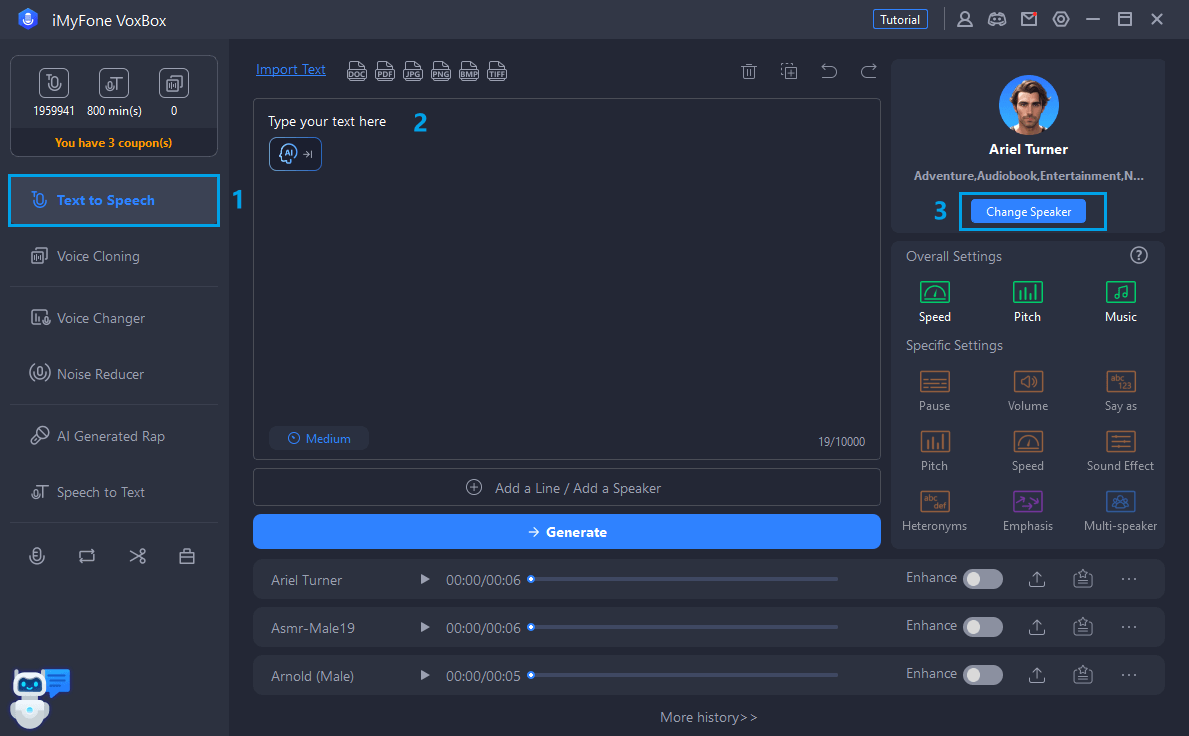
After generating the voice, listen carefully to the results. You might need to make small adjustments to get exactly the sound you’re looking for. Don’t be afraid to experiment with different settings—sometimes slight changes can make a big difference in how natural the voice sounds.
Advanced Customization Techniques
For those who want more control over their Project Sekai AI voices, several advanced techniques can elevate your results. Voice blending allows you to mix characteristics from different characters, creating unique vocal combinations that still maintain that familiar Project Sekai feel.
Emotional tuning is another powerful feature available in some PJSK TTS tools. By adjusting parameters like speech rate, pitch variation, and pause length, you can make characters sound happy, sad, excited, or contemplative. This emotional range makes the voices feel more alive and appropriate for different contexts.
If you’re working on longer projects, consistency becomes important. Many Project Sekai voice generator tools allow you to save custom voice profiles. This ensures that every time you generate dialogue for a particular character, it maintains the same vocal qualities and characteristics.
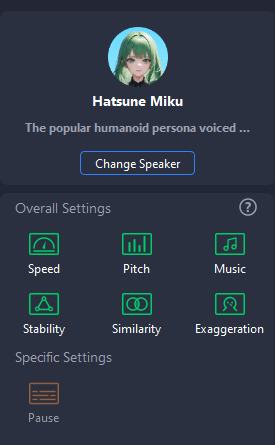
For truly unique requirements, some tools offer voice training capabilities. By providing sample audio of the specific vocal qualities you want to emulate, the AI can learn to reproduce those characteristics. This is particularly useful if you want to create voices for original characters that still fit the Project Sekai aesthetic.
Real-Time Project Sekai Voice Changing
Live Voice Modification Basics
While pre-generated Project Sekai TTS is great for prepared content, sometimes you need live voice modification. This is where real-time voice changers come into play. These tools can transform your voice as you speak, making you sound like your favorite Project Sekai characters during live streams, gaming sessions, or voice chats.
The technology behind real-time PJSK AI voice changing is fascinating. As you speak into your microphone, the software immediately processes your voice, applying complex algorithms to modify its characteristics. The result is instant vocal transformation that maintains the natural flow of conversation while sounding completely different.
Setting up for real-time voice changing is surprisingly simple. You’ll need a reasonable quality microphone—nothing professional grade, but something better than a basic headset mic. The software typically creates a virtual audio device that you select as your microphone input in whatever application you’re using.
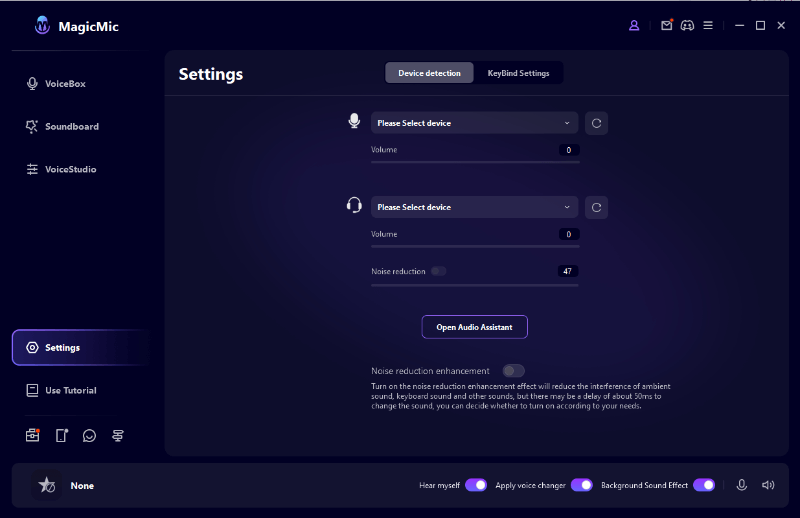
Latency is the biggest challenge with real-time voice modification. Good PJSK voice generator tools minimize this delay so your modified voice comes through almost instantly. This makes conversations feel natural rather than disjointed and awkward.
Applications for Live PJSK Voices
The entertainment possibilities with live Project Sekai voice changing are endless. Streamers and content creators use this technology to create engaging personas or to role-play as different characters during their broadcasts. Imagine playing games while sounding like Hatsune Miku or hosting a podcast with Kaito’s warm tones.
Online gaming communities have embraced real-time PJSK TTS technology too. Whether you’re coordinating with teammates using a character voice or just having fun with friends, it adds a new layer of enjoyment to gaming sessions. The immediate recognition of Project Sekai voices often sparks conversations and connections with fellow fans.
Virtual meetings and online classes become more engaging when participants use character voices. While it might not be appropriate for formal business settings, for casual gatherings or creative collaborations, it can break the ice and make digital interactions more memorable and enjoyable.
Content creation benefits greatly from live voice modification too. Instead of recording voiceovers separately and editing them in, you can perform them live with the character voice already applied. This workflow can save significant time while allowing for more spontaneous and natural-sounding performances.
Popular Project Sekai Characters for TTS
Hatsune Miku: The Virtual Diva
No discussion of Project Sekai TTS would be complete without focusing on the most famous vocaloid of all. Hatsune Miku’s voice is instantly recognizable to millions of fans worldwide. Her cheerful, energetic tone works perfectly for a wide range of content, from enthusiastic announcements to playful conversations.
When generating Miku’s voice through text to speech, you’ll notice certain characteristics that make her unique. Her speech tends to be bright and clear with a distinctive pitch that’s become synonymous with virtual pop music. Getting the right balance of sweetness without being overly saccharine is key to authentic-sounding Miku TTS.
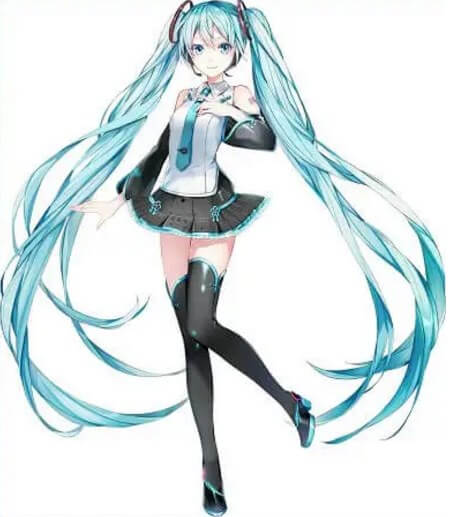
Content creators often choose Miku for projects that need an uplifting or futuristic feel. Her voice immediately signals to audiences that they’re experiencing something innovative and cutting-edge. This makes her perfect for technology-related content, creative projects, or anything targeting younger, digitally-native audiences.
Kagamine Rin and Len: The Dynamic Duo
The twin vocaloids Kagamine Rin and Len offer interesting possibilities for Project Sekai text to speech projects. Rin’s energetic, playful voice contrasts beautifully with Len’s cooler, more mischievous tone. Using them together in dialogues or alternating between them in narration creates engaging audio dynamics.
When working with Rin’s voice in a PJSK TTS generator, you’ll want to emphasize her lively, almost bubbly quality. She sounds youthful and enthusiastic, perfect for content that needs energy and positivity. Len’s voice, while still youthful, carries a slightly more mature and sometimes sarcastic edge that works well for witty commentary.

The relationship between these two characters opens up creative storytelling opportunities. Using their voices for back-and-forth dialogue, whether in animations, games, or audio dramas, immediately creates a sense of chemistry and interaction that single-voice projects might lack.
Supporting Cast Voices
Beyond the headliners, Project Sekai features several other characters with distinct vocal qualities that work wonderfully for text to speech applications. Megurine Luka’s mature, elegant voice brings sophistication to any project. Her deeper tone and more measured speech pattern make her ideal for narration or more serious content.

Kaito’s voice offers something different altogether. As one of the original vocaloids, his voice carries a sense of nostalgia and warmth. His soothing tones work beautifully for comforting content, guided meditations, or any project that needs a gentle, reassuring presence.

MEIKO brings a powerful, confident voice to the Project Sekai TTS roster. Her strong vocal presence commands attention, making her perfect for announcements, leadership content, or any situation where authority and confidence need to be communicated.
Technical Considerations for Quality Results
Audio Quality and Format Options
When using Project Sekai text to speech tools, output quality should be a primary consideration. Higher bitrates and sample rates result in clearer, more professional-sounding audio. For most applications, 44.1kHz sample rate with 128kbps or higher bitrate will provide excellent quality without creating unnecessarily large files.
The format you choose depends on how you plan to use the audio. MP3 offers good compression with minimal quality loss, making it ideal for online content. WAV files are uncompressed and therefore larger, but they preserve every detail of the audio, which is important if you plan further editing or processing.
If you’re generating voices for video projects, consider matching the audio format to your video settings. Consistent sample rates prevent potential sync issues during editing. Most modern Project Sekai voice generator tools offer multiple output options to accommodate different workflows.
Integration with Other Software
One of the strengths of quality PJSK TTS technology is how well it integrates with other creative software. Many tools offer direct plugins for popular audio and video editing platforms, allowing you to generate voices without leaving your primary workspace.
For game developers, integration with game engines like Unity or Unreal can be particularly valuable. Some Project Sekai AI voice tools offer SDKs or APIs that allow for dynamic voice generation during gameplay. This enables features like procedurally generated dialogue or player-input-driven character responses.
Web developers can also leverage Project Sekai text to speech through various web APIs. This allows for interactive experiences where website visitors can make characters speak custom text. Educational websites, interactive stories, and fan communities often implement these features to enhance user engagement.
iMyFone VoxBox.Best AI Voice Generator & AI Voice Cloner: Create Custom Voices Instantly.iMyFone VoxBox is a powerful free text-to-speech software offering 3,500+ lifelike AI voices in 250+ languages, all with 10 features in one tool. Create professional voiceovers and captivate audiences worldwide in just minutes with VoxBox AI.
Check More Details | Download Now! | Check All Deals
Creative Project Ideas Using PJSK TTS
Fan Content and Community Projects
The Project Sekai community has embraced AI voice technology for creating amazing fan content. Fan-made audio dramas let characters explore stories beyond the game’s narrative. Using a Project Sekai voice generator, fans can write and produce their own episodes, expanding the universe in creative directions.
Music producers use PJSK TTS tools to create original vocaloid tracks without needing access to the commercial voice banks. While the quality may differ from official releases, it opens up music creation to fans who might not otherwise have the resources to produce vocaloid music.
Podcasts narrated by Project Sekai characters have become surprisingly popular. Whether discussing the game itself, covering other topics from a character’s perspective, or presenting fictional news from the SEKAI world, these podcasts demonstrate the versatility of Project Sekai text to speech technology.
Educational and Accessibility Applications
Beyond entertainment, Project Sekai AI voices serve practical purposes in education and accessibility. Language learning materials become more engaging when vocabulary and phrases are spoken by familiar characters. This emotional connection can improve retention and make practice more enjoyable.
For children with reading difficulties, having text read aloud by favorite characters can reduce frustration and encourage reading practice. The association between enjoyable characters and reading activities creates positive reinforcement that traditional text-to-speech voices might not provide.
Accessibility features benefit from the personal touch that character voices provide. Navigation apps, screen readers, and smart home devices become more pleasant to interact with when they speak with the voice of Hatsune Miku or other Project Sekai characters. This personalization can make technology feel less sterile and more friendly.
Troubleshooting Common PJSK TTS Issues
Voice Quality Problems
Sometimes Project Sekai text to speech results might not meet your quality expectations. Robotic or unnatural sounding voices are common issues, especially with free or limited tools. This often comes from insufficient processing power or overly simplistic voice synthesis algorithms.
If you’re experiencing quality issues, first check your input text. Unusual words, complex sentence structures, or improper punctuation can confuse TTS systems. Simplifying your text and adding appropriate pauses through punctuation often improves results significantly.
Background noise in generated audio usually stems from low-quality source material or compression artifacts. Using a Project Sekai voice generator that offers higher quality output settings typically resolves this. If the problem persists, try generating the audio again—sometimes temporary server issues affect quality.
Technical Compatibility Issues
Compatibility problems can frustrate users excited to start their PJSK TTS projects. The most common issue involves audio drivers conflicting with voice changing software. This typically manifests as no sound output or the inability to select the virtual audio device in other applications.
Solving driver issues often requires updating your audio drivers or temporarily disabling audio enhancements in your system settings. Most quality Project Sekai AI voice tools provide detailed troubleshooting guides for common configuration problems specific to different operating systems.
File format compatibility becomes important when moving generated audio between different applications. If your video editor won’t import the audio files your PJSK TTS tool exports, check that you’re using a compatible format. Converting between formats using audio conversion software usually resolves these issues.
Future of Project Sekai Voice Technology
Emerging Trends in AI Voice Synthesis
The technology behind Project Sekai text to speech continues to evolve rapidly. Recent advances in neural network-based voice synthesis have dramatically improved the naturalness and expressiveness of AI-generated voices. These improvements mean that PJSK TTS tools will likely produce even more convincing character voices in the near future.
Emotional intelligence in AI voices represents another exciting development direction. Future Project Sekai voice generator tools may automatically detect emotional context from text and adjust vocal delivery accordingly. A sad story would sound different from an exciting announcement, even with the same character voice.
Real-time performance continues to improve as well. As processing power increases and algorithms become more efficient, the delay in live voice modification will become virtually unnoticeable. This will make real-time Project Sekai AI voice changing practical for more applications, including professional broadcasting and live performances.
Community and Creative Implications
As Project Sekai TTS technology becomes more accessible and higher quality, we’re likely to see an explosion of creative content from the community. The barrier to creating professional-sounding vocaloid content continues to lower, meaning more fans can participate in content creation rather than just consumption.
Educational applications will probably expand as the technology improves. Imagine history lessons narrated by Kaito or science explanations from Hatsune Miku. The engagement potential of character voices in educational contexts is enormous, particularly for younger audiences who grew up with these characters.
The relationship between official content and fan creations may evolve as well. As fans demonstrate innovative uses of Project Sekai text to speech technology, developers might incorporate similar features directly into games and official media. This two-way inspiration between creators and fans often drives technological and creative progress.
Getting Started with Your First Project
Planning Your PJSK TTS Project
Beginning your journey with Project Sekai AI voices