TOOL HUNTER

Ever wondered what it would be like to have the voice of Hazbin Hotel’s most charismatic demon? If you’ve been searching for a way to sound like Alastor, you’re in luck. With today’s technology, you can transform your ordinary speaking voice into the distinctive tones of the Radio Demon himself using specialized voice changing software.
The popularity of Hazbin Hotel has created massive demand for tools that let fans emulate their favorite characters. Whether you want to prank your friends, create entertaining content, or just have fun experimenting with different voices, an Alastor voice changer makes it possible to achieve that classic radio broadcast sound that makes this character so memorable.
Table of Contents
- Getting to Know Alastor: Hazbin Hotel’s Radio Demon
- Understanding Voice Changing Technology
- Real-Time Voice Changing with MagicMic
- Step-by-Step Guide to Using MagicMic for Alastor Voice
- Creating Alastor AI Voice for Content Creation
- Advanced Features for Professional Results
- Compatibility and System Requirements
- Creative Applications for Your Alastor Voice
- Ethical Considerations and Best Practices
- Troubleshooting Common Voice Changing Issues
- The Future of Voice Changing Technology
- Making Your Choice: Selecting the Right Voice Changer
- Getting Started with Your Alastor Voice Journey
Getting to Know Alastor: Hazbin Hotel’s Radio Demon
Before we dive into the technical aspects of voice changing, let’s take a moment to appreciate the character that’s captured so much attention. Alastor, often called the Radio Demon, stands out as one of Hazbin Hotel’s most complex and intriguing personalities. His unique blend of charm and menace, combined with that distinctive radio-filtered voice, creates a character that’s both terrifying and captivating.
What makes Alastor particularly interesting from a voice perspective is how his audio qualities reflect his character. The vintage radio effect isn’t just a random choice—it connects directly to his backstory and powers. As a demon who can manipulate radio waves and broadcast his voice across Hell, the audio quality becomes an essential part of his identity. This connection between character traits and vocal characteristics makes replicating his voice particularly appealing for fans.

Understanding Voice Changing Technology
Voice changers have come a long way from the simple pitch-shifting effects of early software. Modern voice transformation tools use sophisticated algorithms and AI technology to create realistic voice modifications that can mimic specific characters or create entirely new vocal personas.
The technology behind these tools typically involves several processes working together. Real-time audio processing captures your voice and applies effects instantly, while AI voice models can learn the specific characteristics of a target voice and recreate them with surprising accuracy. For characters like Alastor, this might include not just the radio effect but also the cadence, tone, and speech patterns that make his voice recognizable.
When we talk about creating an Alastor AI voice, we’re referring to technology that can either transform your existing voice in real-time or generate entirely new speech from text input. Both approaches have their uses, depending on whether you’re looking for live voice modification or need voiceover content for videos and other projects.
Real-Time Voice Changing with MagicMic
For those who want to sound like Alastor during live conversations, gaming sessions, or streaming, real-time voice changing offers the most immediate solution. MagicMic provides exactly this capability with its extensive library of voice effects and filters.
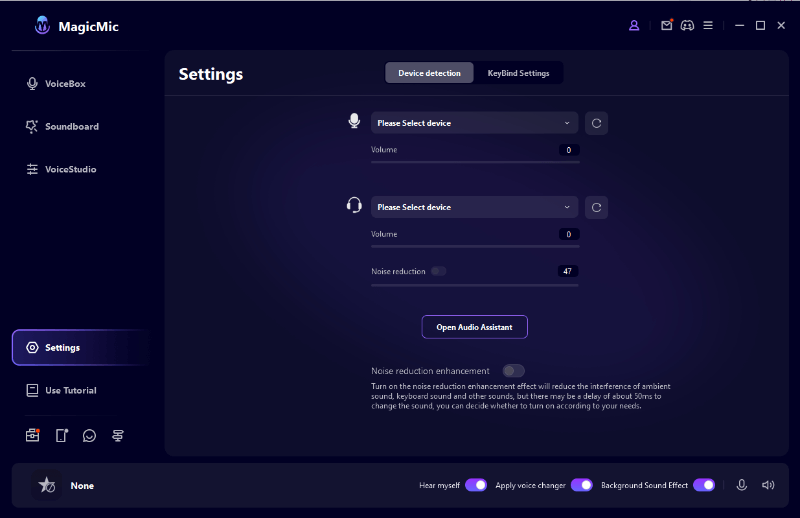
The process of setting up real-time voice changing is surprisingly straightforward. After installing the software, you select your microphone and headphones, choose the appropriate audio settings, and then browse through the available voice effects to find the perfect Alastor sound. The ability to test different effects in real-time means you can fine-tune the settings until you achieve exactly the right audio quality you’re looking for.
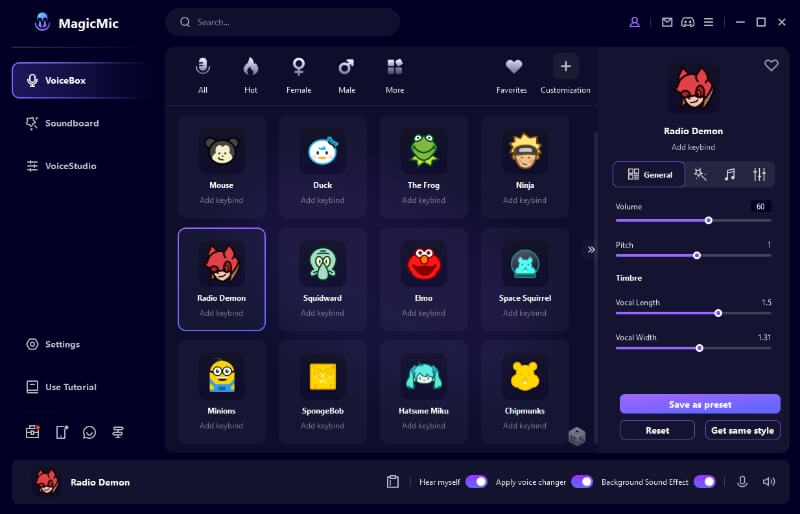
One of the advantages of using specialized software like MagicMic is the depth of customization available. Beyond simply selecting a preset voice effect, you can adjust parameters like pitch, resonance, and echo to create a more personalized version of the Alastor voice. This level of control ensures that your transformed voice sounds authentic while still allowing for your unique vocal characteristics to shine through.
iMyFone MagicMic.Best Real Time AI Voice Changer.MagicMic is a professional real-time AI voice changer that changes your voice while communicating online. It’s easy to use, has extremely low latency, features high quality AI voices and is compatible with all systems. Discover 500+ AI voices and 100K+ meme soundboards with MagicMic today!

Check More Details | Download Now! | Check All Deals
Step-by-Step Guide to Using MagicMic for Alastor Voice
Getting started with voice changing might seem complicated, but modern software has made the process remarkably user-friendly. Here’s a general overview of how you can begin transforming your voice into the Radio Demon’s distinctive tones:
First, you’ll need to download and install the voice changing software. This typically involves visiting the official website, selecting the appropriate version for your operating system, and following the installation prompts. Most modern voice changers are designed to be lightweight and won’t take up much space on your computer.
Once installed, launch the application and take a moment to familiarize yourself with the interface. You’ll want to configure your audio settings by selecting your microphone and headphones from the available devices. This step is crucial for ensuring clear audio input and output.
After your audio devices are properly configured, you can begin exploring the voice effects library. For Alastor’s voice, you might search for terms like “radio demon,” “vintage radio,” or simply “Alastor” depending on how the effects are categorized in your chosen software. Most applications include a search function to help you quickly locate specific voice filters.
When you’ve found a promising voice effect, activate it and test how it sounds with your voice. Speak normally into your microphone and listen to the transformed output through your headphones. Don’t be discouraged if the first effect you try isn’t perfect—experiment with different options and adjustments until you achieve the sound you’re looking for.
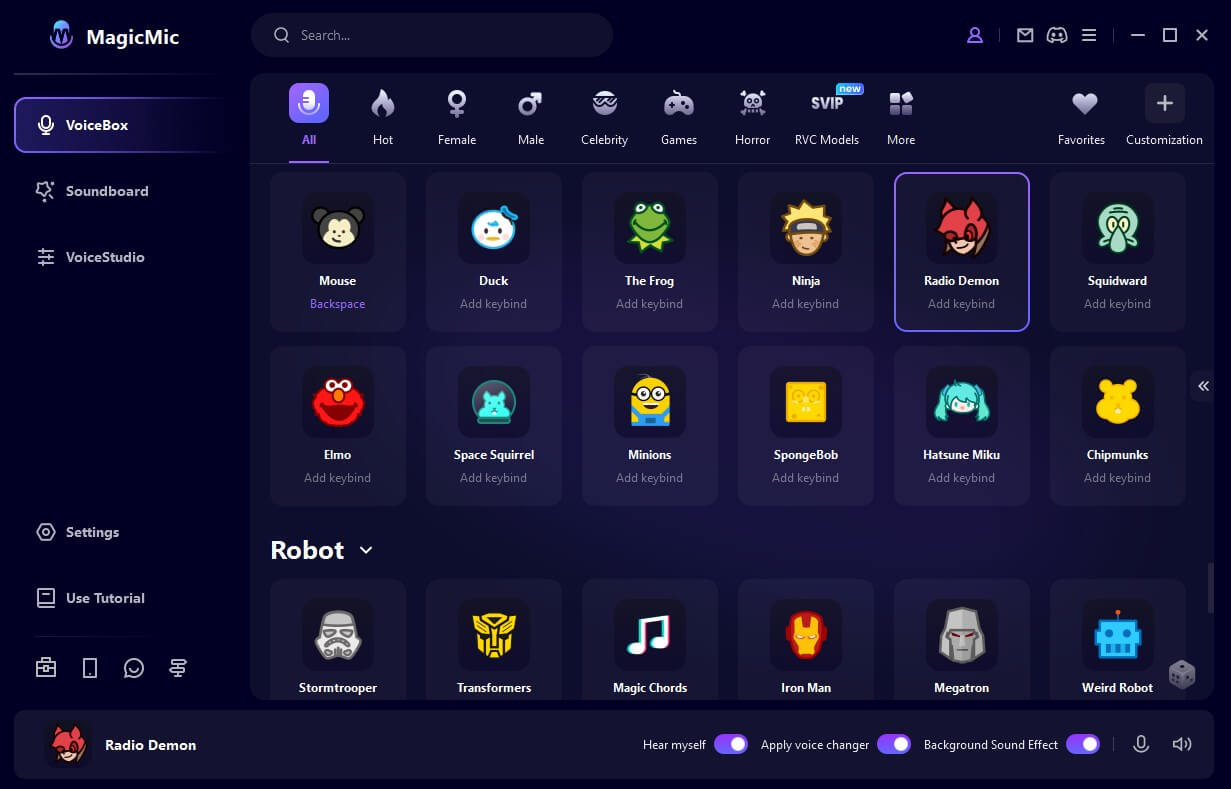
For those seeking even more authenticity, some voice changers offer advanced features like AI voice models specifically trained on character voices. These models can capture subtle nuances that generic voice effects might miss, resulting in a more convincing Alastor voice transformation.
Creating Alastor AI Voice for Content Creation
While real-time voice changing is great for live interactions, content creators often need a different approach for producing videos, podcasts, and other media. This is where AI voice generation comes into play, allowing you to create professional-quality voiceovers without needing to record your own voice.
Text-to-speech technology has advanced significantly in recent years, with AI models capable of generating surprisingly natural-sounding speech. For Hazbin Hotel fans, this means being able to create dialogue in Alastor’s voice simply by typing the text you want him to speak. This approach is particularly useful for animation projects, video dubbing, or creating audio content where you need consistent voice quality throughout.
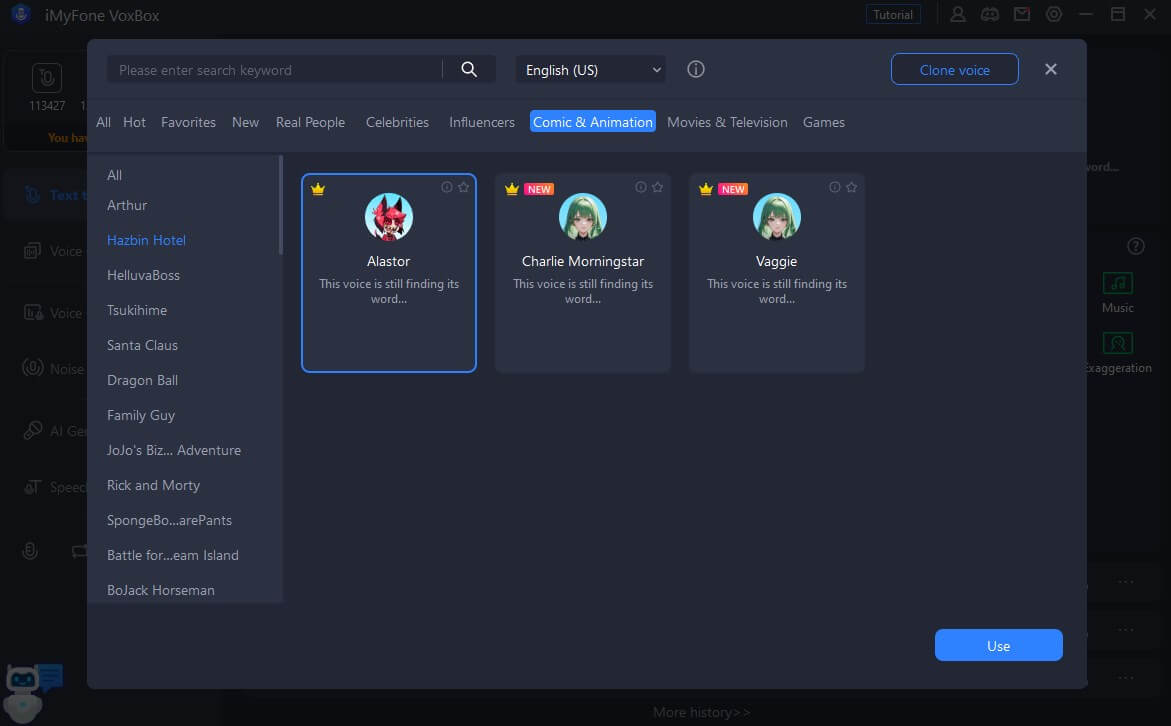
Software like VoxBox specializes in this type of AI voice generation, offering a range of character voices including the Radio Demon himself. The process typically involves selecting your desired voice model, inputting the text you want to be spoken, and then generating the audio file. Most applications provide options to adjust speaking rate, pitch, and other parameters to fine-tune the final output.
One of the advantages of using AI voice generation for content creation is the consistency it offers. Unlike recording your own voice multiple times and potentially having slight variations, AI-generated speech maintains the same quality and character throughout your project. This can be particularly valuable for longer productions where consistency is important.
Advanced Features for Professional Results
As you become more comfortable with voice changing technology, you might want to explore some of the more advanced features available in professional-grade software. These tools can help you achieve even more realistic and polished results, whether you’re using voice changing for entertainment or professional projects.
Voice studio features allow for detailed post-processing of recorded audio. This means you can record your transformed voice and then make additional adjustments to fine-tune the final product. This might include adding background effects, adjusting specific frequency ranges, or applying additional filters to enhance the radio broadcast quality.
Soundboard functionality is another valuable feature, especially for streamers and content creators. With a soundboard, you can pre-record specific phrases or sound effects in your Alastor voice and trigger them with a single keystroke during live sessions. This adds an extra layer of entertainment value and allows for more dynamic interactions with your audience.
Custom shortcut creation streamlines your workflow by allowing you to assign frequently used voice effects or soundboard clips to specific keys. This means you can switch between different voices or play specific audio clips without interrupting your flow during gaming sessions or live streams.
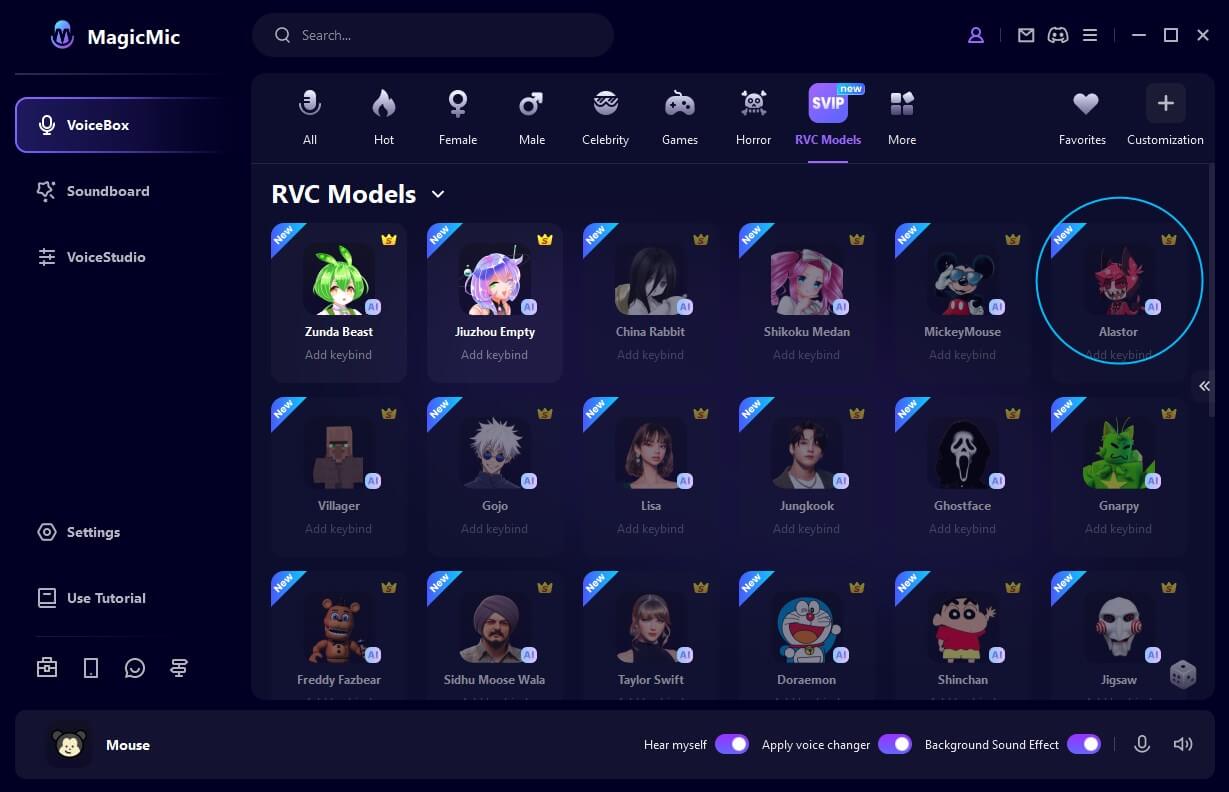
Background audio integration is another sophisticated feature that can enhance the authenticity of your Alastor voice. Some voice changers include optional background sounds that mimic radio static or vintage broadcast equipment, adding an extra layer of immersion to your voice transformation.
Compatibility and System Requirements
Before diving into the world of voice changing, it’s important to consider compatibility and system requirements. Most modern voice changing software is designed to work across multiple platforms, but specific features might vary depending on your operating system and hardware.
Windows and Mac users will typically find the widest selection of voice changing applications with the most advanced features. These desktop applications often offer the best performance and deepest customization options. Mobile versions for iOS and Android are also available, though they may have slightly limited functionality compared to their desktop counterparts.
In terms of hardware, you’ll need a decent quality microphone to ensure clear audio input. While expensive studio microphones aren’t necessary, a basic USB microphone will typically produce much better results than built-in laptop or webcam microphones. Similarly, a good pair of headphones will help you monitor your transformed voice accurately.
Most voice changers are designed to be compatible with popular communication and streaming platforms like Discord, Zoom, Twitch, and OBS. This means you can use your Alastor voice during online gaming, video calls, or live streams without complicated setup procedures. The software typically creates a virtual audio device that other applications can recognize as a microphone input.
Creative Applications for Your Alastor Voice
Once you’ve mastered the technical aspects of voice changing, the real fun begins—exploring creative ways to use your new vocal abilities. The applications for a convincing Alastor voice are limited only by your imagination, but here are some popular uses to inspire you:
Content creation represents one of the most obvious applications. Whether you’re producing Hazbin Hotel fan content, creating parody videos, or developing original animations, having the ability to voice characters with authenticity adds tremendous production value. The radio demon voice changer opens up creative possibilities that would otherwise require hiring voice actors or developing impressive vocal skills yourself.
Gaming and streaming communities have embraced voice changers as tools for enhancing entertainment value. Using an Alastor voice during gameplay sessions, especially in horror or role-playing games, can create memorable moments for both you and your viewers. The unexpected appearance of the Radio Demon’s voice in an unrelated game often generates positive reactions from audiences.
Social interactions in online spaces represent another popular use case. Whether you’re participating in Hazbin Hotel-themed Discord servers or just want to surprise your friends during casual chats, temporarily adopting Alastor’s distinctive voice can add an element of fun to your digital communications. Just remember to use this power responsibly and respect others’ comfort levels.
Educational and demonstration purposes shouldn’t be overlooked either. If you’re creating content about Hazbin Hotel or analyzing character voices, having the ability to demonstrate specific vocal qualities directly can make your explanations more engaging and effective. This approach can be particularly valuable for video essays or analytical content.
Ethical Considerations and Best Practices
While voice changing technology offers exciting creative possibilities, it’s important to approach its use with responsibility and consideration for others. The ability to disguise or alter your voice comes with ethical implications that thoughtful users should consider.
Transparency is key when using voice changers in social contexts. While surprising friends with a temporary voice change can be harmless fun, deliberately misleading people or using voice alteration for deceptive purposes crosses ethical boundaries. It’s generally best practice to let people know when you’re using a voice changer, especially in ongoing relationships or communities.
Respecting copyright and intellectual property represents another important consideration. While creating fan content using character voices typically falls under fair use, commercial applications might require permissions, especially if you’re generating revenue from content featuring recognizable character voices. When in doubt, err on the side of caution or seek proper authorization.
Considering your audience’s comfort level is crucial, particularly when using potentially unsettling voices like Alastor’s. The Radio Demon’s voice has distinctive horror elements that might be disturbing to some listeners, especially in unexpected contexts. Being mindful of your environment and audience helps ensure that your voice changing activities remain enjoyable for everyone involved.
Understanding platform policies regarding voice modification is another practical consideration. While most platforms permit voice changers for entertainment purposes, some have specific rules about audio manipulation, particularly in competitive gaming contexts. Familiarizing yourself with relevant terms of service helps avoid potential issues.
Troubleshooting Common Voice Changing Issues
Like any technology, voice changers can occasionally present challenges, especially when you’re first getting started. Understanding how to address common issues will help you maintain a smooth and enjoyable voice changing experience.
Audio latency, or delay between speaking and hearing the transformed voice, represents one of the most common issues with real-time voice changing. This typically stems from buffer settings in either the voice changer software or your audio drivers. Adjusting buffer sizes downward usually reduces latency, though extremely small buffers might cause audio glitches on less powerful systems.
Audio quality problems like distortion, robotic sounds, or excessive background noise can often be resolved through microphone adjustments or software settings. Ensuring proper microphone placement, using pop filters, and adjusting input levels can significantly improve clarity. Most voice changers also include noise reduction features that can help minimize background interference.
Compatibility issues with specific applications sometimes occur when voice changer software isn’t properly recognized as an audio input. This can usually be resolved by checking audio settings within the target application and ensuring that the voice changer’s virtual microphone is selected as the input device. Restarting applications or your computer can also help refresh connection settings.
Performance impact on system resources represents another potential concern, particularly on older computers or when running multiple applications simultaneously. Closing unnecessary programs, updating audio drivers, and adjusting voice changer quality settings can help reduce the resource footprint of voice changing software.
The Future of Voice Changing Technology
Voice changing technology continues to evolve at a rapid pace, with new developments constantly expanding what’s possible. Understanding emerging trends can help you appreciate both current capabilities and future possibilities for character voice replication.
AI and machine learning represent the most significant area of advancement in voice technology. As these systems become more sophisticated, we’re seeing increasingly accurate voice replication with less training data required. Future voice changers will likely offer even more convincing character voices with the ability to adapt to individual users’ speech patterns more effectively.
Real-time processing improvements continue to reduce latency and increase quality. As computing power grows and algorithms become more efficient, we can expect voice changers to deliver studio-quality transformations with minimal delay, making them suitable for even professional broadcasting applications.
Integration with other technologies represents another exciting direction. We’re already seeing voice changers that work seamlessly with video filters, augmented reality applications, and virtual environments. This convergence of technologies creates more immersive experiences where visual and auditory transformations work together harmoniously.
Accessibility improvements make voice changing technology available to broader audiences. Simplified interfaces, one-click setups, and mobile optimization ensure that even users with limited technical expertise can enjoy character voice transformation. This democratization of technology means more people can participate in creative voice expression.
Making Your Choice: Selecting the Right Voice Changer
With numerous voice changing options available, selecting the right tool for your needs requires careful consideration of several factors. Your specific use case, technical requirements, and budget will all influence which solution works best for you.
For real-time voice changing during gaming or streaming, software like MagicMic offers comprehensive features with low latency performance. The extensive voice library and compatibility with popular platforms make it a strong choice for entertainment applications. The ability to quickly switch between voices and use soundboards adds versatility for dynamic content creation.
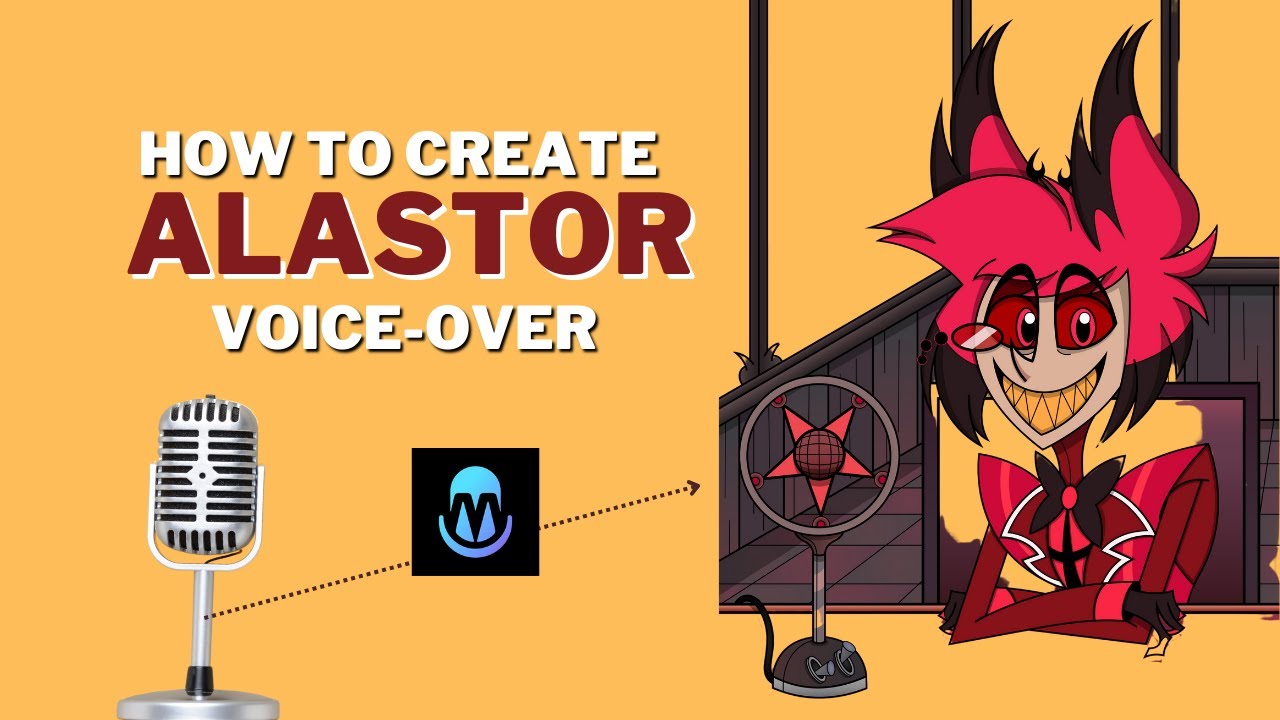
For content creation focused on producing voiceovers rather than live transformation, AI voice generation tools like VoxBox provide specialized functionality. The text-to-speech capabilities with character voices allow for efficient production of consistent audio content without recording sessions. This approach works particularly well for animated content or projects requiring extensive dialogue.
Your technical comfort level should also influence your choice. Some voice changers prioritize simplicity with one-click operation and preset voices, while others offer deep customization for users who want fine control over every aspect of their voice transformation. Honestly assessing your technical skills and willingness to learn complex software will guide you toward the appropriate tool.
Budget considerations naturally play a role in selection. Many voice changers offer free versions with basic functionality, while premium versions unlock advanced features, additional voices, and priority support. Determining which features you actually need will help you decide whether a free solution suffices or if premium features justify the investment.
iMyFone MagicMic.Best Real Time AI Voice Changer.MagicMic is a professional real-time AI voice changer that changes your voice while communicating online. It’s easy to use, has extremely low latency, features high quality AI voices and is compatible with all systems. Discover 500+ AI voices and 100K+ meme soundboards with MagicMic today!
Check More Details | Download Now! | Check All Deals
Getting Started with Your Alastor Voice Journey
Embarking on your voice transformation journey might seem daunting initially, but breaking the process into manageable steps makes it approachable for beginners. Starting with simple experiments and gradually exploring more advanced features allows you to build confidence while discovering the creative possibilities.
Begin by familiarizing yourself with basic voice changing concepts through free resources and trial versions of software. Many voice changers offer limited free versions that let you explore core functionality before committing to purchase. Use this opportunity to understand the fundamental workflow of selecting voices, adjusting settings, and applying transformations.
Practice regularly to become comfortable with hearing your transformed voice and learning how to speak naturally while using voice effects. Many users initially feel self-conscious when hearing their modified voice, but this discomfort typically fades with repeated exposure. Regular practice also helps you develop an intuitive understanding of how different speech patterns affect the final output.
Engage with communities of other voice changer enthusiasts to learn tips, troubleshoot issues, and discover creative applications. Online forums, social media groups, and content creator communities often contain valuable knowledge from experienced users. These communities can provide inspiration and practical advice as you develop your skills.
Experiment with different content formats to discover which applications of voice changing you enjoy most. You might try creating short audio clips, participating in voice channels on Discord, incorporating voice