TOOL HUNTER

Ever wondered how to make a video on FB with pictures that actually gets noticed? With over 8 billion daily video views on Facebook, learning to create engaging picture videos could be your ticket to standing out in the crowded social media landscape. Whether you’re a small business owner, content creator, or just someone who wants to share memories in a more dynamic way, mastering the art of Facebook video creation is more valuable than ever.
The beauty of creating a Facebook picture video is that you don’t need to be a professional video editor or have expensive software. Facebook provides built-in tools that make the process surprisingly simple, while third-party applications offer even more creative possibilities for those wanting to take their videos to the next level.
How to Make a Picture Video on Facebook
Creating engaging content doesn’t have to be complicated. When you learn how to make a video on FB with pictures, you’re tapping into one of the most effective ways to capture attention on social media. The process is straightforward and can be completed in just a few minutes once you get the hang of it.
Access Your Facebook Creation Tools
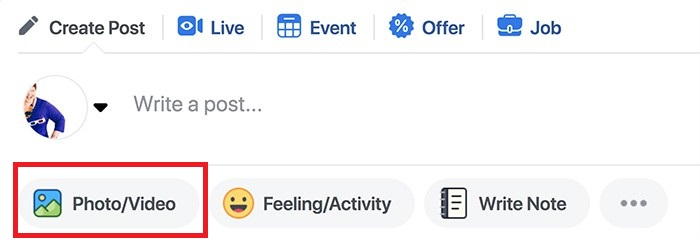
Begin by navigating to your Facebook page using a desktop computer. While mobile options exist, the desktop interface provides the most comprehensive set of tools for creating your picture video. Look for the “What’s on your mind?” status update section where you typically post text updates or share photos.
Click on the “Photo/Video” option, which will reveal additional creation choices. Among these options, you’ll find “Create a Slideshow” – this is your gateway to transforming static images into an engaging Facebook picture video that tells a story and captures viewer interest.
Configure Your Video Settings
Once you’ve selected the slideshow creation option, a new settings panel will appear. This is where you determine the fundamental characteristics of your Facebook video collage. You’ll need to decide on the aspect ratio – square works well for news feed display, while vertical may be better if you’re creating content that might be shared to Stories or other vertical-oriented spaces.
Consider the duration for each image in your sequence. Shorter durations (2-3 seconds) create a more dynamic, fast-paced video, while longer displays (5-7 seconds) give viewers more time to absorb each image. You can also experiment with transition effects between images, though subtle transitions often work best for maintaining a professional appearance.
Select Background Music
Music transforms a simple sequence of images into an emotional experience. Facebook provides a library of royalty-free music across various genres, ensuring you won’t encounter copyright issues when your video is published. The platform categorizes music by mood and purpose – you can find tracks labeled as energetic, inspirational, trustworthy, fun, or modern to match the tone of your content.
When selecting music for your Facebook picture video, consider your audience and the message you want to convey. An upbeat track might work well for a product launch or celebration, while something more subtle and emotional could better suit a memorial or heartfelt story.
Upload and Arrange Your Images
This is the core of your creation process – selecting and organizing your visual content. Facebook requires at least three images to create a slideshow video, with a maximum of ten images permitted. This limitation encourages thoughtful curation rather than overwhelming viewers with too many visuals.
You can source images from multiple locations: directly from your computer, from existing photos on your Facebook timeline, or even by taking new photos using your computer’s webcam if you need to add something quickly. Think carefully about the sequence of your images – the order should tell a story or present information in a logical progression that builds understanding or emotion as the video progresses.
Review and Refine Your Creation
Before publishing your Facebook video collage, take advantage of the preview function to watch your creation from start to finish. Pay attention to how the images flow together, whether the timing feels right, and if the music complements the visuals effectively. This is your opportunity to make adjustments – perhaps changing the order of images, adjusting how long each displays, or swapping out the background music.
Don’t rush this quality control step. Watch the video multiple times, and if possible, get a second opinion from a colleague or friend. What seems clear to you might not be as obvious to someone seeing the content for the first time. This attention to detail can make the difference between a video that gets scrolled past and one that captures and holds attention.
Share Your Picture Video
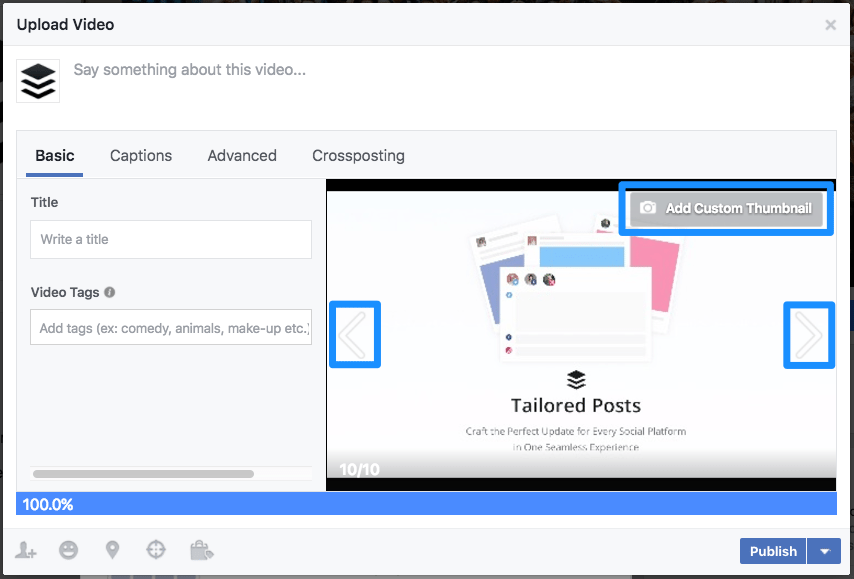
Once you’re satisfied with your creation, it’s time to share it with your audience. Add a compelling caption that encourages viewers to watch the video – you might pose a question, create intrigue, or directly state what value they’ll get from watching. Consider who you want to see this content and use Facebook’s audience targeting options if appropriate.
After publishing, monitor how your video performs. Facebook provides analytics that show you how many people watched your video, for how long, and what actions they took afterward. This information is invaluable for refining your approach to how to make a video on FB with pictures in the future.
Creative Approaches for Your Facebook Video Content
Knowing the technical steps of how to make a facebook video of pictures is only half the battle – the real magic happens when you pair that knowledge with compelling content ideas. Your picture videos should serve a purpose beyond simply displaying images; they should inform, entertain, inspire, or connect with your audience in meaningful ways.
Educational and Demonstration Content
One of the most valuable applications for Facebook picture videos is creating educational content that shows rather than just tells. If you’re wondering how to make a facebook video collage that teaches something, this approach is your answer. The step-by-step nature of slideshow videos perfectly suits tutorial content where each image can represent a different step in a process.
Consider creating cooking demonstrations where each image shows a subsequent stage of preparing a recipe. Or develop product tutorials that highlight different features or use cases. How-to guides that solve common problems in your industry position you as an authority while providing genuine value to your audience. The key is ensuring that each image clearly advances the instructional narrative, with concise text overlays if needed to clarify complex points.
Narrative Storytelling
Humans are wired for stories, and Facebook picture videos offer a powerful medium for storytelling. When you create a narrative sequence, you’re not just showing disconnected images – you’re taking viewers on a journey. This approach works exceptionally well for personal accounts, brand stories, case studies, or historical overviews.
Think about creating a visual timeline of your business’s growth, from humble beginnings to current success. Share customer transformation stories through a series of images that show their progression. Document an event from preparation through execution to aftermath. The narrative approach to how to make a video on FB with pictures creates emotional connection and makes your content more memorable than a simple collection of images would be.
Curated Collections
Sometimes, the power of your visual content comes from bringing related images together in a thoughtful collection. This approach works wonderfully for showcasing product lines, highlighting different aspects of a service, presenting portfolio work, or creating thematic compilations.
A fashion retailer might create seasonal lookbooks through Facebook video collages. A restaurant could showcase signature dishes. A photographer might display their best work from a particular genre or location. A travel blogger could compile highlights from a recent trip. When you’re learning how to make a video collage on facebook, the collection approach allows you to demonstrate breadth, variety, or evolution within a specific category.
The collection method is particularly effective for “best of” compilations – your top products, most popular services, or greatest achievements. This not only showcases what you have to offer but also provides social proof by highlighting what others have appreciated.
Teasers and Announcements
Create anticipation and excitement using the teaser approach to your Facebook picture videos. Rather than revealing everything at once, use a sequence of images that gradually build curiosity about an upcoming launch, event, or announcement. This method leverages the natural human desire for resolution and closure.
When planning how to make a facebook video of pictures that teases effectively, consider what information to reveal early versus what to hold back. You might show behind-the-scenes preparation without revealing the final product. You could display abstract or close-up images that hint at but don’t fully show what’s coming. The final image might be a call to action to learn more, sign up, or mark their calendars for a full reveal.
This approach works wonderfully for product launches, event promotions, special announcements, or even personal milestones. The key is creating just enough intrigue to make viewers feel invested in discovering what comes next.
Advanced Techniques for Professional Facebook Videos
While Facebook’s built-in slideshow tool is excellent for quick creations, sometimes you need more control, customization options, and professional features. This is where dedicated video editing software like iMyFone Filme comes into play, taking your Facebook video creations to the next level.
Filme – Best Video Editor for Beginners.Explore Your Creativity, Limitless
Check More Details | Download Now! | Check All Deals
Why Choose Professional Editing Software?
While learning how to make a video on FB with pictures using Facebook’s native tools is valuable, professional editing software opens up creative possibilities that can significantly enhance your results. These applications provide precision control over every aspect of your video, from exact timing to sophisticated effects that go beyond basic transitions.
Professional tools typically offer larger libraries of royalty-free music, more sophisticated text and title options, advanced color correction features, and the ability to combine pictures with video clips in the same project. They also provide higher resolution exports, ensuring your content looks crisp and professional regardless of how viewers access it.
For businesses and serious content creators, investing time in learning a dedicated video editor pays dividends through higher engagement, more professional presentation, and greater creative flexibility. The good news is that many modern video editing applications have dramatically reduced the learning curve, making professional results accessible even to beginners.
Template-Based Video Creation
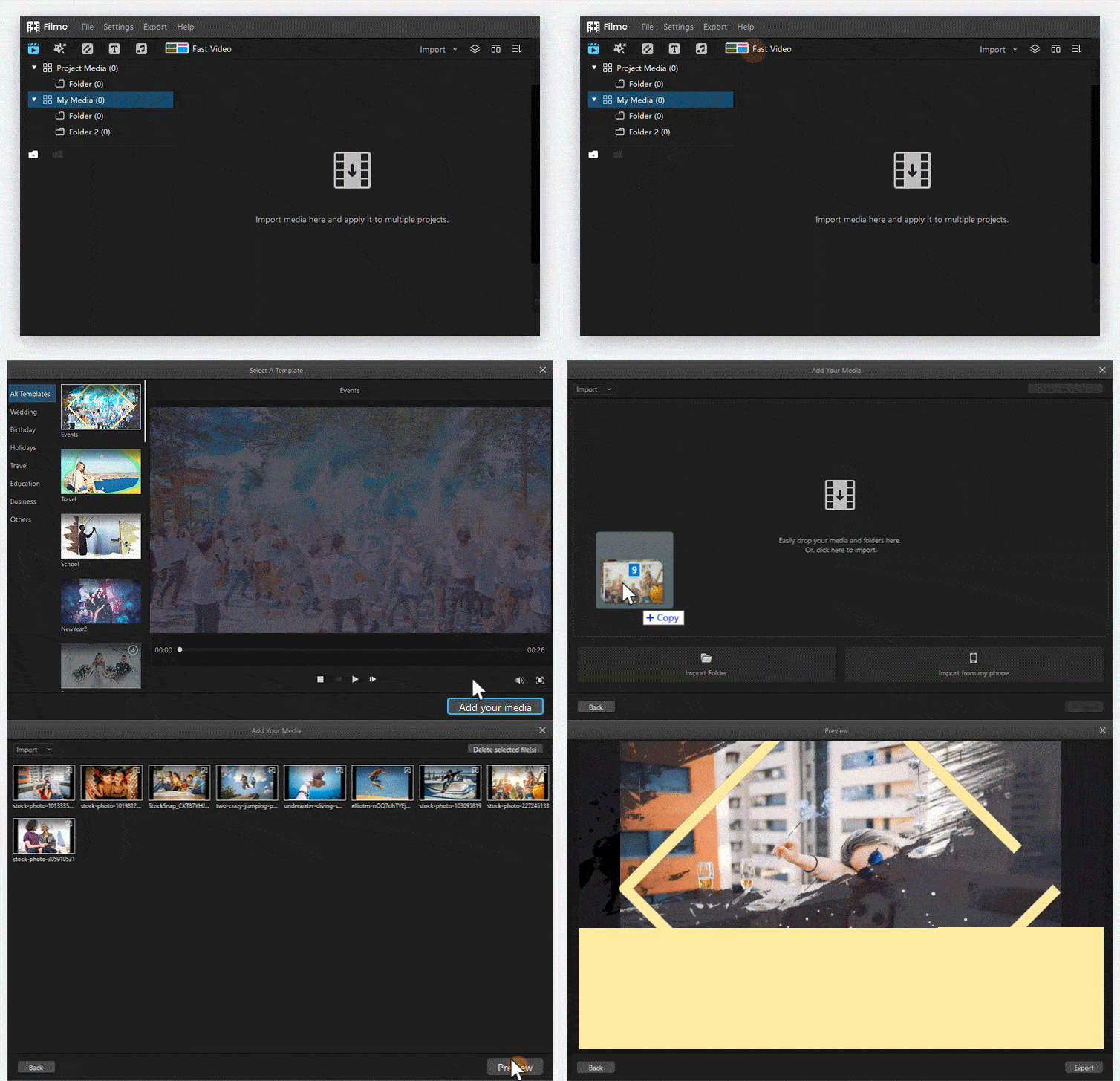
For those new to video editing or short on time, template-based creation offers a perfect balance of professional results and efficiency. iMyFone Filme and similar applications provide collections of pre-designed templates tailored to various purposes and styles – perfect for learning how to make a facebook video collage with polish and personality.
These templates handle the technical aspects of video creation – timing, transitions, and motion – while allowing you to focus on content selection and messaging. You’ll find templates designed specifically for product promotions, travel videos, event recaps, birthday greetings, business announcements, and countless other scenarios.
The template approach is ideal for maintaining brand consistency across multiple videos, as you can establish a look and feel that becomes recognizable to your audience. Many applications allow you to customize these templates further, replacing colors to match your brand or adjusting timing to suit your specific content needs.
Custom Video Creation
When you’re ready to move beyond templates or have a specific vision for your Facebook picture video, custom creation gives you complete control over every element. This approach allows you to develop a unique style that sets your content apart and perfectly communicates your intended message.
Custom creation means you determine exactly how long each image displays, what transition effect moves viewers from one image to the next, where text appears and how it animates, and how all these elements synchronize with your chosen music. This level of control is essential when you need your video to match specific branding guidelines or convey complex information clearly.
The custom approach to how to make a video on FB with pictures does require more time and potentially a steeper learning curve, but the results can be significantly more distinctive and effective. Many creators start with templates and gradually incorporate more custom elements as they become comfortable with the editing tools.
Creating Professional Facebook Videos with iMyFone Filme
For those ready to elevate their Facebook video content beyond the platform’s built-in tools, iMyFone Filme offers an excellent balance of professional features and accessibility. Let’s walk through the process of creating a standout Facebook picture video using this application.
Starting Your Project
Begin by downloading and installing iMyFone Filme on your computer. The application is available for both Windows and Mac systems, ensuring compatibility with most computers. Once installed, launch the program and select whether you want to start with a template or begin with a blank project for complete customization.
If you’re using the template approach, browse through the available options and select one that matches the tone and purpose of your video. The templates are conveniently categorized by use case, making it easy to find options suited for business promotions, personal events, educational content, or entertainment purposes.
For custom projects, you’ll begin by importing your selected images into the media library. Filme supports all common image formats and allows you to organize your assets before placing them in your timeline. This initial organization step saves time later in the process.
Arranging Your Visual Sequence
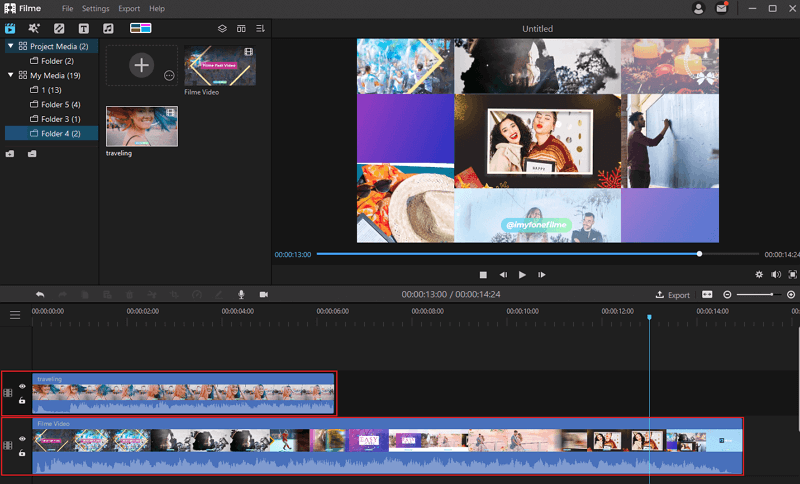
With your images imported, the next step in creating your Facebook video collage is arranging them in the timeline in your desired sequence. Simply drag each image from your media library to the timeline, placing them in the order that best tells your story or presents your information.
Consider the narrative flow as you arrange your images. Each should logically follow the previous one while building toward your overall message or conclusion. The timeline interface allows you to easily rearrange images if you change your mind about the sequence – just drag and drop to new positions.
At this stage, you can also adjust how long each image displays in your video. The duration for each image can be set individually, allowing you to give more important images additional screen time while moving more quickly through supporting visuals. This control over pacing is one of the key advantages of using professional editing software rather than Facebook’s built-in tool.
Enhancing with Transitions and Effects
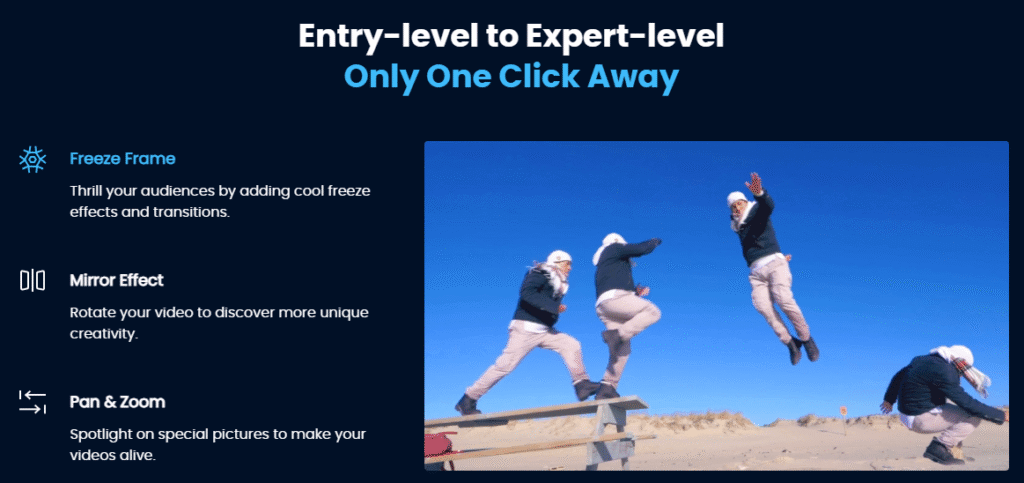
Transitions guide viewers smoothly from one image to the next, while effects can add visual interest or emphasis to specific images. iMyFone Filme provides a wide selection of transition options, from subtle fades and dissolves to more dynamic wipes and motion effects.
When applying transitions, consistency often works better than using a different effect between every image. A consistent transition style creates a cohesive viewing experience, though you might choose to use a distinctive transition to mark a significant shift in your video’s content or mood.
In addition to transitions, consider whether certain images would benefit from motion effects like gentle zooming or panning across the image. These Ken Burns-style effects can add dynamism to otherwise static images. Text overlays, when used sparingly, can provide context, highlight key information, or pose questions to engage viewers.
Adding Audio and Finalizing
Music and sound effects significantly impact your video’s emotional resonance. iMyFone Filme includes a library of royalty-free music categorized by genre and mood, making it easy to find the perfect audio backdrop for your Facebook picture video. You can also import your own music files if you have specific tracks in mind.
When adding music, pay attention to how the audio rhythm aligns with your image transitions. Well-timed transitions that match the beat or phrasing of your music create a more polished, professional viewing experience. You can adjust the volume of your music track to ensure it supports rather than overwhelms any voiceover or doesn’t distract from the visual content.
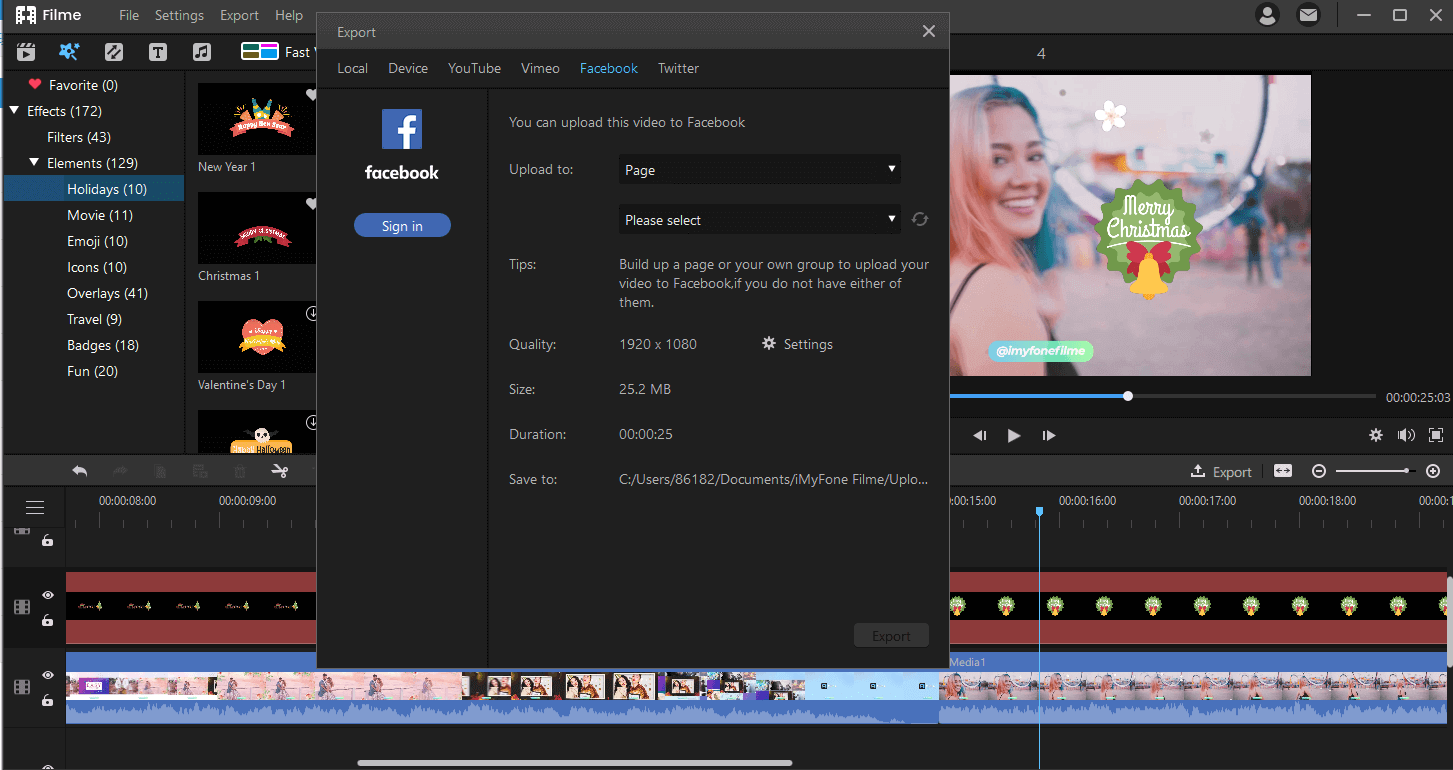
Before exporting your final video, watch it through several times to catch any issues with timing, transitions, or audio synchronization. Make any necessary adjustments, then export your video in a format optimized for Facebook. The platform recommends MP4 format with H.264 compression, which provides good quality with manageable file sizes.
Uploading to Facebook
With your video created and exported, you’re ready to share it with your Facebook audience. The process for uploading a video created in external software is similar to uploading any other video to Facebook. Navigate to your page or profile, click on “Photo/Video” in the status update area, and select your exported video file.
While your video uploads, craft a compelling caption that encourages viewing. Consider what would make someone stop scrolling to watch your video. You might pose a question that the video answers, tease interesting content, or directly state the value viewers will get from watching.
Tag relevant people or pages, select an engaging thumbnail image (either chosen from frames in your video or uploaded separately), and determine the best audience for your content. If you’re managing a business page, you might also consider boosting your video with targeted advertising to reach beyond your existing followers.
Filme – Best Video Editor for Beginners.Explore Your Creativity, Limitless
Check More Details | Download Now! | Check All Deals
Maximizing Your Facebook Video Impact
Creating an engaging Facebook picture video is only part of the equation – to truly benefit from your efforts, you need to ensure your content reaches and resonates with your intended audience. Understanding Facebook’s algorithm and best practices for video content can dramatically improve your results.
Optimization Strategies
Facebook’s algorithm prioritizes content that keeps users on the platform and generates meaningful interactions. To align with these priorities, create videos that capture attention quickly – the first 3 seconds are critical for determining whether viewers will continue watching. Start with your most compelling image or pose an intriguing question immediately.
Encourage engagement by ending your video with a clear call to action. Ask viewers to comment with their thoughts, share the video with someone who would appreciate it, or click through to your website for more information. These interactions signal to Facebook that your content is valuable, increasing its distribution to wider audiences.
When determining how to make a video collage on facebook that performs well, consider uploading videos directly to Facebook rather than sharing YouTube links. Native Facebook videos typically receive greater reach and engagement in the platform’s algorithm. Additionally, include captions or text overlays since many users watch videos with sound off, especially when browsing in public places.
Analyzing Performance and Iterating
After publishing your Facebook video collage, monitor its performance through Facebook’s built-in analytics. Note which videos generate the most watch time, engagement, and positive feedback. Look for patterns in your successful content – perhaps certain topics, styles, or formats resonate particularly well with your audience.
Use these insights to refine your approach to how to make a facebook video of pictures in the future. If your audience responds well to educational content, create more tutorial-style videos. If personal stories generate the most engagement, incorporate more narrative elements into your videos. Continuous improvement based on actual performance data will make each video more effective than the last.
Remember that consistency