TOOL HUNTER

Ever found yourself in a situation where you needed the perfect sound effect for a video project, wanted to prank your friends, or just needed to express yourself in a more entertaining way? Soundboards have become incredibly popular tools for all these purposes and more. But finding exactly what you’re looking for can sometimes feel like searching for a needle in a haystack.
That’s why learning how to create your own soundboard might be the perfect solution. When you know how to make your own soundboard, you’re not limited to what’s already out there – you can customize everything to match your specific needs. Whether you’re a gamer looking to enhance your Discord chats, a content creator wanting unique audio elements, or just someone who enjoys having fun with sounds, understanding how to create soundboard tools can open up a world of possibilities.
How Do I Make a Soundboard Using Online Platforms?
If you’re wondering “how do I make a soundboard without downloading any software,” online platforms offer a great starting point. These web-based solutions let you create soundboards directly through your browser, which is perfect if you’re not ready to commit to installing software or if you need something quick and accessible from any device.
One of the most popular platforms for this purpose is 101 Soundboards. This website has gained quite a reputation in the soundboard community for its extensive features and user-friendly approach to helping people learn how to make a soundboard online.
What makes 101 Soundboards particularly appealing is its massive library of existing soundboards that you can browse for inspiration. But more importantly, it provides all the tools you need when you want to know how to create soundboard collections of your very own.
The platform supports multiple audio formats, which means you’re not limited to just MP3 files – you can work with WAV, OGG, and other common formats too. This flexibility is crucial when you’re figuring out how to make your own soundboard because it means you can use audio from various sources without worrying about conversion issues.
Another great feature is the ability to pause and resume your soundboard creation process. This is perfect for those times when you need to step away from your project but don’t want to lose your progress. The interface is designed to be intuitive, so even if you’ve never created a soundboard before, you’ll find the process relatively straightforward.
When you’re ready to learn exactly how to get a soundboard setup using 101 Soundboards, the process typically involves four main steps. First, you’ll need to visit their website and create an account. This account will allow you to save your projects and access them later from any device.
Once you’re logged in, you’ll navigate to the “My Soundboards” section and select “Add new brand” to start your creation. This is where you’ll begin building your personalized sound collection. The next step involves uploading your audio files – these could be recordings you’ve made yourself, sound effects you’ve downloaded, or any other audio clips you want to include.
After uploading your sounds, you’ll use the “Request Transcription” feature, which helps label your soundboard properly. This step ensures that your sounds are organized and easy to identify when you’re using your soundboard later.
Editing Your Sounds Before Uploading
Sometimes, the audio files you want to use might need a little tweaking before they’re ready for your soundboard. Maybe you need to trim silence from the beginning or end, adjust the volume levels, or combine multiple sounds. When you’re learning how to create soundboard projects, having some basic audio editing knowledge can be really helpful.
There are numerous free online audio editors available that can handle these basic tasks. These tools typically allow you to cut, copy, and paste sections of audio, adjust volume, apply simple effects, and export in various formats. Using these editors before uploading to your soundboard platform can ensure your sounds are polished and ready to use.
Creating Advanced Soundboards with Desktop Software
While online platforms are great for basic soundboard creation, sometimes you need more advanced features and real-time performance. This is where desktop software like MagicMic really shines. If you’re serious about learning how to make a soundboard that you can use during live streams, gaming sessions, or video calls, dedicated software offers capabilities that web platforms can’t match.
MagicMic takes soundboard creation to the next level by combining traditional soundboard functionality with real-time voice changing technology. This means you’re not just playing pre-recorded sounds – you’re able to modify your actual voice while communicating online, and trigger sound effects simultaneously.
The software comes packed with over 100,000 meme soundboards ready to use right out of the box. But more importantly, it provides robust tools for creating your own custom soundboards. When you’re learning how to make your own soundboard with professional software, having this extensive library gives you plenty of examples to learn from and inspiration for your own creations.
One of the standout features is the real-time voice changing capability with over 500 AI voices. This means you can sound like anyone from a celebrity to a cartoon character while using your custom sound effects. The software maintains extremely low latency, which is crucial when you’re using it during live conversations or gaming sessions where timing is everything.
iMyFone MagicMic.Best Real Time AI Voice Changer.MagicMic is a professional real-time AI voice changer that changes your voice while communicating online. It’s easy to use, has extremely low latency, features high quality AI voices and is compatible with all systems. Discover 500+ AI voices and 100K+ meme soundboards with MagicMic today!

Check More Details | Download Now! | Check All Deals
Compatibility is another strong point. The software works seamlessly with popular platforms like Discord, Zoom, Google Meet, Twitch, and most major games. This broad compatibility means that once you learn how to create soundboard setups using MagicMic, you can use them across all your favorite applications without additional configuration.
The development team regularly updates the software, adding new features, voices, and soundboards. This commitment to improvement means that as you continue to learn how to make a soundboard with this tool, you’ll have access to an ever-expanding set of resources and capabilities.
Step-by-Step Guide to Creating Custom Soundboards in MagicMic
When you’re ready to learn exactly how to make your own soundboard using MagicMic, the process is designed to be user-friendly while still offering plenty of customization options. The first step is downloading and installing the software on your computer. The installation process is straightforward and typically only takes a few minutes.
Once installed, launch the application and navigate to the Soundboard section. Here you’ll find the main interface where you can manage both the pre-loaded soundboards and create your own. To start building your custom soundboard, look for the “+” icon – this is your gateway to creating something unique.
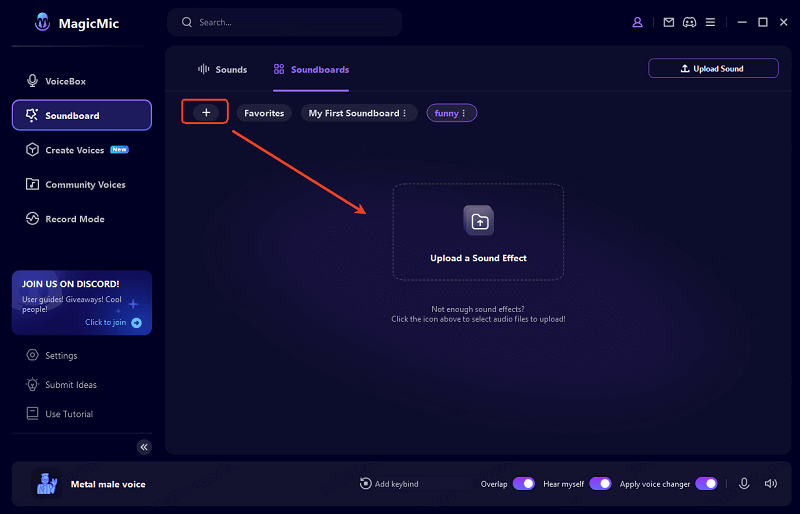
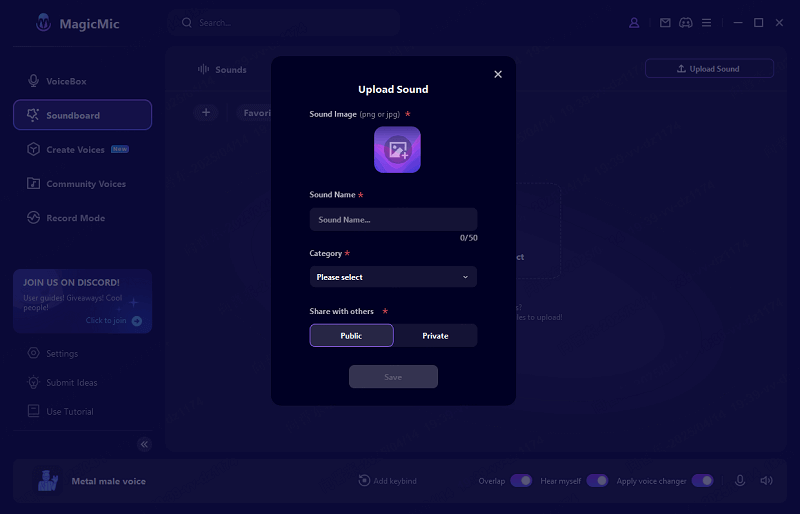
Clicking the “+” icon will prompt you to name your new soundboard. Choosing a descriptive name is more important than it might seem – when you have multiple soundboards, being able to quickly identify the one you need saves time and frustration. After naming your soundboard, you’ll upload sound clips from your computer.
The upload process supports various audio formats, giving you flexibility in what types of sounds you can include. Whether it’s short meme sounds, longer audio clips, or anything in between, the software can handle it. This is where knowing how to get a soundboard that perfectly matches your needs really pays off – you’re in complete control of the content.
After uploading your sounds, you’ll have the option to categorize them and decide whether you want to share your creation with the MagicMic community. The categorization feature is particularly useful for keeping your sounds organized, especially as your collection grows.
Once your soundboard is complete, you can start using it immediately. The software allows you to assign keybinds to your sounds, meaning you can trigger them with simple keyboard shortcuts during conversations or streams. This real-time functionality is what sets desktop software apart when you’re learning how to create soundboard tools for live use.
The ability to use your custom soundboards across different platforms without switching applications makes the process seamless. Whether you’re on a Discord call with friends, streaming on Twitch, or in a Zoom meeting (for appropriate occasions, of course), your soundboards are readily available.
Why Soundboard Creation Has Become So Popular
The growing interest in learning how to make a soundboard isn’t just a passing trend – there are genuine reasons behind this popularity surge. Soundboards have evolved from niche tools to mainstream entertainment and utility applications, and understanding this phenomenon helps explain why so many people are eager to learn how to create soundboard collections of their own.
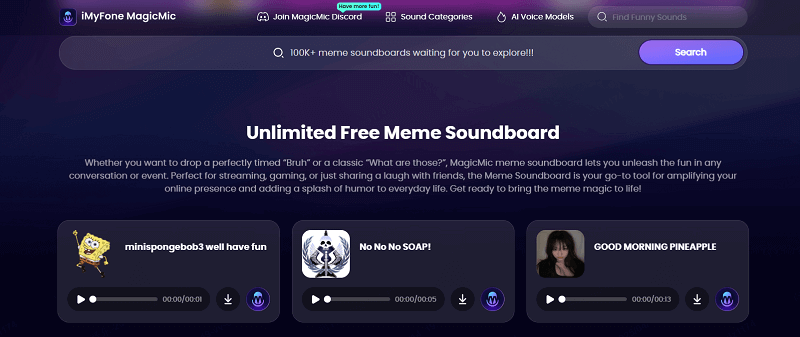
At its core, the appeal of soundboards lies in their ability to transform ordinary moments into memorable experiences. Whether it’s injecting humor into a conversation, enhancing gaming sessions with appropriate sound effects, or adding production value to content creation, soundboards serve multiple purposes that resonate with today’s digital culture.
The celebrity factor plays a significant role in this popularity. Many people first encounter soundboards through clips of famous personalities – politicians, actors, or internet celebrities – saying something funny or memorable. When you know how to make your own soundboard, you’re not limited to existing celebrity clips; you can create your own or modify existing ones to suit your specific needs.
The creative possibilities are another major draw. When you learn how to make a soundboard, you’re essentially learning to craft your own audio toolkit. This creative aspect appeals to the same part of us that enjoys customizing phone ringtones, creating playlists, or designing digital spaces. It’s a form of personal expression using sound as the medium.
The social aspect can’t be overlooked either. Soundboards have become social tools that people use to connect with others who share their sense of humor or interests. When you use a well-timed sound effect during a group call or gaming session, it creates shared moments that strengthen social bonds. This social utility provides strong motivation for people to learn how to create soundboard tools they can use in group settings.
The practical applications extend beyond just entertainment. Content creators use soundboards to enhance their videos and streams, educators use them to make lessons more engaging, and even professionals use them for lighthearted moments during virtual meetings (when appropriate). Understanding how to get a soundboard that serves these various purposes has become a valuable digital skill.
The accessibility of soundboard creation tools has also contributed significantly to their popularity. With platforms like 101 Soundboards offering free online creation tools and software like MagicMic providing more advanced capabilities, there’s an entry point for everyone regardless of technical expertise or budget.
The Evolution of Soundboard Usage
Soundboards have come a long way from their early days as simple novelty items. The evolution of how people use soundboards mirrors broader changes in digital culture and technology adoption. Initially, soundboards were primarily used for prank calls and simple jokes. But as more people learned how to make a soundboard, the applications diversified considerably.
Today, soundboards are integrated into professional broadcasting, content creation workflows, online education, and even therapeutic applications. This expansion of use cases has created more reasons for people to learn how to create soundboard tools tailored to their specific needs rather than relying on generic, pre-made options.
The gaming community has been particularly influential in driving soundboard innovation. Gamers were among the first to recognize the potential of custom soundboards for enhancing multiplayer experiences. The demand from this community has pushed developers to create more sophisticated tools and has inspired many gamers to learn how to make your own soundboard specifically for gaming contexts.
Live streaming has been another major driver. Streamers constantly look for ways to make their content more engaging and interactive, and soundboards provide an excellent tool for this purpose. The ability to trigger sounds in response to chat messages or specific game events has become a standard feature in many streams, creating more opportunities for people who know how to create soundboard setups optimized for streaming.
Expanding Your Soundboard Skills
Once you’ve mastered the basics of how to make a soundboard, there’s a whole world of advanced techniques and applications to explore. The learning process doesn’t stop after you’ve created your first soundboard – in fact, that’s often just the beginning of discovering what’s possible with this versatile tool.
One area worth exploring is sound design specifically for soundboards. When you understand how to create soundboard effects that are clean, well-timed, and appropriately processed, your creations will stand out from generic soundboards. This might involve learning basic audio editing techniques like normalization (adjusting volume levels), trimming silence, adding fade-ins and fade-outs, and sometimes even applying subtle effects like reverb or EQ.
Another advanced consideration is organization and categorization. As your soundboard collection grows, being able to quickly find and trigger the right sound becomes increasingly important. Learning how to make your own soundboard with intuitive categorization systems can significantly improve your user experience. This might mean creating themed soundboards for different situations or organizing sounds by type (e.g., memes, sound effects, music clips).
Integration with other software and hardware is another frontier for those looking to expand their soundboard skills. Many advanced users connect their soundboard software with streaming tools like OBS, voice modulation software, or even physical controllers like MIDI boards or custom button boxes. When you know how to get a soundboard working seamlessly with your entire setup, you unlock new levels of convenience and functionality.
The community aspect of soundboard creation is also worth emphasizing. Many soundboard platforms, including MagicMic, have active communities where users share their creations, techniques, and ideas. Participating in these communities can accelerate your learning and expose you to creative approaches you might not have considered. Seeing how others have solved particular challenges can inspire your own projects and help you think more creatively about how to create soundboard tools that truly meet your needs.
iMyFone MagicMic.Best Real Time AI Voice Changer.MagicMic is a professional real-time AI voice changer that changes your voice while communicating online. It’s easy to use, has extremely low latency, features high quality AI voices and is compatible with all systems. Discover 500+ AI voices and 100K+ meme soundboards with MagicMic today!
Check More Details | Download Now! | Check All Deals
Creative Applications Beyond Entertainment
While entertainment is the most obvious application for soundboards, the skills you develop when learning how to make a soundboard can transfer to other areas as well. Educational uses are increasingly common – teachers use soundboards to make lessons more engaging, to provide audio feedback, or to create interactive learning experiences.
Therapeutic applications represent another interesting frontier. Some therapists use soundboards as part of certain therapeutic approaches, particularly with clients who respond well to auditory stimuli or who have difficulty with verbal expression. While this is a specialized application, it demonstrates the versatility of the technology.
Accessibility is another area where soundboard skills can make a difference. Individuals with certain disabilities sometimes use soundboards as communication aids or to control their environment. Understanding how to create soundboard setups that serve these important functions adds another dimension to the skill.
In professional contexts, soundboards can serve as productivity tools. Imagine having a soundboard with frequently used phrases or information for customer service, or sound effects for video production that you use regularly. When you know how to make your own soundboard optimized for work tasks, you can save time and maintain consistency.
The Future of Soundboard Technology
As more people learn how to make a soundboard and the technology continues to evolve, we’re likely to see even more innovative applications and features. The current trajectory suggests several exciting developments on the horizon.
Artificial intelligence is poised to revolutionize soundboard creation and use. We’re already seeing early implementations of AI in tools like MagicMic’s voice changing features, but future developments might include AI that can generate custom sound effects based on text descriptions, or that can automatically categorize and tag sounds based on their content.
Cloud integration represents another likely development. As internet speeds increase and cloud technology advances, we may see soundboard platforms that seamlessly sync your custom creations across all your devices. This would mean that whether you’re on your computer, phone, or tablet, your soundboards would be available and up-to-date.
Voice activation and natural language processing could make soundboards even more intuitive to use. Instead of clicking buttons or pressing keybinds, you might simply say “play celebration sound” or “do the robot voice.” This hands-free approach would be particularly valuable in situations where your hands are occupied, like during gaming or while creating content.
The social and collaborative aspects of soundboards are also likely to expand. We might see features that allow multiple people to contribute to the same soundboard simultaneously, or that let you easily share sounds with friends during a call. These social features would build on the existing community aspects that have contributed to the popularity of soundboards.
As virtual and augmented reality technologies mature, soundboards will likely find applications in these spaces as well. Imagine having a virtual soundboard in your AR glasses that you can control with gestures, or spatial audio effects that respond to your position in a virtual environment. The skills you develop now while learning how to create soundboard tools will prepare you for these future developments.
Getting Started with Your First Soundboard
If you’re feeling inspired to create your first soundboard, the good news is that getting started has never been easier. The barriers to entry are low, and the learning curve is gentle enough that you can create something simple but functional almost immediately.
Your first project doesn’t need to be elaborate. Start with a small collection of sounds that you find amusing or useful. Maybe it’s a handful of your favorite meme sounds, or some simple sound effects you think would be fun to use during calls with friends. The goal at this stage isn’t to create the perfect soundboard – it’s to learn the basic process of how to make a soundboard.
As you become more comfortable with the creation process, you can gradually expand your skills and tackle more ambitious projects. Maybe you’ll learn how to record and edit your own sounds, or how to create themed soundboards for specific games or applications. Each new skill you add to your toolkit makes your soundboards more personalized and effective.
Remember that the soundboard community is generally welcoming to newcomers. Don’t hesitate to look for tutorials, join discussion forums, or ask questions when you encounter challenges. The collective knowledge of the community can help you overcome obstacles and discover techniques you might not find on your own.
Most importantly, have fun with the process! Soundboard creation is ultimately about expression and enjoyment. Whether you’re creating soundboards for practical purposes or just