TOOL HUNTER

Ever wanted to sound like a robot, a monster, or even a celebrity while chatting with your friends on Discord? Using a voice changer for Discord can transform your ordinary conversations into hilarious, entertaining experiences. Whether you’re gaming, streaming, or just hanging out in voice channels, modifying your voice adds a whole new layer of fun.
The best part is you don’t need to be tech-savvy to use a Discord voice modifier. With the right tools, you can instantly sound completely different. This guide will walk you through various methods to change your voice on Discord across all your devices – PC, Mac, and mobile.
Table of Contents
- Why Use a Discord Voice Modifier?
- Changing Your Voice on Windows and Mac Computers
- Mobile Voice Changing Solutions for Discord
- Troubleshooting Common Voice Changer Issues
- Choosing the Right Voice Changer for Your Needs
- Creative Uses for Discord Voice Changers
- Future of Voice Modification Technology
- Getting Started with Your Discord Voice Changer
Why Use a Discord Voice Modifier?
Voice changers have become incredibly popular among Discord users for several reasons. Privacy protection is a big one – you might not want to reveal your real voice in public servers. Entertainment value is another major factor – imagine reading storybooks in a deep monster voice or pretending to be an AI assistant during gaming sessions.
The Discord voice filter technology has advanced significantly, allowing for real-time voice transformation that sounds surprisingly natural. Whether you want a subtle pitch adjustment or a complete voice overhaul, there’s a Discord voice changer solution for every need.
iMyFone MagicMic.Best Real Time AI Voice Changer.MagicMic is a professional real-time AI voice changer that changes your voice while communicating online. It’s easy to use, has extremely low latency, features high quality AI voices and is compatible with all systems. Discover 500+ AI voices and 100K+ meme soundboards with MagicMic today!

Check More Details | Download Now! | Check All Deals
Changing Your Voice on Windows and Mac Computers
Desktop computers offer the most powerful options for voice modification. You can access sophisticated software with extensive voice libraries and real-time processing capabilities. Let’s explore the top choices for PC users looking to enhance their Discord experience with voice filters.
MagicMic: Comprehensive Discord Voice Changer
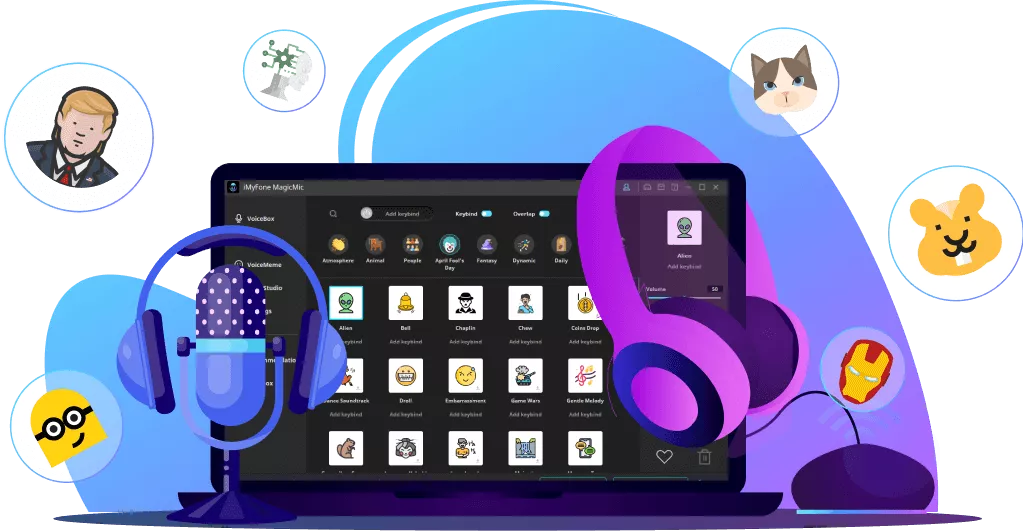
MagicMic stands out as one of the most versatile voice changers available today. This software works seamlessly on both Windows and Mac systems, providing real-time voice transformation during your Discord conversations. The interface is intuitive, making it accessible even for beginners.
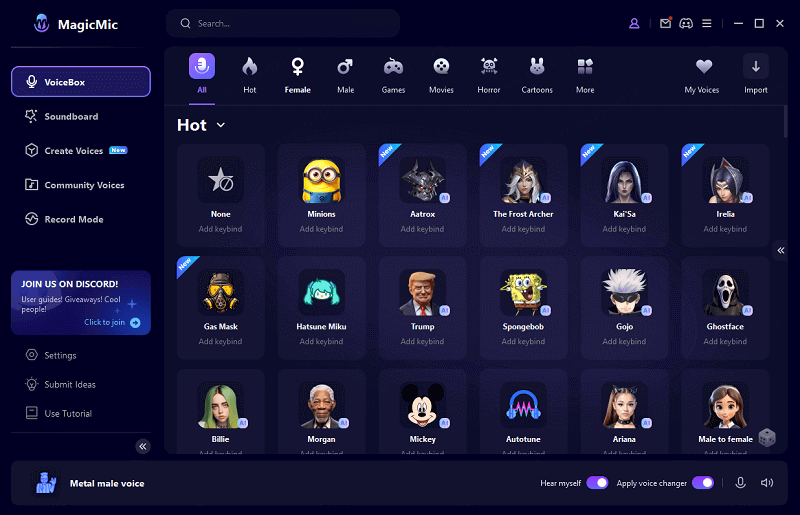
What makes MagicMic particularly impressive is its massive library of voice options. You get access to hundreds of different voice effects, from gender transformations to fantasy creatures and robotic voices. The Discord voice filter quality is exceptional, with minimal latency that ensures your modified voice sounds natural in conversation.
Key Features That Make MagicMic Stand Out
The real-time processing capability means your voice changes instantly as you speak – no delay, no awkward pauses. You can set up keyboard shortcuts to switch between different voices quickly during conversations. This is perfect for content creators who want to perform multiple character voices during their streams.
The voice library includes everything from subtle pitch adjustments to completely transformative effects. Want to sound like a chipmunk? A demon? A celebrity? MagicMic’s Discord voice modifier options have you covered. The background effects add another layer of immersion, placing your voice in different environments like caves, stadiums, or space stations.
Soundboard functionality provides access to thousands of sound effects and meme audio clips. These can be triggered with single clicks during your Discord sessions, adding comedic timing or dramatic emphasis to your conversations.
Setting Up MagicMic for Discord
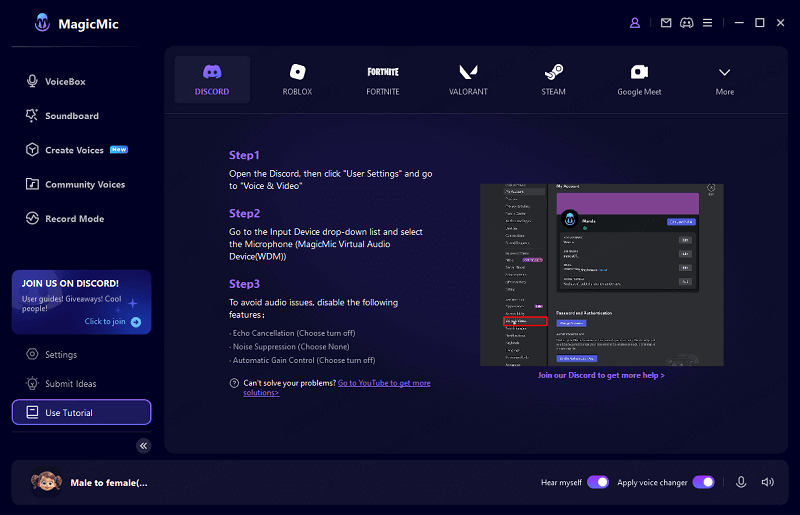
Getting started with this Discord voice changer is straightforward. After installation, you’ll need to configure your audio settings to ensure Discord recognizes the software as your input device. The setup wizard guides you through this process step by step.
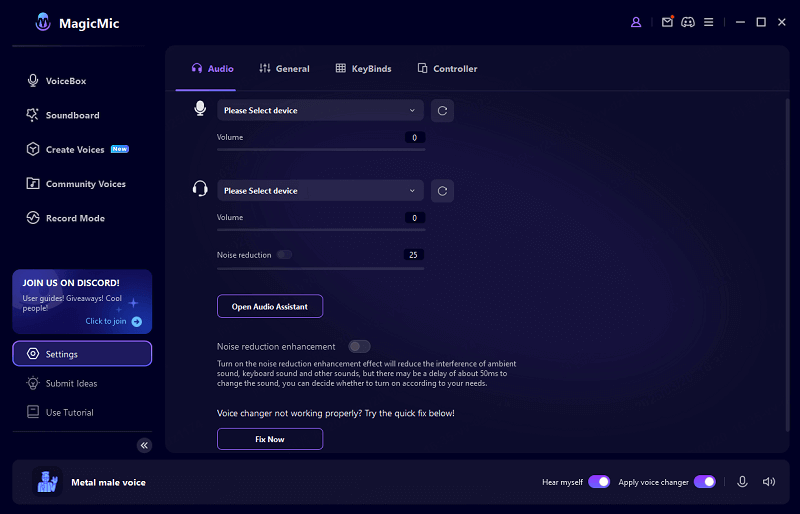
Once configured, you can test different voice effects using the “Hear Myself” feature before joining Discord calls. This lets you preview how you’ll sound to others. The noise reduction filters help clean up your audio, removing background static or keyboard noises for clearer voice transmission.
Integration with Discord is seamless. The software creates a virtual microphone that Discord recognizes as an input device. When you select this virtual microphone in Discord’s settings, all your voice communications will pass through MagicMic’s processing before reaching other users.
MorphVox Pro: Alternative Discord Voice Modifier
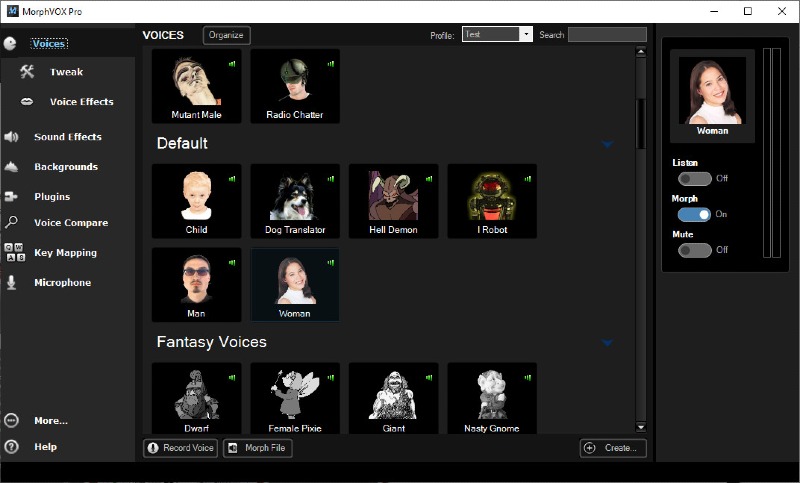
For users seeking another reliable option, MorphVox Pro offers solid voice changing capabilities. While it has a smaller voice library compared to MagicMic, it excels in voice quality and customization options. The software is particularly known for its effective noise cancellation features.
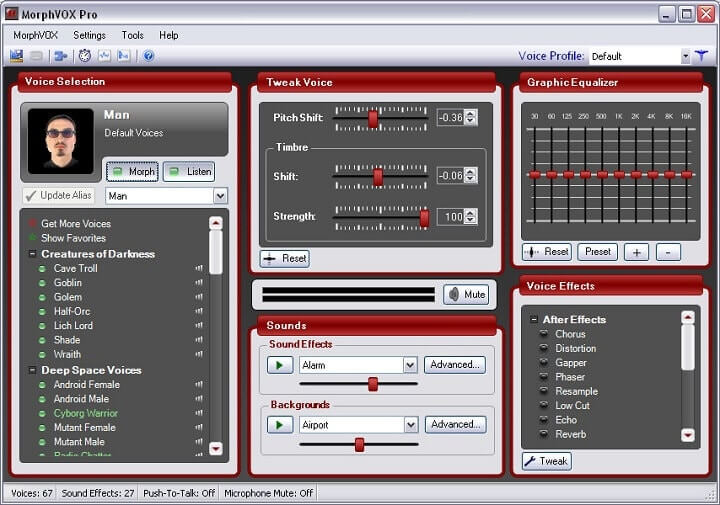
MorphVox Pro functions as a capable Discord voice filter with realistic voice transformations. The learning curve is slightly steeper than MagicMic, but the additional control over voice parameters appeals to users who want to fine-tune their sound precisely.
Getting Started with MorphVox
The setup process involves installing the software and configuring it as your default microphone input. You’ll then need to adjust Discord’s audio settings to recognize MorphVox’s virtual audio device. The software includes comprehensive tutorials to guide you through this configuration.
Voice selection in MorphVox is organized into themed packs that you can download individually. This modular approach lets you only install the voices you actually need, saving disk space. The voice quality is consistently high across different effects, with particular strength in human-like voice modifications.
Background voice effects add environmental context to your modified voice. Whether you want to sound like you’re in an echoey cathedral or a crowded restaurant, these spatial effects enhance the believability of your Discord voice changer experience.
Mobile Voice Changing Solutions for Discord
While computer-based voice changers offer the most features, mobile solutions provide convenience and accessibility. If you primarily use Discord on your smartphone, several apps can help you modify your voice during mobile conversations.
Android Voice Changer Options
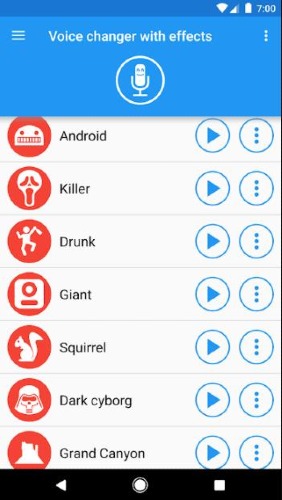
Android users have access to various voice modification apps through the Google Play Store. “Voice Changer with Effects” is a popular choice that offers over 40 different voice filters. The interface is straightforward, making it easy to apply effects to your recordings.
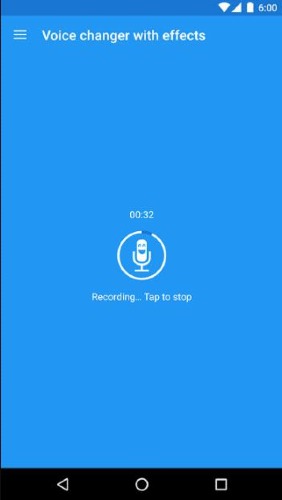
The process involves recording your voice first, then applying the desired effect. Once you’re satisfied with the result, you can play the modified recording during your Discord voice calls. While this isn’t real-time voice changing, it works well for prepared statements or short audio clips.
The app also includes text-to-speech functionality, allowing you to type messages that get converted to speech with your chosen voice effect. This can be particularly entertaining for reading out messages or announcements in your Discord server with a funny voice.
iPhone Voice Modification Methods
iOS users can explore “Voice Changer Plus” from the App Store, which offers an impressive collection of over 55 voice effects. The app handles both pre-recorded audio and real-time voice modification, though the real-time features have some limitations compared to desktop solutions.

The recording process is simple – just tap the record button, speak your message, then browse through the available voice effects. Each effect can be previewed before saving, ensuring you pick the perfect voice for your Discord conversation. The reversed audio feature is particularly popular for creating mysterious or comedic moments.
For better integration with Discord, you can use audio routing apps that send your modified voice directly to Discord. This requires additional setup but provides a more seamless experience than playing recordings manually during calls.
iMyFone MagicMic.Best Real Time AI Voice Changer.MagicMic is a professional real-time AI voice changer that changes your voice while communicating online. It’s easy to use, has extremely low latency, features high quality AI voices and is compatible with all systems. Discover 500+ AI voices and 100K+ meme soundboards with MagicMic today!
Check More Details | Download Now! | Check All Deals
Troubleshooting Common Voice Changer Issues
Even with the best software, you might encounter technical challenges when setting up your Discord voice modifier. Here are solutions to the most common problems users face.
Audio Device Detection Problems
Sometimes your computer fails to recognize the virtual audio devices created by voice changer software. This typically happens when the audio drivers aren’t properly configured or when there’s conflict with existing audio devices.
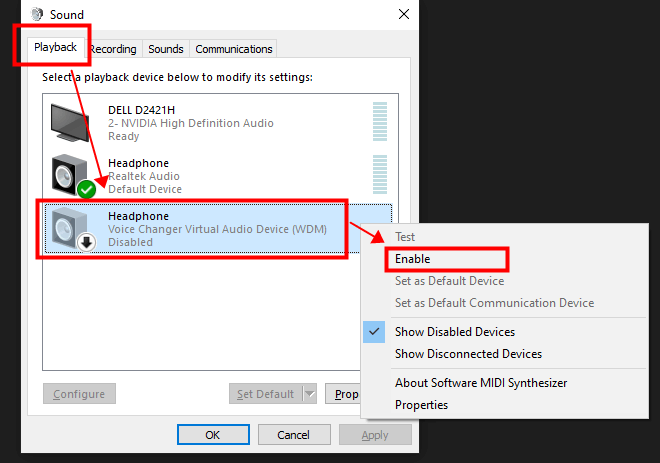
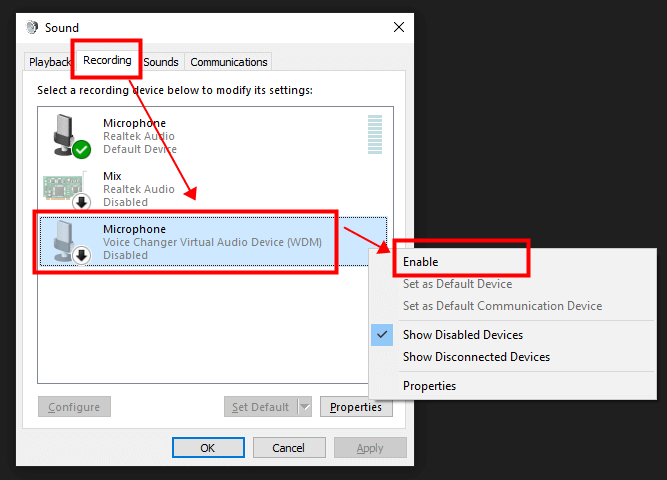
The first step is checking your sound settings in the Control Panel (Windows) or System Preferences (Mac). Ensure that the virtual microphone created by your voice changer software is enabled and set as the default recording device. If the device shows as disabled, right-click and select “Enable.”
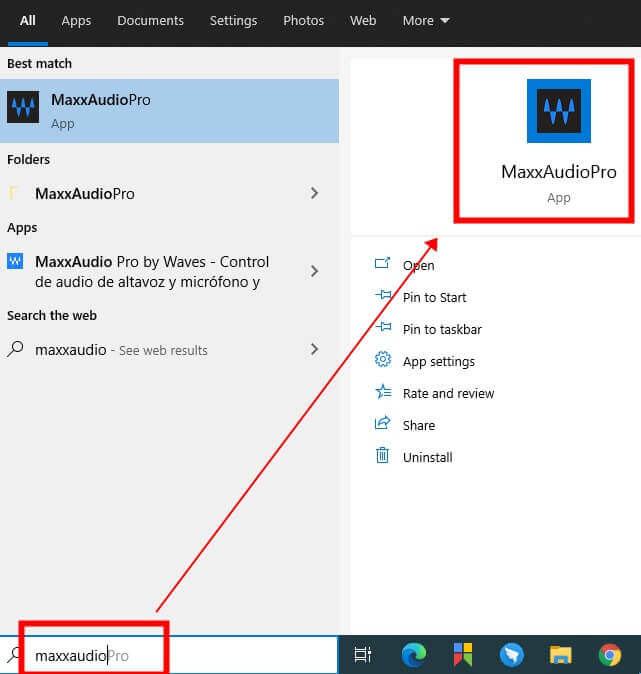
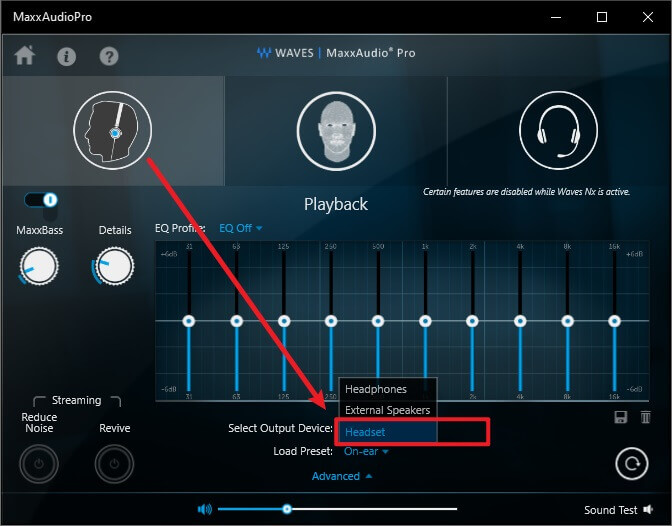
For persistent detection issues, specialized audio management software like MaxxAudio can help. This is particularly useful for Dell computers, but other brands have similar utilities available. These programs help your system properly recognize and prioritize audio input devices.
Audio Quality and Performance Optimization
If your modified voice sounds choppy, distorted, or has noticeable delay, several Discord settings might need adjustment. The platform’s built-in audio processing features sometimes conflict with voice changer software.
Disabling noise suppression is crucial when using a Discord voice filter. This feature is designed to eliminate background noise, but it often mistakes modified voices for noise and tries to remove them. The result is a stuttered, broken audio transmission that ruins the voice changing effect.
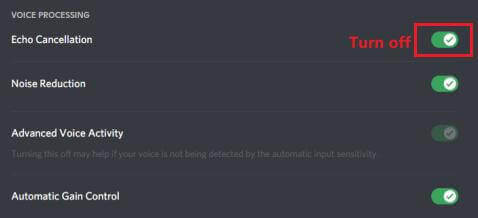
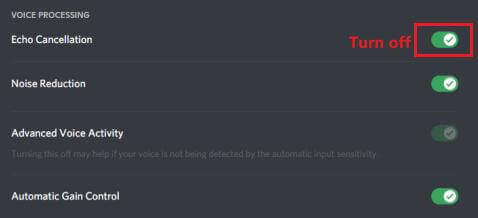
Echo cancellation can also interfere with voice changer performance. While useful in normal conversations, this feature may disrupt the audio processing of your Discord voice modifier. Turning it off typically improves audio clarity and stability.
Input sensitivity settings should be adjusted manually rather than using Discord’s automatic detection. Set the sensitivity slider to cover your normal speaking volume while excluding background noises. This ensures consistent audio input to your voice changer software.
Choosing the Right Voice Changer for Your Needs
With so many options available, selecting the perfect Discord voice changer depends on your specific requirements and technical preferences.
Real-Time vs. Pre-Recorded Voice Modification
Real-time voice changers like MagicMic process your voice as you speak, making them ideal for live conversations, gaming sessions, and streaming. The instant feedback allows for natural interactions without interrupting the flow of conversation.
Pre-recorded voice modification works better for content creation, prepared segments, or situations where audio quality is the top priority. You can take multiple takes, fine-tune the effects, and ensure perfect delivery before sharing with your Discord audience.
Platform Compatibility Considerations
Your primary devices should guide your voice changer selection. Desktop software typically offers the most features and best performance, while mobile apps provide convenience and accessibility. Some users prefer having both options available for different usage scenarios.
Cross-platform compatibility is another factor. If you frequently switch between devices, cloud-based voice changers or software with consistent performance across platforms might serve you better than device-specific solutions.
Voice Quality and Natural Sound
The best Discord voice modifier balances creative effects with natural-sounding results. Some voice changers produce robotic, artificial-sounding voices that become irritating over time. Others maintain vocal nuance and expression while applying the desired modifications.
Testing different options through free trials or demo versions helps you find the voice quality that matches your expectations. Pay attention to how the software handles speech nuances, emotional tones, and conversational pacing.
Creative Uses for Discord Voice Changers
Beyond simple entertainment, voice modification opens up numerous creative possibilities within Discord communities.
Roleplaying and Character Development
Many Discord servers host roleplaying games and interactive storytelling sessions. A reliable Discord voice filter helps players embody their characters more convincingly. Whether you’re playing a grizzled dwarf warrior or a sophisticated android, the right voice enhances immersion for everyone involved.
Consistent character voices also help other players distinguish between your out-of-character comments and in-character dialogue. This separation maintains the game’s atmosphere while allowing for necessary meta-conversation.
Content Creation and Streaming
Streamers and content creators use voice changers to protect their identity while maintaining engaging commentary. The Discord voice modifier functionality allows for creative content without compromising privacy. Many successful streamers have built their brand around distinctive modified voices.
Soundboard integration adds another dimension to streaming content. Well-timed sound effects, meme audio, and atmospheric sounds keep audiences engaged and entertained during longer streaming sessions.
Educational and Professional Applications
Voice changers aren’t just for entertainment. Educators use them to create engaging audio content for students, while professionals might use voice modification for anonymity during sensitive discussions. The Discord voice filter technology has practical applications beyond gaming and socializing.
Language learners sometimes use pitch modification to practice pronunciation without self-consciousness. Hearing their voice at different pitches can help identify articulation issues that might be missed when listening to their natural voice.
Future of Voice Modification Technology
Voice changing technology continues to evolve rapidly, with several exciting developments on the horizon for Discord users.
AI-powered voice synthesis is becoming increasingly sophisticated, allowing for more natural-sounding modifications and even voice cloning capabilities. Future Discord voice changer tools might include personalized voice models trained on your own speech patterns.
Real-time language translation combined with voice modification could break down language barriers in international Discord communities. Imagine speaking in your native language while others hear you in theirs, all with your preferred voice characteristics.
Cloud-based processing may eliminate the need for powerful local hardware, making advanced voice modification accessible to users with less capable devices. This could particularly benefit mobile Discord users who want desktop-quality voice effects.
iMyFone MagicMic.Best Real Time AI Voice Changer.MagicMic is a professional real-time AI voice changer that changes your voice while communicating online. It’s easy to use, has extremely low latency, features high quality AI voices and is compatible with all systems. Discover 500+ AI voices and 100K+ meme soundboards with MagicMic today!
Check More Details | Download Now! | Check All Deals
Getting Started with Your Discord Voice Changer
Embarking on your voice modification journey is easier than you might think. Start by identifying your primary use case – are you looking for entertainment, privacy, or creative expression? This will help determine which type of Discord voice modifier best suits your needs.
Most quality voice changers offer free trials or limited free versions. Take advantage of these to test different options before committing. Pay attention to setup complexity, voice quality, and compatibility with your specific hardware configuration.
Remember that optimal performance often requires tweaking both the voice changer settings and Discord’s audio configuration. Don’t get discouraged if things don’t sound perfect immediately – minor adjustments can make significant improvements to your audio quality.
The Discord voice filter community is generally welcoming and helpful. Don’t hesitate to seek advice from other users who have experience with your chosen software. They can often provide tips and troubleshooting advice that isn’t covered in official documentation.
Whether you choose a sophisticated desktop solution like MagicMic or a convenient mobile app, voice modification can transform your Discord experience. From protecting your privacy to unleashing your creativity, the right Discord voice changer opens up new possibilities for communication and entertainment.
The technology continues to improve, making voice modification more accessible and realistic than ever before. With the guidelines in this article, you’re well-equipped to find, configure, and enjoy the perfect voice changing solution for your Discord activities.
Some images courtesy of iMyFone