TOOL HUNTER

Ever wanted to sound like an archangel who’s both terrifying and charismatic? If you’re a fan of ULTRAKILL, you’ve probably been captivated by Gabriel’s powerful voice. That deep, commanding tone has become iconic in the gaming community, and now you can use it yourself with the right tools. Whether you want to generate Gabriel’s voice for videos or speak in his voice during live streams, there are some fantastic options available that make it surprisingly easy.
Table of Contents
- Getting to Know Gabriel from ULTRAKILL
- Creating Gabriel ULTRAKILL Voice with Text-to-Speech
- Real-Time Gabriel ULTRAKILL Voice Changer Options
- Gabriel’s Most Memorable Voice Lines
- Exploring Other ULTRAKILL Character Voices
- Answering Common Questions About Gabriel ULTRAKILL Voice
- Bringing It All Together
Getting to Know Gabriel from ULTRAKILL
ULTRAKILL is this super intense retro-style first-person shooter that feels like a modern version of classic games like Quake and Doom. It was created by Arsi “Hakita” Patala and published by New Blood Interactive. The game throws you into these crazy levels inspired by Dante’s layers of Hell, where you’re constantly moving fast and shooting everything in sight.
Gabriel serves as the main antagonist in ULTRAKILL – he’s an archangel who’s carrying out orders from the Council in Hell. They call him the “Will of God,” which sounds pretty impressive until you learn that he actually loses his divine power after failing to defeat V1. Now he’s facing potential death unless he can prove his devotion by finally taking down that machine.
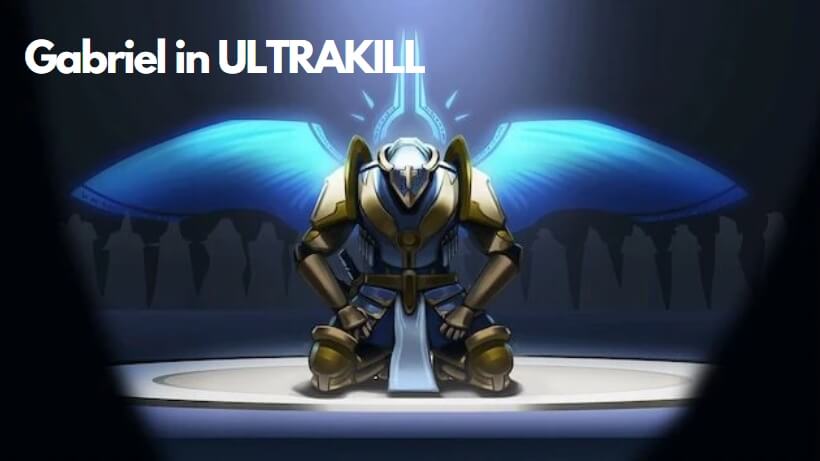
When it comes to his appearance, Gabriel looks absolutely stunning with his silver armor that has these beautiful gold accents. He’s got this golden cross on his helmet, plus these glowing blue light wings and a spiky halo that complete his angelic yet intimidating look.
Understanding Your Options for Gabriel Voice Modification
So you want to sound like Gabriel? You’ve got two main approaches depending on what you need:
If you want to create audio files with Gabriel’s voice for videos, podcasts, or other content, you’ll want a text-to-speech generator. This takes written text and converts it into spoken words using Gabriel’s voice.
But if you’re looking to actually speak in Gabriel’s voice during live conversations, gaming sessions, or streaming, you’ll need a real-time voice changer. This transforms your voice as you speak, making it sound like Gabriel is talking through you.
Creating Gabriel ULTRAKILL Voice with Text-to-Speech
For generating Gabriel’s voice from text, iMyFone VoxBox is an excellent choice. This software lets you create Gabriel AI voice clips in just a few clicks. You can take any of Gabriel’s famous lines – or write your own – and convert them into speech that sounds just like him.
What’s really cool is that besides Gabriel’s voice, VoxBox also supports V1 voice and gives you access to over 3,200 other AI voices. These range from other fictional characters and celebrities to various real-person voices, covering pretty much any audio need you might have.
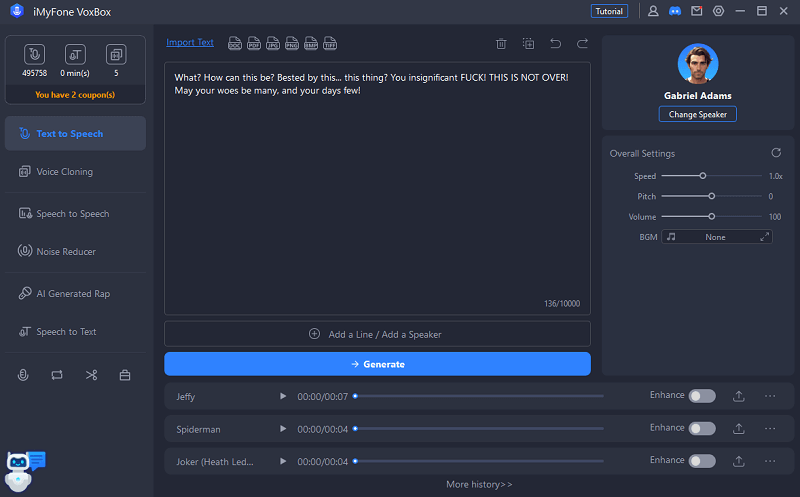
The process is straightforward: just download and launch VoxBox, head to the “Text to Speech” section, select the Gabriel ULTRAKILL AI voice, type your text, and hit “Generate.” Within moments, you’ll have an audio file featuring Gabriel’s voice speaking your words.
What Makes VoxBox Special for Voice Generation
VoxBox stands out because it lets you clone and generate high-quality AI voices for any character from ULTRAKILL, including both Gabriel and V1. After you’ve cloned the voices you want, you get 2,000+ free character counts to create AI speech from text.
The software supports an incredible 77+ languages and offers those 3,200+ voices I mentioned earlier. But it’s more than just a text-to-speech tool – it also includes features like speech-to-text conversion, noise reduction, audio editing, and even AI rap generation.
When you’re done creating your voice clips, you can export them in various formats including MP3, WAV, and Ogg, making them compatible with pretty much any platform or device.
iMyFone MagicMic.Best Real Time AI Voice Changer.MagicMic is a professional real-time AI voice changer that changes your voice while communicating online. It’s easy to use, has extremely low latency, features high quality AI voices and is compatible with all systems. Discover 500+ AI voices and 100K+ meme soundboards with MagicMic today!

Check More Details | Download Now! | Check All Deals
Real-Time Gabriel ULTRAKILL Voice Changer Options
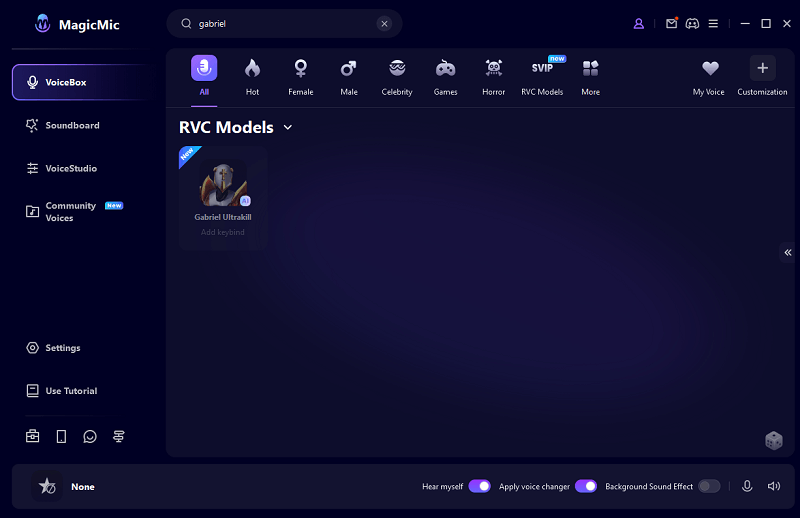
If you’re looking to use Gabriel’s voice during live interactions, you’ll need a real-time voice changer, and MagicMic is perfect for this purpose. This software lets you transform your voice into Gabriel’s while you’re streaming, gaming, or chatting online with friends.
The experience becomes even more engaging when you add in the 600+ sound effects, 200+ voice memes, or background sound effects that MagicMic provides. Imagine surprising your gaming buddies by suddenly speaking in Gabriel’s powerful voice during an intense match!
What sets real-time voice changers like MagicMic apart from online tools is their ability to alter your voice instantly as you speak. Online voice changers typically can’t do this – they usually require you to upload audio files for processing. But with software like MagicMic, you can sound like Gabriel or V1 while you’re actually talking.
Key Features of MagicMic Voice Changer
MagicMic boasts over 300 AI voice filters that let you change your voice with a single click. You can customize voices to your liking by importing corresponding voice files, which is perfect for getting that perfect Gabriel or V1 sound.
The software comes packed with 700+ sound effects and 800+ voice memes that can seriously level up your streaming or gaming experience. You can even modify pre-recorded audio files to sound like V1 or Gabriel from Ultrakill, or any other voice you prefer.
For gamers, MagicMic includes background noise reduction to make your gaming sessions more immersive. It integrates seamlessly with popular platforms like Discord, Fortnite, Valorant, Zoom, Twitch, and many others.
How to Use Gabriel Ultrakill Voice Changer in Real Time
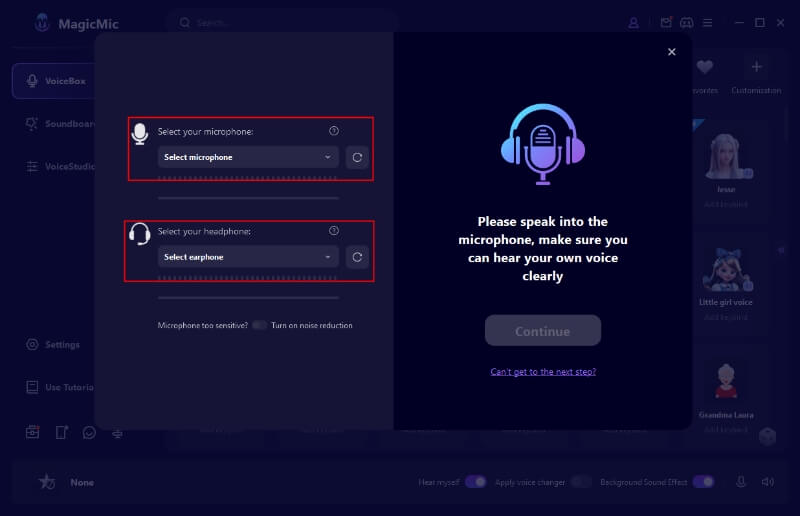
Using MagicMic to sound like Gabriel is surprisingly simple. First, download and launch the application, then select your microphone and headphones to ensure you can hear your voice clearly.
Next, navigate to the “VoiceBox” section and search for the Gabriel ULTRAKILL AI voice. Once selected, you can start speaking and your voice will be transformed into Gabriel’s in real-time, perfect for surprising your friends during gaming sessions.
Gabriel’s Most Memorable Voice Lines
As a dedicated ULTRAKILL fan, you’ve probably found yourself repeating Gabriel’s lines because they’re just so compelling. His dialogue has this amazing mix of menace and elegance that really makes the character stand out.
Let’s look at some of his most iconic quotes that have captured players’ imaginations:
“Machine… I will cut you down, break you apart, splay the gore of your profane form across the STARS! I will grind you down until the very SPARKS CRY FOR MERCY! My hands shall RELISH ENDING YOU… HERE! AND! NOW!”
“May your woes be many, and your days few…” – This line has become particularly popular in the community for its poetic menace.
“BEHOLD! THE POWER OF AN ANGEL!” – Delivered with such intensity during battles.
And who could forget his simple but powerful “Enough!” that cuts through the chaos?
The Voice Behind Gabriel
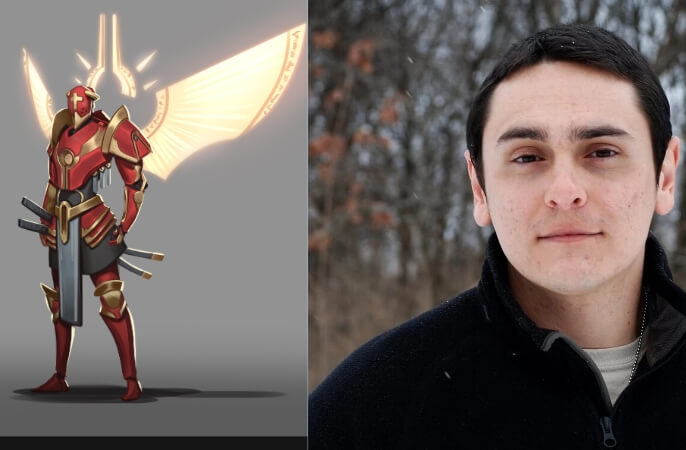
The talented voice actor who brings Gabriel to life is Gianni Matragrano. His performance as Gabriel has become one of his most recognized roles in the gaming world, showcasing his incredible vocal range and ability to convey both power and nuance.
Matragrano has also done impressive work in other projects like Death Battle and Sri Asih. Interestingly, he’s married to Marieke Douma, adding a personal connection that fans find endearing.
Exploring Other ULTRAKILL Character Voices
While Gabriel’s voice is undoubtedly captivating, he’s not the only character in ULTRAKILL with an interesting vocal presence. The main character you play as is V1, a blood-fueled machine navigating Hell for survival after humanity’s extinction.
As the first version of the V model, V1 specializes in quick repairs and absorbs blood through experimental armor. Visually, it stands out with its blue color scheme, “V1” displayed on its chest, and a unique left arm design.

V1 features eight wing-like protrusions on its back that allow for aerial maneuvers, dashes, and continuous sliding while storing unused weapons. While V1 doesn’t speak in the traditional sense, its mechanical sounds and effects have their own distinctive character that fans have come to recognize.
iMyFone MagicMic.Best Real Time AI Voice Changer.MagicMic is a professional real-time AI voice changer that changes your voice while communicating online. It’s easy to use, has extremely low latency, features high quality AI voices and is compatible with all systems. Discover 500+ AI voices and 100K+ meme soundboards with MagicMic today!
Check More Details | Download Now! | Check All Deals
Answering Common Questions About Gabriel ULTRAKILL Voice
How can I make my voice sound like Gabriel from ULTRAKILL?
You can achieve Gabriel’s voice using a voice changer like iMyFone MagicMic. The process is simple: just choose the Gabriel voice filter, speak into your microphone, and you’ll instantly sound like the archangel himself. This works great for real-time conversations during gaming or streaming sessions.
Is it possible to create Gabriel ULTRAKILL AI song covers?
Absolutely! You can use AI music tools to create song covers featuring Gabriel’s voice. These tools convert text into songs using his distinctive vocal characteristics, allowing you to create unique musical pieces featuring Gabriel’s voice in just minutes.
What specific voice effect creates Gabriel’s distinctive sound?
Gabriel’s voice utilizes a reversed reverb effect that gives it that ethereal, powerful quality. This effect is supported by voice changing software like MagicMic, so you can apply it during online chats to achieve a similar sound.
How can I get V1’s voice from ULTRAKILL?
For V1’s voice, you can use online text-to-speech generators or free V1 ULTRAKILL AI voice tools. Software options like VoxBox and Fineshare are excellent choices that can generate V1’s mechanical voice from text input.
Bringing It All Together
Whether you’re a dedicated ULTRAKILL fan wanting to experiment with character voices, a streamer looking to add some celestial flair to your broadcasts, or a content creator needing specific voices for projects, the tools available today make it easier than ever to access Gabriel’s iconic voice.
Text-to-speech generators like VoxBox are perfect for creating audio files featuring Gabriel’s voice, while real-time voice changers like MagicMic let you actually speak in his voice during live interactions. Both approaches have their strengths depending on your specific needs.
The technology has advanced to the point where you don’t need professional audio engineering skills to achieve convincing character voices. With user-friendly software and plenty of customization options, you can quickly start experimenting with Gabriel’s voice and other ULTRAKILL character voices.
iMyFone MagicMic.Best Real Time AI Voice Changer.MagicMic is a professional real-time AI voice changer that changes your voice while communicating online. It’s easy to use, has extremely low latency, features high quality AI voices and is compatible with all systems. Discover 500+ AI voices and 100K+ meme soundboards with MagicMic today!
Check More Details | Download Now! | Check All Deals
So why wait? Dive into the world of voice modification and start experiencing the thrill of speaking with Gabriel’s powerful, commanding voice. Whether you’re surprising friends in games, creating unique content, or just having fun with voice modification, the tools are right at your fingertips.
Some images courtesy of iMyFone