TOOL HUNTER

Ever wondered how you can make your computer read text aloud? Whether you’re a student trying to listen to study materials, a professional needing to proofread documents, or someone who just enjoys having content read to them, text-to-speech technology has become incredibly useful. One of the pioneering tools in this space is Apple’s Macintalk voice generator, which has been helping Mac users convert written text into spoken words for decades.
The world of text-to-speech has evolved significantly since the early days of robotic-sounding computer voices. Today’s technology offers remarkably natural-sounding speech that can mimic human intonation and rhythm. While Macintalk provides a solid foundation for basic text-to-speech needs, many users are discovering that modern alternatives offer enhanced features and more natural voices.
Table of Contents
- Understanding Macintalk Voice Generator Technology
- Getting Started with Macintalk Text to Speech
- Exploring Macintalk for Windows and Cross-Platform Options
- Limitations of Macintalk and the Need for Alternatives
- iMyFone VoxBox: A Comprehensive Macintalk Alternative
- Key Features That Make VoxBox Stand Out
- Using VoxBox for Text to Speech Conversion
- Comparing PlainTalk Text to Speech with Modern Alternatives
- Practical Applications for Modern Text to Speech Technology
- Future Developments in Text to Speech Technology
- Making the Choice Between Macintalk and Modern Alternatives
- Frequently Asked Questions About Text to Speech Technology
Understanding Macintalk Voice Generator Technology
Macintalk represents Apple’s longstanding commitment to accessibility and user-friendly technology. This text-to-speech system allows Mac computers to vocalize written content using synthesized voices. The technology has been particularly valuable for individuals with visual impairments, reading difficulties, or those who simply prefer auditory learning.

What makes the Macintalk voice generator special is its integration within the macOS ecosystem. It’s not just a standalone application but rather a system-level feature that works across various applications and documents. This means you can use Macintalk text to speech functionality in word processors, web browsers, PDF readers, and many other applications.
The history of Macintalk dates back to the early 1990s when Apple introduced PlainTalk text to speech technology. This was part of a broader initiative to make computers more accessible and intuitive. Over the years, the voices available through Macintalk have become more refined and natural-sounding, though they still maintain that distinctive computer-generated quality that many long-time Mac users find familiar.
Getting Started with Macintalk Text to Speech
Using Macintalk for text to speech conversion is relatively straightforward, though the exact steps might vary slightly depending on your macOS version. The beauty of this system is that it doesn’t require any additional software installation – everything you need is already built into your Mac.
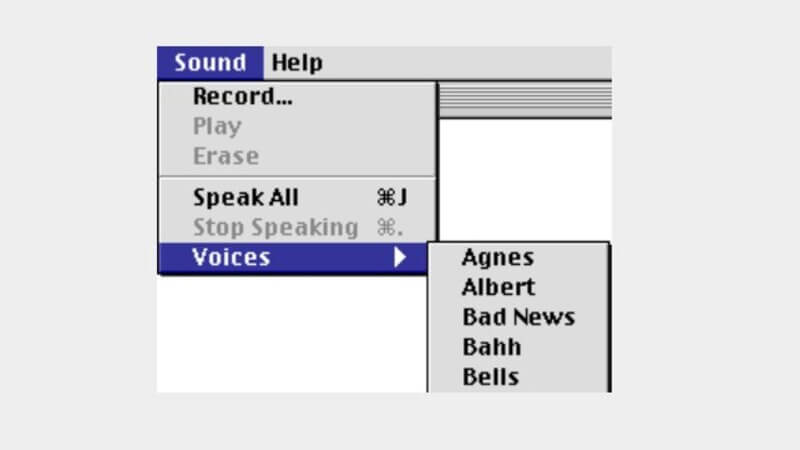
To activate Macintalk text to speech, you typically start by selecting the “Speak All” option from the application menu. This command tells your Mac to read aloud all the text in the current document or selected area. The process is similar across most applications, though some might have slightly different menu placements.
One of the nice features of Macintalk is the ability to choose from different voices. While the default voice might work fine for most purposes, you might prefer a different tone or accent for extended listening sessions. The voice selection options allow you to pick from various computerized voices, each with its own characteristics and speech patterns.
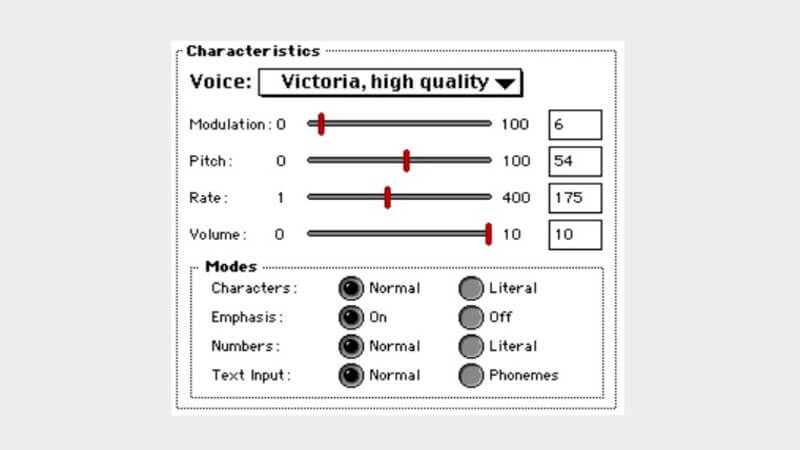
Beyond basic voice selection, Macintalk offers several customization options. You can adjust the speaking rate to make the voice faster or slower, depending on your preference and comprehension needs. There’s also the “Literal for Characters and Numbers” option, which causes the voice to spell out each character and number individually – particularly useful for proofreading or technical content.
For users who want even more control, Macintalk supports phonemic text input. This advanced feature allows you to fine-tune the pronunciation of specific words or phrases, ensuring that specialized terminology or unusual names are spoken correctly.
Exploring Macintalk for Windows and Cross-Platform Options
While Macintalk is inherently an Apple technology, many Windows users wonder about Macintalk for Windows compatibility. The truth is that Macintalk is designed specifically for macOS and isn’t natively available on Windows systems. However, this doesn’t mean Windows users are out of luck when it comes to quality text-to-speech solutions.
The quest for Macintalk for Windows alternatives has led to the development of numerous third-party applications that offer similar or even enhanced functionality. These tools recognize that text-to-speech needs extend beyond platform boundaries, and many users work across both Mac and Windows environments.
When considering Macintalk for Windows options, it’s important to look for applications that offer consistent performance across different operating systems. The best alternatives typically provide similar voice quality and customization options regardless of whether you’re using a Mac or Windows PC.
Limitations of Macintalk and the Need for Alternatives
Despite its historical significance and solid functionality, Macintalk does have some limitations that might lead users to seek alternatives. The voices, while serviceable, often sound noticeably computerized compared to modern AI-powered text-to-speech systems. This can become tiring during extended listening sessions.
Another limitation is the relatively small selection of voices and languages compared to contemporary alternatives. While Macintalk covers the basics, users looking for specific accents, dialects, or specialized voices might find the options somewhat restrictive.
The customization options in Macintalk, while useful, aren’t as extensive as what’s available in dedicated text-to-speech applications. Users who need fine-grained control over speech parameters like pitch, emphasis, and pause duration might find Macintalk’s offerings somewhat basic.
These limitations have created demand for Macintalk text to speech online alternatives that offer more natural voices, broader language support, and enhanced customization features. The good news is that several excellent options are available, with iMyFone VoxBox standing out as a particularly strong contender.
iMyFone VoxBox.Best AI Voice Generator & AI Voice Cloner: Create Custom Voices Instantly.iMyFone VoxBox is a powerful free text-to-speech software offering 3,500+ lifelike AI voices in 250+ languages, all with 10 features in one tool. Create professional voiceovers and captivate audiences worldwide in just minutes with VoxBox AI.

Check More Details | Download Now! | Check All Deals
iMyFone VoxBox: A Comprehensive Macintalk Alternative
For users seeking a more powerful and versatile text-to-speech solution, iMyFone VoxBox presents an excellent alternative to Macintalk. This professional-grade application goes beyond basic text-to-speech functionality to offer a comprehensive suite of audio tools in a single package.
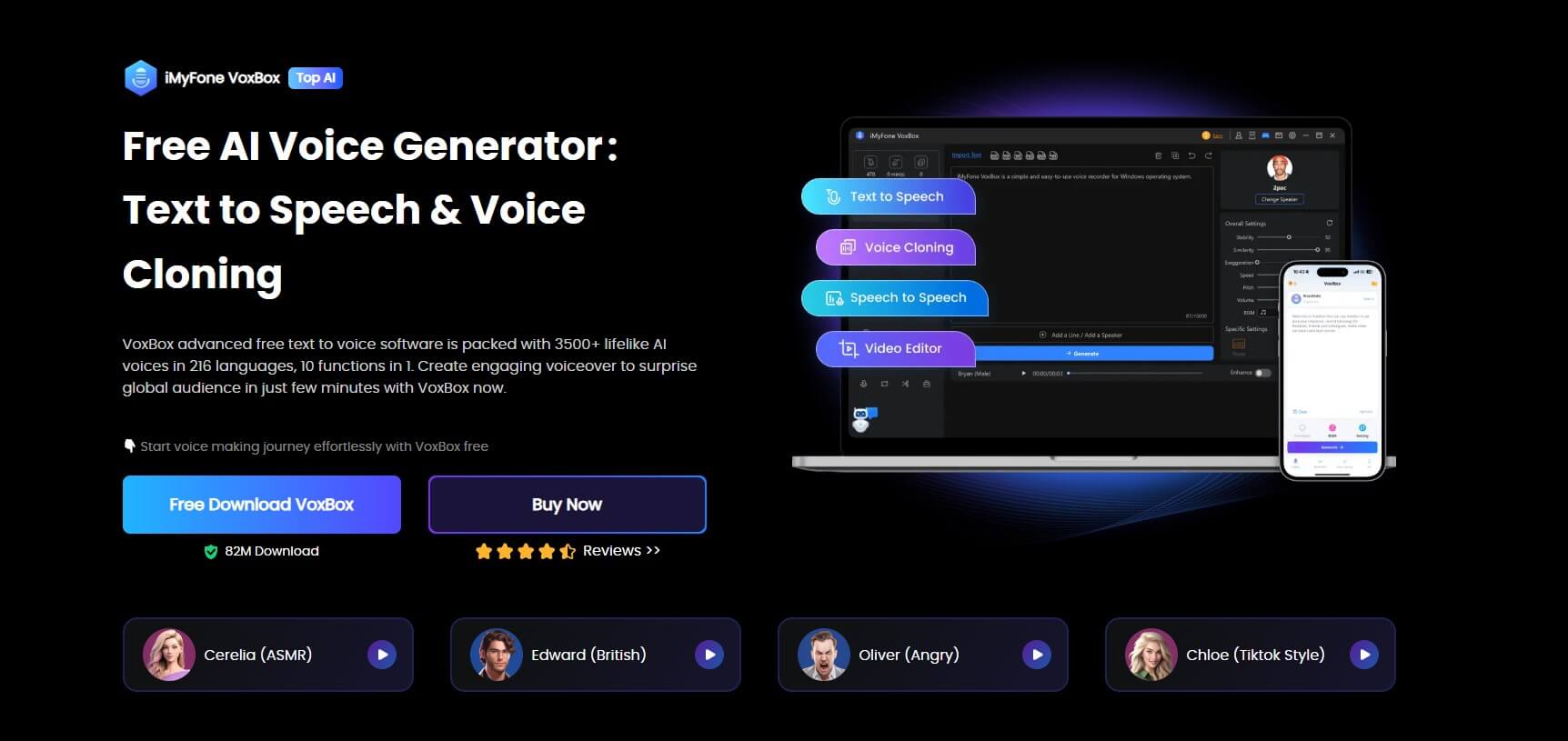
What sets VoxBox apart from Macintalk is its extensive voice library. While Macintalk offers a handful of computerized voices, VoxBox provides access to over 3,200 natural-sounding voices. These aren’t just basic text-to-speech voices – they include celebrity impressions, character voices, and incredibly human-like AI voices that are barely distinguishable from actual human speech.
The language support in VoxBox is equally impressive. Where Macintalk focuses primarily on English with limited additional language support, VoxBox offers 77+ languages and 100+ accents. This makes it an ideal solution for international users, language learners, or anyone creating content for global audiences.
Another area where VoxBox excels is customization. While Macintalk allows basic adjustments to speech rate and voice selection, VoxBox provides detailed control over numerous voice parameters. Users can adjust speed, volume, pitch, emphasis, and pause duration to create exactly the right speech characteristics for their needs.
iMyFone VoxBox.Best AI Voice Generator & AI Voice Cloner: Create Custom Voices Instantly.iMyFone VoxBox is a powerful free text-to-speech software offering 3,500+ lifelike AI voices in 250+ languages, all with 10 features in one tool. Create professional voiceovers and captivate audiences worldwide in just minutes with VoxBox AI.
Check More Details | Download Now! | Check All Deals
Key Features That Make VoxBox Stand Out
Beyond its core text-to-speech capabilities, VoxBox includes several additional features that make it more than just a Macintalk replacement. The application incorporates voice cloning technology, allowing users to create custom voices based on sample recordings. This is particularly useful for content creators who want consistent branding across their audio content.
The speech-to-text functionality in VoxBox provides the reverse capability – converting spoken words into written text. This bidirectional approach makes VoxBox a comprehensive solution for all audio-text conversion needs, something Macintalk doesn’t offer.
Audio enhancement tools within VoxBox allow users to improve the quality of existing audio files. Whether you’re cleaning up recordings, adjusting volume levels, or applying noise reduction, these features extend VoxBox’s utility beyond simple text-to-speech conversion.
For users concerned about compatibility, VoxBox supports multiple platforms including Windows, macOS, iOS, and Android. This cross-platform availability means you can maintain consistent text-to-speech capabilities regardless of which devices you use.
The free trial offering is another significant advantage. While Macintalk comes built into macOS, VoxBox allows users to test its capabilities with 2,000 free characters before committing to a purchase. This trial period helps users determine if the additional features justify moving beyond the built-in Macintalk functionality.
Using VoxBox for Text to Speech Conversion
Getting started with VoxBox is straightforward, even for users who are familiar with Macintalk. The installation process is simple, and the interface is designed to be intuitive for both beginners and advanced users.

Once installed, accessing the text-to-speech features involves navigating to the appropriate section within the application. The “Change Speaker” option reveals the extensive voice library, organized by language, accent, and voice characteristics. This makes it easy to find the perfect voice for any project.
The actual text-to-speech conversion process is similarly straightforward. Users can either type text directly into the application or import text from external files. For longer documents or specific formatting needs, the import functionality saves time and ensures accuracy.
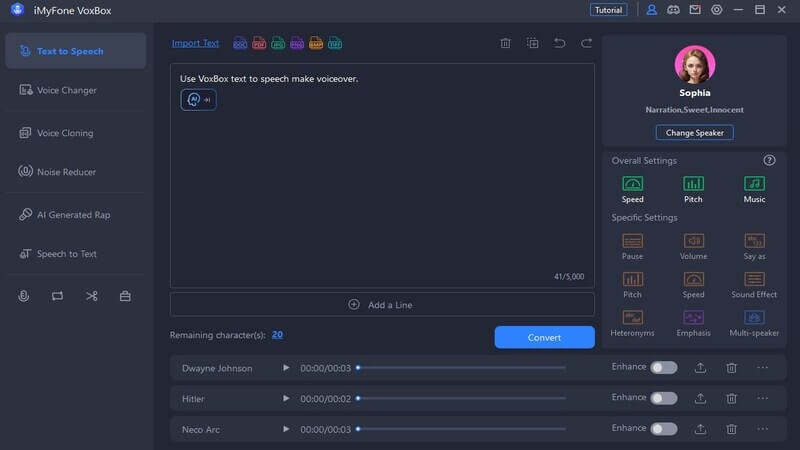
One particularly useful feature is the AI text assistant, which can help refine or expand upon your original text. This is especially valuable for content creators who want to ensure their scripts are optimized for audio delivery.
After conversion, users can preview the audio output and make adjustments to voice parameters as needed. The real-time preview functionality makes it easy to fine-tune settings until the speech sounds exactly right.
Comparing PlainTalk Text to Speech with Modern Alternatives
It’s interesting to consider how far text-to-speech technology has evolved since the introduction of PlainTalk text to speech in the 1990s. PlainTalk was Apple’s umbrella term for their early speech synthesis and recognition technologies, with Macintalk serving as the text-to-speech component.
The original PlainTalk text to speech system was groundbreaking for its time, representing one of the first commercially successful implementations of computer speech synthesis. Released with the Macintosh Quadra AV models in 1993, it became a standard component of System 7 and laid the foundation for future developments in computer speech technology.
While PlainTalk text to speech was innovative in the 1990s, today’s alternatives like VoxBox demonstrate how much the technology has advanced. Modern AI-powered systems offer significantly more natural intonation, better pronunciation accuracy, and emotional nuance that early systems like PlainTalk couldn’t achieve.
The development path from PlainTalk to contemporary text-to-speech solutions shows a consistent trend toward more human-like speech and greater accessibility. What began as a novelty feature has evolved into a sophisticated tool with practical applications across education, entertainment, accessibility, and professional content creation.
Practical Applications for Modern Text to Speech Technology
The uses for advanced text-to-speech technology extend far beyond the basic functionality offered by Macintalk. Content creators are using tools like VoxBox to generate voiceovers for videos, podcasts, and audiobooks without the need for expensive recording equipment or voice actors.
Educational applications are particularly promising. Students can listen to textbooks and study materials, potentially improving comprehension and retention. Language learners benefit from hearing proper pronunciation of foreign words and phrases, while those with reading difficulties can access written content through audio.
In professional settings, text-to-speech technology aids in proofreading by allowing writers to hear their work read aloud – often making it easier to catch errors that might be missed during visual review. The ability to quickly generate spoken versions of documents also facilitates multitasking, as users can listen to content while performing other tasks.
Accessibility remains a crucial application area. Individuals with visual impairments, dyslexia, or other conditions that affect reading can use text-to-speech technology to access digital content that might otherwise be difficult or impossible to consume.
Future Developments in Text to Speech Technology
As impressive as current text-to-speech technology has become, the field continues to evolve rapidly. Researchers are working on even more natural-sounding speech synthesis, with some experimental systems achieving near-perfect mimicry of human voices.
Emotional expression represents another frontier in text-to-speech development. Future systems may be able to detect the emotional content of text and adjust their delivery accordingly, adding appropriate emphasis, tone variations, and pacing to match the intended sentiment.
Integration with other AI technologies is likely to enhance text-to-speech capabilities further. Imagine systems that can automatically summarize long documents before reading them aloud, or that can answer questions about the content they’re vocalizing.
The ongoing development of tools like VoxBox suggests that text-to-speech technology will continue to become more accessible, affordable, and feature-rich. As these tools improve, they’re likely to find applications in increasingly diverse fields and use cases.
Making the Choice Between Macintalk and Modern Alternatives
For Mac users, the decision between sticking with built-in Macintalk functionality or investing in a modern alternative like VoxBox depends on individual needs and use cases. Macintalk remains a perfectly adequate solution for occasional text-to-speech needs, particularly for users who value simplicity and don’t require advanced features.
However, for users who need more natural-sounding voices, broader language support, or additional features like voice cloning and audio editing, modern alternatives offer significant advantages. The investment in a tool like VoxBox can pay dividends through improved audio quality, time savings, and expanded capabilities.
The good news is that it’s not necessarily an either-or decision. Many users continue to use Macintalk for quick, simple text-to-speech tasks while turning to more advanced tools for projects requiring higher quality or special features.
iMyFone VoxBox.Best AI Voice Generator & AI Voice Cloner: Create Custom Voices Instantly.iMyFone VoxBox is a powerful free text-to-speech software offering 3,500+ lifelike AI voices in 250+ languages, all with 10 features in one tool. Create professional voiceovers and captivate audiences worldwide in just minutes with VoxBox AI.
Check More Details | Download Now! | Check All Deals
Frequently Asked Questions About Text to Speech Technology
How does Macintalk compare to modern text-to-speech solutions?
Macintalk provides basic, functional text-to-speech capabilities that work well for simple tasks. However, modern solutions like VoxBox offer significantly more natural voices, broader language support, and additional features that extend beyond basic text-to-speech conversion.
Can I use Macintalk on Windows systems?
Macintalk is designed specifically for macOS and isn’t available natively on Windows. However, several excellent alternatives provide similar or enhanced functionality on Windows platforms, with VoxBox being a particularly strong option for cross-platform compatibility.
What was the significance of PlainTalk in text-to-speech history?
PlainTalk represented Apple’s first major foray into speech synthesis and recognition technology. Introduced in the early 1990s, it brought text-to-speech capabilities to mainstream computer users and established a foundation for future developments in computer speech technology.
How has text-to-speech technology improved in recent years?
Recent advances in AI and machine learning have dramatically improved text-to-speech quality. Modern systems offer more natural intonation, better pronunciation, emotional expressiveness, and the ability to clone specific voices – capabilities that were unimaginable with earlier systems like Macintalk.
What should I consider when choosing a text-to-speech solution?
Key considerations include voice quality and naturalness, language support, customization options, additional features, platform compatibility, and cost. For basic needs, built-in solutions like Macintalk may suffice, while power users typically benefit from more full-featured alternatives.
The evolution from Macintalk to modern text-to-speech solutions illustrates how rapidly this technology has advanced. While Macintalk remains a serviceable option for basic text-to-speech needs, tools like iMyFone VoxBox demonstrate what’s possible with current technology – offering natural-sounding voices, extensive language support, and professional-grade features that cater to diverse user needs.
Whether you’re a casual user needing occasional text-to-speech functionality or a content creator requiring studio-quality voiceovers, today’s text-to-speech landscape offers solutions for every need and budget. The continued development of this technology promises even more impressive capabilities in the future, making digital content increasingly accessible and engaging for all users.
Some images courtesy of iMyFone