TOOL HUNTER

Ever wanted to make your computer talk like Goofy? You know, that classic Disney character with the silly voice that always makes everyone laugh? Well, now you can create that exact voice using some really cool technology called text-to-speech. This isn’t just about having fun – it’s about bringing one of the most beloved cartoon personalities to life in your own projects.
Whether you’re making funny videos for social media, creating unique content for your gaming streams, or just want to prank your friends with hilarious voicemails, having access to a Goofy voice generator can take your creativity to a whole new level. The best part is you don’t need to be a voice actor or have any special skills – the technology does all the work for you!
Table of Contents
- Getting to Know Disney’s Goofy Character
- The Man Behind the Goofy Voice
- Creating Goofy Voice with Text-to-Speech Technology
- Step-by-Step Guide to Creating Goofy Voice with VoxBox
- Advanced Features of Modern Voice Generators
- Practical Applications for Goofy Text to Speech
- Understanding the Technology Behind Voice Generation
- Tips for Getting the Best Results
- Common Questions About Goofy Voice Generation
- The Future of Character Voice Technology
Getting to Know Disney’s Goofy Character
Before we dive into how to create that iconic voice, let’s talk about Goofy himself. Created by Walt Disney Productions back in the 1930s, Goofy has been making people smile for generations. He first appeared in Mickey Mouse cartoons as part of the gang alongside Mickey and Donald Duck.
What makes Goofy so special isn’t just his personality – it’s that unforgettable voice that’s become so recognizable. His speech has this unique quality that’s both funny and endearing. People have tried to imitate it for years, but now with modern technology, you can create authentic-sounding Goofy speech without even opening your mouth.
Goofy isn’t just any cartoon character – he’s become an icon of American animation. Over the decades, he’s starred in his own television shows, movies, and comic books. What started as a minor character in Mickey Mouse shorts evolved into a star who could carry his own stories.
Interesting Facts About Goofy
There’s more to this character than meets the eye. Did you know that Goofy has his own birthday? It’s celebrated on May 25th. He also has a son named Max Goof, who often appears alongside his best friend P.J. in various Disney productions.
Goofy’s favorite activities include golfing, skiing, and bowling – though he’s not particularly skilled at any of them, which just adds to his charm. His unique way of walking combines regular steps with little bounces, making his movements as distinctive as his voice.
As part of the “Fabulous Three” with Mickey Mouse and Donald Duck, Goofy has been part of countless adventures. He even has his own theme song called “The Goof Troop” from his 1990s television series. These details might seem small, but they’re what make the character so memorable and loved by fans of all ages.
The Man Behind the Goofy Voice
For such an iconic character, you might be surprised to learn that only one person has provided Goofy’s voice for the past several decades. Bill Farmer, born on November 14, 1952, took over the role in 1987 and has been the official voice of Goofy ever since. He’s so associated with the character that many people simply refer to him as “the Voice of Goofy.”
Bill Farmer’s talent goes beyond just creating funny sounds. His comedic timing and ability to bring personality to animated characters has made him a legend in the voice acting industry. He doesn’t just do Goofy’s voice – he also provides the vocals for other Disney characters including Pluto.

What’s amazing about Bill Farmer’s performance is how consistent he’s been over the years. Whether you’re watching a classic Goofy cartoon from the 1990s or a new Disney production, that voice remains instantly recognizable. He’s managed to maintain the core elements that make Goofy sound like Goofy while still bringing fresh energy to each performance.
The dedication required to voice a character for this long is impressive. Bill Farmer has essentially dedicated his career to making people laugh through Goofy’s unique vocalizations. Next time you hear that familiar “gawrsh” or “ahyuck,” you’ll know it’s coming from one of the most talented voice actors in the business.
Creating Goofy Voice with Text-to-Speech Technology
Now let’s get to the exciting part – how you can create your own Goofy voice using text-to-speech technology. This isn’t about trying to imitate the voice yourself (unless you’re particularly skilled at voice acting), but rather using specialized software that can generate authentic-sounding Goofy speech from any text you type.
The technology behind these voice generators is pretty amazing. Using artificial intelligence and advanced audio processing, these tools can analyze the unique characteristics of Goofy’s voice and recreate them digitally. The result is speech that sounds remarkably close to the real character.
iMyFone VoxBox.Best AI Voice Generator & AI Voice Cloner: Create Custom Voices Instantly.iMyFone VoxBox is a powerful free text-to-speech software offering 3,500+ lifelike AI voices in 250+ languages, all with 10 features in one tool. Create professional voiceovers and captivate audiences worldwide in just minutes with VoxBox AI.

Check More Details | Download Now! | Check All Deals
One of the best tools for this purpose is VoxBox, which specializes in creating cartoon character voices including Goofy’s. What makes this software stand out is its ability to capture not just the sound but the personality behind the voice. It’s not just about making text sound funny – it’s about recreating that specific Goofy quality that fans know and love.
Why Use a Goofy AI Voice Generator?
You might be wondering why anyone would need a Goofy text to speech generator. The applications are actually more varied than you might think. Content creators use it to add personality to their videos, teachers use it to make learning more engaging for students, and businesses sometimes use it for creative marketing campaigns.
The advantage of using a Goofy AI voice instead of trying to record your own imitation is consistency and quality. Unless you’re a professional voice actor, it’s challenging to maintain that unique Goofy sound throughout an entire recording. With text-to-speech technology, every word comes out perfectly in character.
Another benefit is the time savings. Instead of spending hours recording and editing audio, you can generate professional-quality Goofy voice recordings in minutes. This is especially useful for projects with tight deadlines or when you need to produce large amounts of content quickly.
Step-by-Step Guide to Creating Goofy Voice with VoxBox
Ready to create your own Goofy voice? Let’s walk through the process using VoxBox, one of the most user-friendly tools available. Don’t worry if you’re not tech-savvy – the steps are straightforward and designed for beginners.
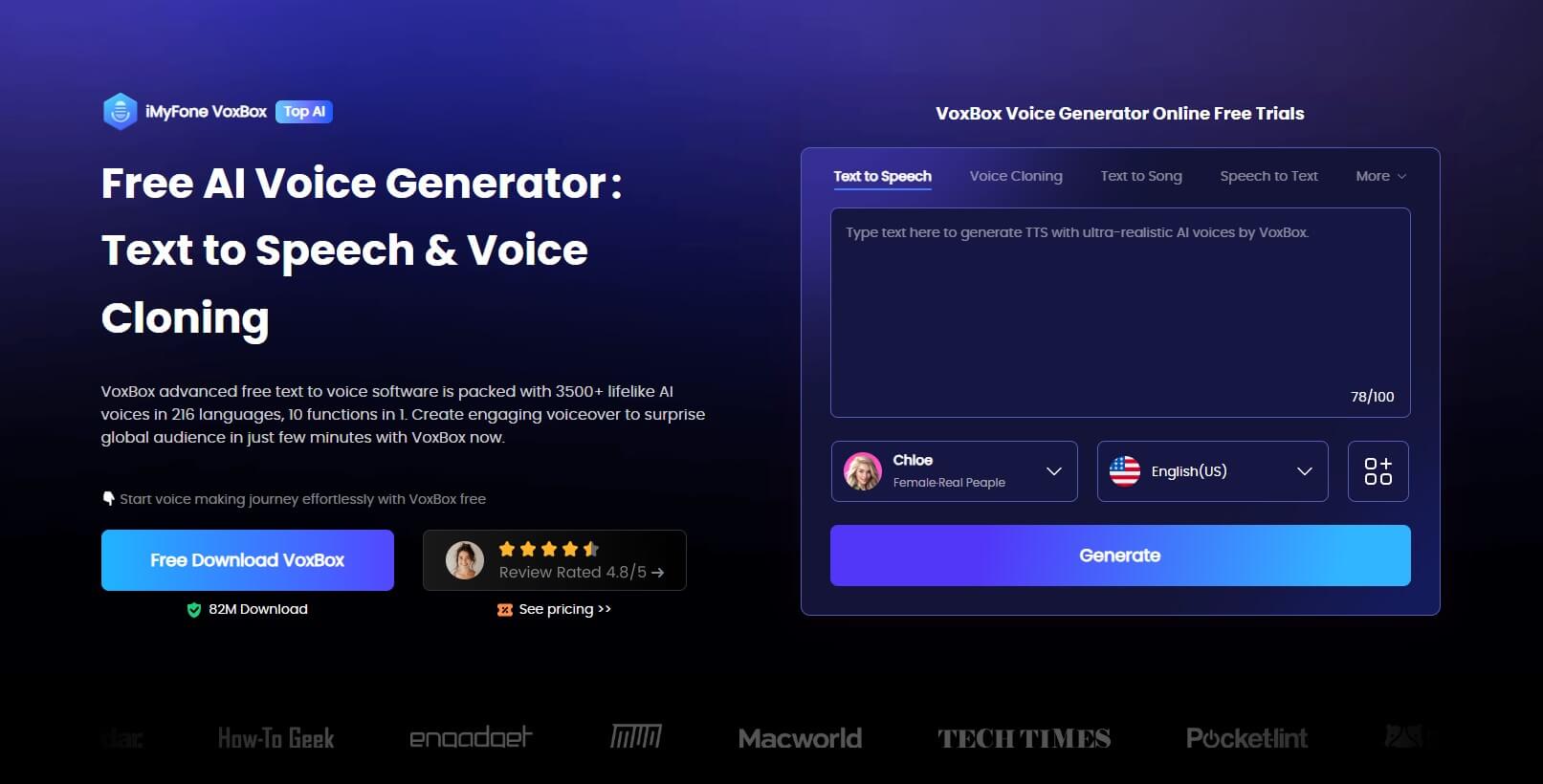
First, you’ll need to download and install the VoxBox software on your computer. The installation process is simple and only takes a few minutes. Once you’ve got it open, you’ll see a clean, intuitive interface with various options for voice generation.
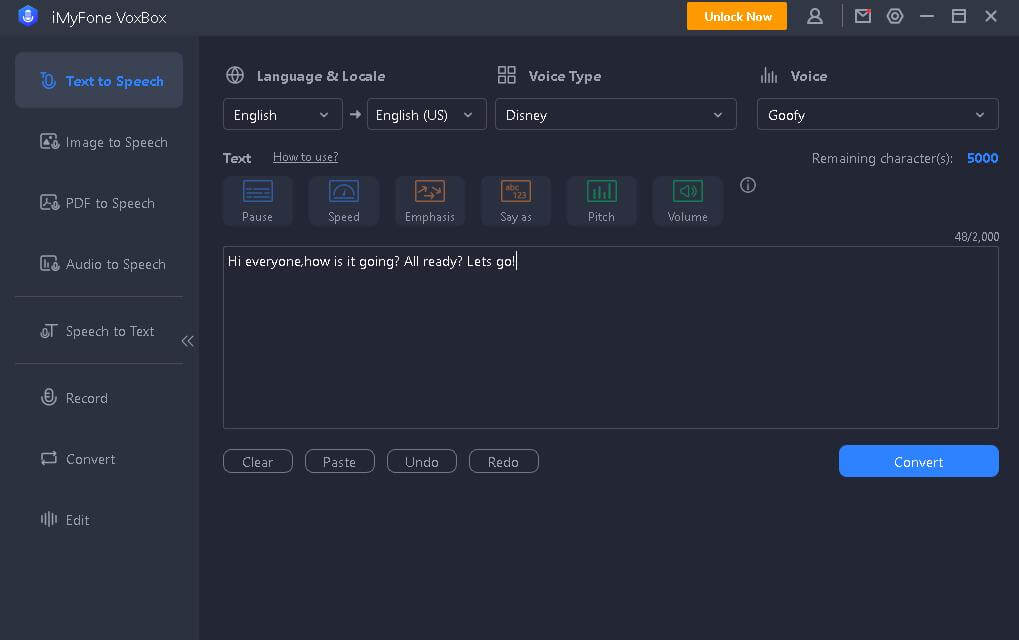
The next step is to select the text-to-speech function. This is usually clearly labeled in the main menu. Once you’re in the text-to-speech section, you’ll need to choose the specific voice you want to use. Look for Disney voices or cartoon character options, and select Goofy from the list.
Now comes the fun part – typing the text you want Goofy to say. You can write anything from a simple greeting to an entire script. The software can handle both short phrases and longer paragraphs, so don’t be afraid to get creative with what you want Goofy to express.
Customizing Your Goofy Voice Output
After you’ve entered your text, you have the option to customize how the voice will sound. While the basic Goofy voice is pre-set, you can adjust elements like speaking speed, pitch, and volume to get exactly the tone you’re looking for.
Want Goofy to sound extra excited? Increase the speed and pitch slightly. Need him to sound more thoughtful or confused? Slow down the pace and adjust the tone accordingly. These customization options let you add emotional nuance to the generated speech.
Once you’re happy with your settings, simply click the convert button. The software will process your text and generate the audio file. This usually only takes a few seconds, depending on the length of your text. Then you can preview the result to make sure it sounds exactly how you want it.
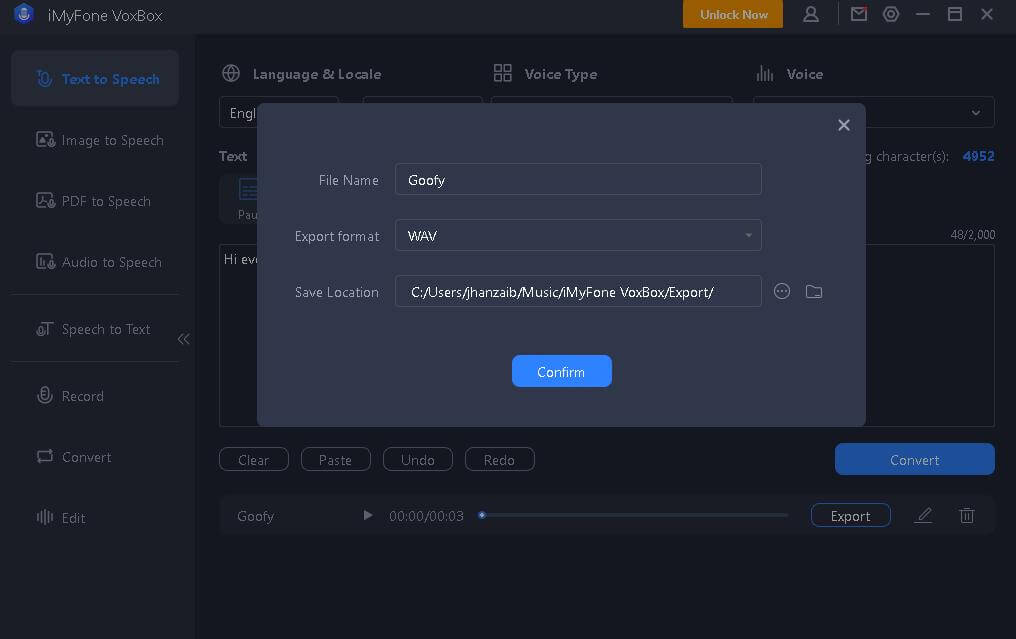
The final step is exporting your creation. VoxBox allows you to save the audio in various formats like MP3 or WAV, so you can use it in different applications. Whether you’re adding it to a video project, using it in a presentation, or just saving it to share with friends, you’ll have a professional-quality Goofy voice recording ready to go.
Advanced Features of Modern Voice Generators
Today’s voice generation technology offers much more than basic text-to-speech conversion. Tools like VoxBox come packed with features that give you incredible control over the final output. Let’s explore some of these advanced capabilities.
One of the most impressive features is the vast library of voices available. Beyond just Goofy, you can access thousands of different voice options across multiple languages. This means you could theoretically have Goofy speaking Spanish, French, or any number of other languages while still maintaining his characteristic sound.
The accent customization is another powerful tool. With over 100 different accent types available, you can fine-tune how regional influences affect the speech pattern. This level of detail ensures that your generated voice sounds authentic and natural, rather than robotic or artificial.
iMyFone VoxBox.Best AI Voice Generator & AI Voice Cloner: Create Custom Voices Instantly.iMyFone VoxBox is a powerful free text-to-speech software offering 3,500+ lifelike AI voices in 250+ languages, all with 10 features in one tool. Create professional voiceovers and captivate audiences worldwide in just minutes with VoxBox AI.
Check More Details | Download Now! | Check All Deals
Advanced editing capabilities allow you to combine elements from different voices to create something completely unique. Imagine taking the basic Goofy voice and mixing it with characteristics from other cartoon characters to invent a brand new voice for your original creations.
The real-time processing feature means you don’t have to wait long for your audio to generate. This instant feedback lets you experiment with different texts and settings until you achieve the perfect result. It makes the creative process much more fluid and enjoyable.
Practical Applications for Goofy Text to Speech
Now that you know how to create Goofy voice using text-to-speech technology, you might be wondering about practical uses. The applications are limited only by your imagination, but here are some popular ways people use generated Goofy voices.
Content creators find Goofy AI voice particularly useful for YouTube videos and social media content. Whether it’s for animated shorts, comedy sketches, or unique channel introductions, having Goofy’s voice can make content more engaging and memorable for viewers.
Teachers and educators sometimes use character voices to make learning more fun for younger students. A lesson explained by Goofy might capture attention better than a standard lecture. This approach works especially well for online educational content or digital learning tools.
Businesses with a fun, creative brand identity might incorporate character voices in their marketing materials. While this approach isn’t for every company, those targeting younger demographics or promoting entertainment products can benefit from the playful association with beloved characters.
Personal and Entertainment Uses
On a personal level, Goofy text to speech can be great for creating custom greetings, funny voicemail messages, or personalized gifts for Disney fans. Imagine surprising a friend with a birthday message from Goofy himself – it’s a unique way to make someone’s day special.
Gamers often use character voices for streaming content or creating mods. Having Goofy commentate your gameplay or provide in-game dialogue can add an extra layer of entertainment for your audience. The distinctive sound makes the content instantly recognizable to viewers.
For aspiring animators or filmmakers, having access to character voices during the storyboarding or rough cut phase can be incredibly helpful. Even if you eventually hire professional voice actors, having placeholder audio that closely matches your intended final product helps tremendously during the development process.
Understanding the Technology Behind Voice Generation
The magic of creating authentic-sounding Goofy voices isn’t actually magic – it’s sophisticated technology. Understanding how these systems work can help you appreciate the incredible engineering behind what might seem like a simple fun tool.
At the core of any good Goofy voice generator is artificial intelligence trained on hours of actual Goofy dialogue from various Disney productions. The AI analyzes patterns in the speech – not just the sound quality but the rhythm, pacing, and emotional inflections that make the voice unique.
This training process involves breaking down speech into its component parts: phonemes (the distinct units of sound that distinguish one word from another), prosody (the rhythm and melody of speech), and timbre (the unique quality that makes one voice different from another). The AI learns to recreate all these elements in combination.
Modern systems use neural networks that can generate speech that flows naturally rather than sounding robotic or stilted. This is why today’s best Goofy AI voice generators can produce speech that sounds much more authentic than text-to-speech technology from just a few years ago.
The Role of Deep Learning
Deep learning algorithms allow the system to understand context and adjust the delivery accordingly. For example, the same sentence might be spoken differently depending on whether it’s a question, an exclamation, or part of a longer narrative. The AI learns these nuances from its training data.
Another important aspect is emotional intelligence. The best Goofy voice generators can detect emotional cues in your text and adjust the delivery to match. A excited sentence will sound different from a confused one, even when using the same basic voice parameters.
The technology continues to improve as more data becomes available and algorithms become more sophisticated. What seems cutting-edge today will likely be standard in a few years, with even more realistic and expressive voice generation capabilities on the horizon.
Tips for Getting the Best Results
Creating perfect Goofy voice recordings does require some practice and technique. Here are some tips to help you get the best possible results from your voice generation sessions.
Pay attention to your text formatting. The software interprets punctuation as cues for pauses and inflection. Using commas, periods, exclamation points, and question marks appropriately will make the generated speech sound more natural and expressive.
Experiment with different phrasing. Sometimes the way you word a sentence can significantly affect how it sounds when spoken. If a particular phrase doesn’t sound right when generated, try rephrasing it while keeping the same meaning.
Use the customization options wisely. While it’s tempting to play with all the settings, sometimes subtle adjustments work better than dramatic changes. Small tweaks to speed and pitch can make a big difference in achieving that authentic Goofy sound.
Technical Considerations
Consider your audio export settings based on how you plan to use the recording. For online videos, MP3 format with a moderate bitrate is usually sufficient. For professional projects or music integration, you might want higher quality WAV files.
If you’re planning to edit the audio further in other software, export it without compression when possible. This gives you the highest quality source material to work with during your editing process.
Remember that ambient noise can affect your final product if you’re combining the generated voice with other audio. Try to work with clean source material and consider using audio editing software to balance levels and reduce background noise if necessary.
Practice makes perfect. The more you work with your chosen Goofy voice generator, the better you’ll understand its capabilities and limitations. Don’t be afraid to experiment with different approaches until you find what works best for your specific needs.
Common Questions About Goofy Voice Generation
As with any technology, people often have questions about how Goofy text to speech works and what they can expect. Here are answers to some of the most frequently asked questions.
Many people wonder about the legal aspects of using character voices. While creating content for personal use is generally fine, commercial applications may have different considerations. It’s always wise to understand the terms of service for any voice generation software you use.
Another common question is about voice quality and authenticity. How close can these generated voices get to the real thing? With modern AI technology, the results can be remarkably accurate, especially to casual listeners. The best systems capture the essence of the character’s voice while maintaining clarity and intelligibility.
People often ask about customization limits. How much can you alter a generated Goofy voice before it stops sounding like Goofy? This varies by software, but most systems maintain the core characteristics that make the voice recognizable while allowing adjustments to speed, pitch, and emotional tone.
Technical Questions
Some users wonder about compatibility with other software. Can you import generated voices into video editing programs, presentation software, or other applications? Most voice generators export standard audio formats that work with virtually all multimedia software.
There are often questions about processing time. How long does it take to generate audio from text? For most systems, the process is nearly instantaneous for short passages and only takes a few seconds for longer texts. The speed has improved dramatically in recent years.
Many people ask about language support. Can Goofy speak languages other than English? While the character is primarily associated with English, some voice generators can apply the characteristic sound to other languages, though the result may vary in authenticity.
The Future of Character Voice Technology
The technology behind Goofy voice generators is evolving rapidly. What we can do today is impressive, but the future promises even more exciting possibilities for character voice creation and manipulation.
We’re likely to see even more realistic emotional expression in generated voices. Future systems may be able to detect subtle emotional cues in text and adjust the vocal delivery with greater nuance, making the speech sound more natural and context-appropriate.
Real-time voice conversion is another area of development. Imagine being able to speak into a microphone and have your voice converted to Goofy’s in real time during live streams or video calls. This technology already exists in basic forms but will become more sophisticated and accessible.
**iMyFone VoxBox.Best AI Voice Generator & AI Voice Cloner: Create Custom Voices Instantly.iMyFone VoxBox is a powerful free text-to-speech software offering 3,500+ lifelike AI voices in