TOOL HUNTER

Summary: This guide provides a complete answer to the common question, “can you download shows on Max app?” We cover the official methods for mobile devices and reveal a powerful solution for downloading HBO Max content directly to your computer without restrictions. Learn how to download shows on HBO Max for true offline freedom.
Ever found yourself stuck with a poor internet connection just as you’re about to dive into the latest episode of The Penguin or rewatch a classic DC movie? Streaming is great, but having your favorite content available offline is even better. This leads many users to search for terms like “how to download shows on HBO max” or “can i download movies on max.” If you’ve been wondering the same thing, you’re in the right place. This comprehensive guide will walk you through every possible way to save your HBO Max (now often called Max) movies and TV shows for viewing anywhere, anytime.
Table of Contents
Can You Download Movies & TV Shows on HBO Max?
Let’s tackle the big question first: can you download shows on max app officially? The short answer is yes, but with significant caveats. The Max platform does include a download feature for offline viewing, which is a lifesaver for travelers, commuters, or anyone with an unreliable internet connection. However, this functionality is not a free-for-all.
Firstly, your ability to download depends entirely on your subscription tier. If you’re on the budget-friendly “With Ads” plan, the download feature is locked. You’ll need at least the “Ad-Free” plan or the top-tier “Ultimate Ad-Free” plan to save content to your device. Secondly, even with a premium plan, there are caps. The Ad-Free plan allows you to have up to 30 videos downloaded at a time, while the Ultimate Ad-Free plan raises that limit to 100. Some individual series may also have their own limits, like a maximum of 25 downloadable episodes regardless of your plan.

Most importantly, the official download on HBO Max feature is only available on mobile and tablet devices. If you’re hoping to download a movie to your Windows PC or Mac for a big-screen offline experience, you’re out of luck through official channels. This restriction is due to content protection measures. So, while you can download shows on HBO Max to your phone, doing so on a computer requires a different approach, which we’ll explore later.
How to Download Shows on HBO Max on Your iPhone or iPad
For iOS users, the process to download shows on max app is straightforward. The Max app is designed to make saving content for later quite simple. Here’s how you can do it on your iPhone, iPad, or iPod Touch.
Step 1: Open the Max app and find the movie or TV episode you want to save. Tap on it to go to its details page.Step 2: Look for the download button (it usually looks like a downward arrow or has a “Download” label). Tap it to start downloading the title to your device.Step 3: Once the download is complete, you can access all your offline content by going to your Profile tab (usually in the bottom right corner) and selecting the Downloads section.

A crucial thing to remember is that these downloads aren’t permanent. You typically have 30 days to start watching them. Once you press play, you’ll usually have 48 hours to finish watching before the download expires. You can always check the expiration date next to each title in your Downloads library. To manage space, you can remove downloads manually by tapping “Edit” and then the “X” next to any title you want to delete.
How to Download Shows on HBO Max on Android Devices
The process for Android phones and tablets is almost identical to iOS. If you’re an Android user asking “how to download shows on max app,” follow these steps.
Step 1: Launch the Max app on your Android device and browse to the video you wish to download.Step 2: On the video’s description page, you’ll see the download button. Give it a tap to initiate the download.Step 3: To find your downloaded videos, navigate to your Profile and then enter the Downloads menu, where all your offline content is stored.

The same rules apply here: downloads expire after 30 days (or 48 hours after you start watching), and your total number of downloads is limited by your subscription plan. It’s a convenient system for temporary offline access on the go.
How to Download HBO Max Content on an Amazon Fire Tablet
What about Amazon’s ecosystem? Can you download shows on max app using a Fire Tablet? Absolutely, but there’s a device requirement. The Max app is available for Amazon Fire Tablets of the 4th generation or later. You can find and install it directly from the Amazon Appstore.
Once the app is installed, the download process mirrors what you do on a smartphone:
Step 1: Open Max on your Fire Tablet and select the movie or episode.Step 2: On its details screen, tap the download arrow.Step 3: Access your saved videos later via Profile > Downloads.

This makes Fire Tablets excellent dedicated devices for offline entertainment, especially for long trips where you might not have Wi-Fi.
How to Download HBO Max Movies and Shows on a Computer
Now, let’s address the elephant in the room: can i download movies on max to my Windows PC or MacBook? As we’ve established, the official Max app for browsers and the dedicated Windows app do not offer a download function. This is a major gap for users who prefer watching on a larger screen or want to build a permanent personal library without expiration dates.
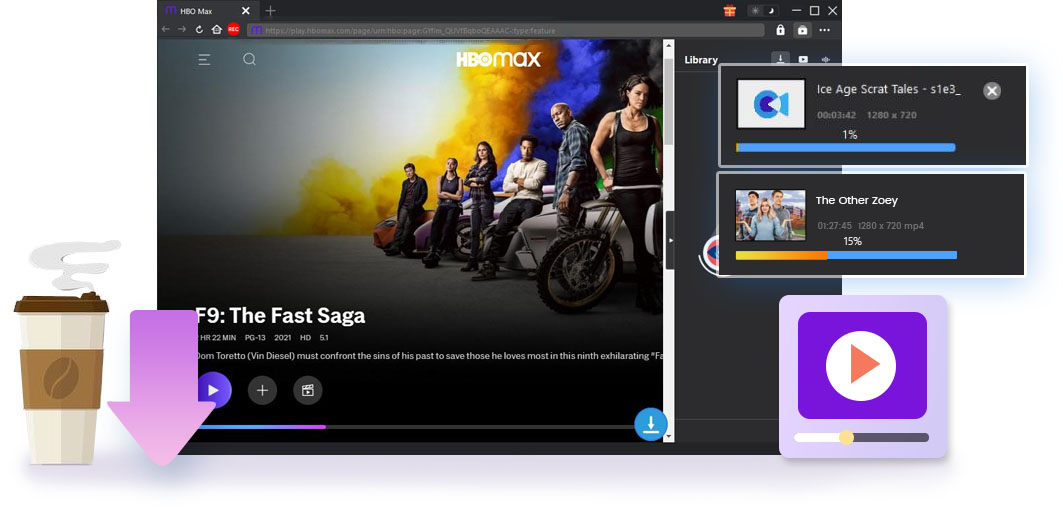
This is where third-party software tools come into play. A dedicated video downloader can bridge this gap, allowing you to save HBO Max videos directly to your computer’s hard drive as standard video files (like MP4 or MKV). One such tool often recommended is CleverGet MAX Downloader. This type of software works by accessing Max through a built-in browser within the downloader app, letting you log into your account, play a video, and then save a local copy.
The advantages are significant: no download limits, no expiration dates, and the ability to choose your preferred resolution and format. The downloaded files are yours to keep, and you can transfer them to other devices like a USB drive for TV playback or to your phone. Importantly, these tools can also download available subtitles and alternate audio tracks, preserving the full viewing experience.
Try CleverGet HBO Max Downloader right now! Download Max/HBO MAX videos including movies, TV series, HBO Originals and B/R Sports videos with all or selected subtitles and audio tracks to HD MP4/MKV files for watching offline.
Get the Windows version | Get the Mac version | Use the time-limited promotional campaign,
Steps to Use a Downloader for HBO Max on PC
Here’s a general overview of how the process works with a tool like CleverGet MAX Downloader:
Step 1: Install the SoftwareDownload and install the video downloader on your computer. Launch the program after installation.

Step 2: Configure SettingsIt’s a good idea to first set your preferred download folder. Look for a settings or gear icon, usually in the top corner of the application. Navigate to the general settings and specify where you want the saved videos to be stored on your computer.

Step 3: Access HBO Max and Find Your VideoWithin the downloader software, you’ll typically find a browser or a dedicated site navigator. Use it to go to the HBO Max website. Log in with your subscription credentials just like you would in a normal browser. Then, browse or search for the movie or TV show episode you want to download.
Step 4: Analyze and DownloadPlay the video. The downloader software will automatically detect the streaming video and present you with download options. A pop-up window will appear, showing different available resolutions (like 480p, 720p, or 1080p), audio language choices, and subtitle options.

Select your preferred settings and click the download button. The software will then start saving the video file to your specified folder.
Step 5: Manage Your DownloadsYou can usually monitor the download progress within the application. Once complete, your videos will be available in the software’s library or directly in the output folder you set, ready for offline playback on any media player.

Conclusion and Final Thoughts
So, can you download shows on Max app? Yes, you definitely can, both through the official method on supported mobile devices and via alternative methods for computers. The official route is perfect for convenient, temporary offline viewing on your phone or tablet, though it comes with plan restrictions and expiration dates. For users who want more control—permanent saves, no limits, and the ability to watch on a PC or transfer files—a dedicated video downloader provides a powerful solution.
Try Leawo Video Converter Ultimate right now! Convert videos and audios in 180+ formats, download from 1000+ sites like YouTube and Facebook, rip and convert DVDs, burn videos and photos to DVD, create stunning photo slideshows, and enhance your media with powerful editing tools.
Get the Windows version | Get the Mac version | Use the time-limited promotional campaign,
Whether you’re preparing for a flight, dealing with a spotty home internet connection, or simply want to ensure your favorite content is always accessible, knowing how to download shows on HBO Max gives you the freedom to enjoy your subscription to the fullest. Start by trying the official downloads on your mobile device, and if you need more flexibility, explore the computer-based options available.
Some images are sourced from the internet.