TOOL HUNTER

If you’re into creating videos or streaming content online, you’ve probably noticed how much a good sound effect can change the whole vibe. Whether it’s a funny meme noise or a dramatic explosion, the right audio can make your content stand out. One tool that’s been getting a lot of attention lately is the Voicemod Tuna soundboard. It’s a massive library of user-uploaded sounds that people use for everything from Discord chats to YouTube videos.
But what exactly is this tuna soundboard everyone’s talking about? How do you use it, and what happens when it stops working? We’re going to dive deep into everything about the Voicemod Tuna platform, from its basic features to troubleshooting common problems. We’ll also look at some alternatives in case you want to explore other options.
What Exactly Is Voicemod Tuna?
Voicemod Tuna is basically a huge online collection of sound clips that users from around the world have uploaded and shared. Think of it as a massive sound library where you can find pretty much any sound effect you might need. The platform has grown significantly over time and now boasts over 150,000 different sound effects available for download.
The cool thing about this tuna voicemod platform is that it’s not just about downloading sounds – you can also create your own custom soundboards. These personalized collections can then be used on various platforms like Discord during your gaming sessions or video calls. It’s particularly popular among gamers and content creators who want to add some personality to their communications.
The whole concept behind Voicemod Tuna is community-driven content. Users upload their own creations, others download and use them, and the library just keeps growing. It’s like a social network for sound effects where everyone contributes to building this massive audio resource.
Getting Started With Voicemod Tuna Soundboard
Using the Voicemod Tuna soundboard is pretty straightforward once you get the hang of it. The platform offers two main ways to interact with its content. First, you can simply browse through the massive library and download individual sound effects directly to your computer. This is great if you just need a specific sound for a project.
The second option is more involved but also more rewarding – you can create your own custom soundboards. This means you’re not just taking from the community but also contributing to it. You can organize sounds into personalized collections that fit your specific needs, whether that’s for streaming, video editing, or just messing around with friends on voice chat.
These custom sound effects can be incredibly useful for various scenarios. Content creators use them to enhance their YouTube videos or Twitch streams. Teachers have been known to use them to make online classes more engaging. And of course, gamers love having a collection of funny sounds ready to go during multiplayer sessions.
A quick tip if you’re just getting started: if you see a sound you like on the Tuna soundboard, you can usually download it directly by clicking the download button next to that specific sound. But if you want access to the full Voicemod experience with all the soundboards, you’ll need to download the actual Voicemod application to your computer.
Creating Your Own Custom Soundboard
Making your own soundboard on Voicemod Tuna is a process that lets you express your creativity. Here’s how it works:
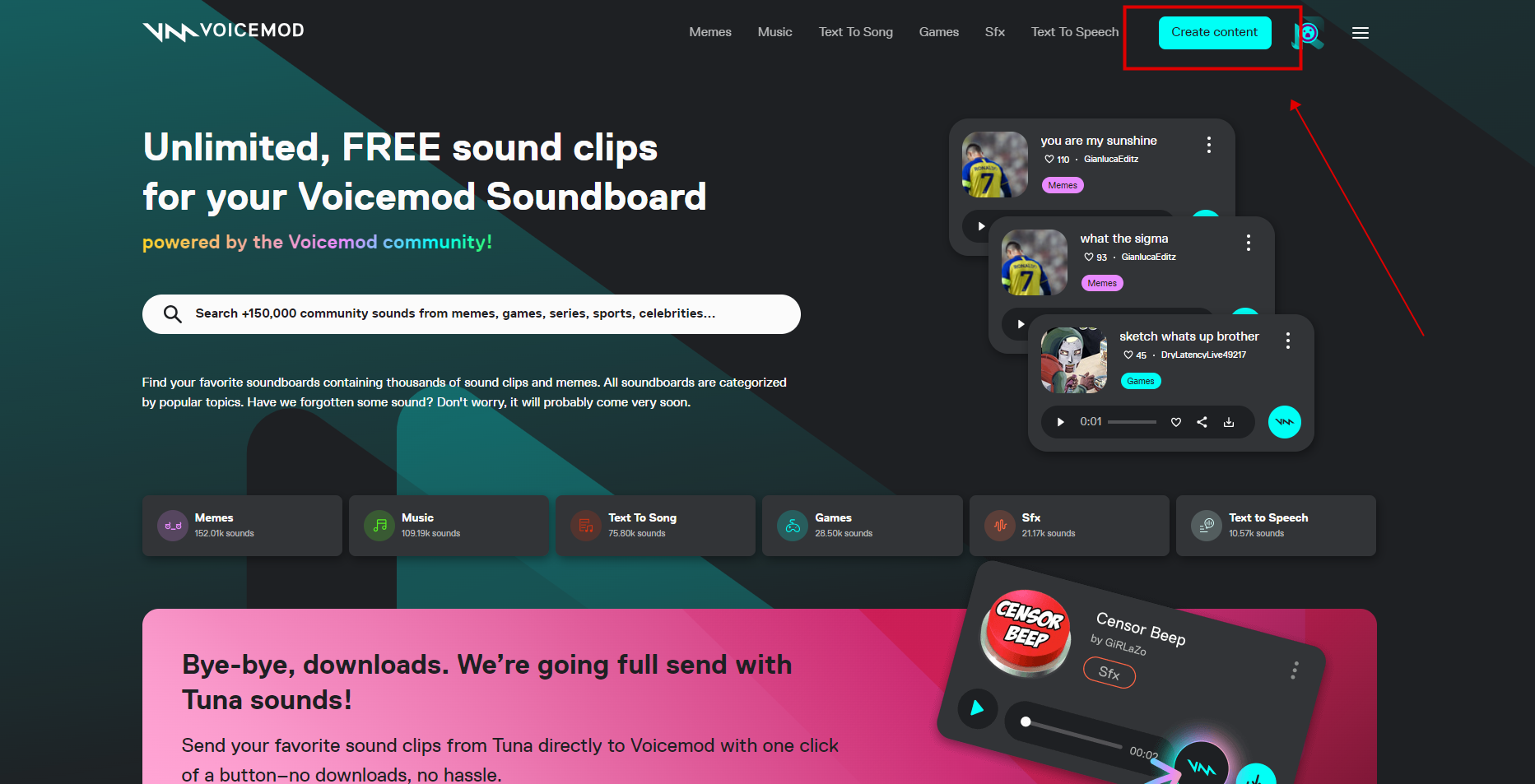
First, you’ll need to visit tuna.voicemod.net and log into your account. Once you’re in, look for the “Create content” option – that’s your starting point for adding new sounds to the platform.
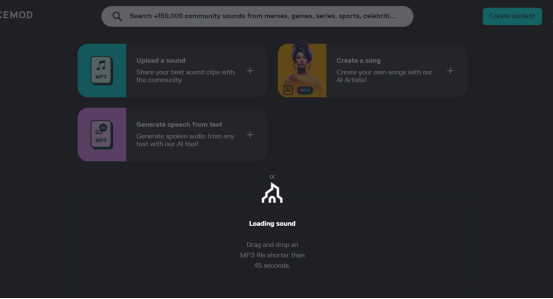
You can either upload an MP3 file from your computer or simply drag and drop it directly into the browser window. There is one important limitation to keep in mind: your audio files need to be shorter than 45 seconds. This keeps the sounds quick and manageable for real-time use.
After your file is uploaded, you’ll need to fill in some information about it. This includes things like a description of the sound, what category it fits into, and any tags that might help other users find it. Proper labeling is super important because it helps your sound get discovered by others in the massive Tuna voicemod library.
Once you’ve completed the upload process, you can import your new sound into Voicemod itself. Then you’ll be able to find it among your Voicemod soundboard sounds and use it on whatever platform you prefer, whether that’s Discord, Zoom, or anywhere else you use voice chat.
One thing to be aware of: sometimes the upload process to the Tuna soundboard can take a while or even get stuck on the loading screen. This is a common issue that many users report, so don’t panic if it happens to you – just be patient or try again later.
While Voicemod itself is generally considered a decent real-time voice changer, the Tuna component has received mixed reviews from users. Some people love the vast library, while others have experienced various technical issues that can be frustrating.
Common Voicemod Tuna Soundboard Issues and Solutions
Like any software, the Voicemod Tuna platform isn’t perfect and can sometimes run into problems. If you’re experiencing issues with your soundboard not working properly, you’re not alone. There are several common reasons why Voicemod Tuna might act up.
One of the most frequent problems is outdated software. If you haven’t updated Voicemod in a while, it might be missing important patches that keep it running smoothly. Audio driver issues on your computer can also cause problems, as Voicemod needs properly configured drivers to function correctly.
Sometimes the issue is with your computer’s audio settings themselves. If these are configured in a way that conflicts with Voicemod, the software might not be able to access your microphone properly. Connection problems can also occur, either on your end or with Voicemod’s servers, disrupting the service.
Another common headache is application conflicts. If you have other programs running that also use your microphone or sound card, they might be fighting with Voicemod for control, causing one or both to malfunction.
Troubleshooting Voicemod Tuna Problems
If you’re dealing with a non-functional Voicemod Tuna soundboard, there are several steps you can take to try to resolve the issue.
Start with the simplest solution first: close all running applications and restart your computer. This can resolve a surprising number of software conflicts. You can use your computer’s Task Manager to identify any applications that might be conflicting with Voicemod, particularly those that use your sound card or microphone. If simply closing these apps doesn’t help, a full computer restart followed by relaunching Voicemod often does the trick.
If that doesn’t work, try reinstalling Voicemod on your PC. Sometimes installation files get corrupted or the software lacks important updates. Reinstalling the latest version can fix these issues. Make sure to completely remove the existing version before reinstalling to ensure a clean installation.
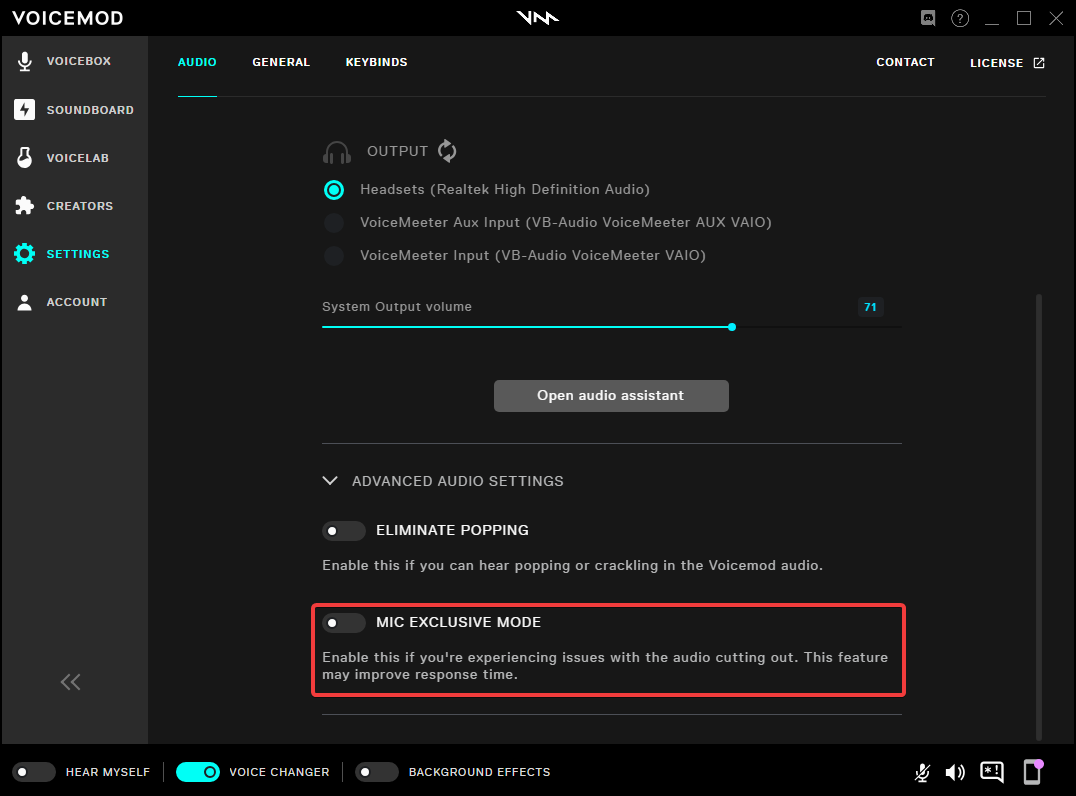
Another common fix involves checking the exclusive mode option in Voicemod. This setting can sometimes interfere with how the application accesses your microphone. To adjust this, go to Settings > Advanced settings and disable the MIC EXCLUSIVE MODE switch. This simple change is often enough to get everything working properly again.
Top Alternatives to Voicemod Tuna Soundboard
While Voicemod Tuna has its merits, some users find they want more voice options or a different user experience. If you’re in this camp, there are several solid alternatives worth considering that might better suit your needs.
iMyFone MagicMic – Best Real Time AI Voice Changer
MagicMic is a professional real-time AI voice changer that changes your voice while communicating online. It’s easy to use, has extremely low latency, features high quality AI voices and is compatible with all systems. Discover 500+ AI voices and 100K+ meme soundboards with MagicMic today!

Check More Details | Download Now! | Check All Deals
One of the standout alternatives is MagicMic, which offers unlimited soundboards completely free of charge. Whether you’re creating content for social media or just want high-quality sounds for personal use, MagicMic delivers excellent audio quality without the need for registration. This makes it more convenient than the Tuna voicemod platform for quick access.
MagicMic comes packed with impressive features that give it an edge over many competitors. The platform offers over 100,000 pre-recorded or professionally designed voice clips and soundboards to choose from. It’s compatible with various gaming and voice platforms, making it versatile for different use cases.
Where MagicMic really shines is in its voice modification capabilities. With 300+ voice filters, you can make yourself sound like pretty much anyone or anything. This opens up endless possibilities for having fun with friends or creating unique content. You can also create custom voices or soundboards by uploading your own audio clips, giving you complete creative control.
iMyFone MagicMic – Best Real Time AI Voice Changer
MagicMic is a professional real-time AI voice changer that changes your voice while communicating online. It’s easy to use, has extremely low latency, features high quality AI voices and is compatible with all systems. Discover 500+ AI voices and 100K+ meme soundboards with MagicMic today!

Check More Details | Download Now! | Check All Deals
Another excellent alternative is iMyFone VoxBox, which takes a slightly different approach as an AI voice generator. While Voicemod Tuna focuses mainly on sound effects, VoxBox offers comprehensive voice generation and modification tools that are perfect for content creation.
VoxBox boasts an impressive library of over 3,200 different voices supporting 77+ languages, with access to more than 100 different accents. This makes it incredibly useful for creators working with international audiences or multiple languages.
One of VoxBox’s standout features is its AI rap generation capability. Unlike the basic Tuna voice mod functionality, VoxBox can automatically generate complete AI rap songs with lyrics based on text you input. This creative feature opens up possibilities that go far beyond simple sound effects.
The platform also includes powerful text-to-speech and voice cloning technology that lets you efficiently create voiceovers for videos. You can even upload video links for voice extraction and cloning, which is incredibly useful for content creators.
VoxBox gives you fine control over your audio with options to adjust pause, pitch, speed, and emphasis to perfect your sound. You can even add emotional tones to make the voices sound more natural. The software supports multiple output formats including MP3, WAV, and AAC, making it compatible with various editing software and platforms.

Frequently Asked Questions About Voicemod Tuna
Is the Voicemod Tuna soundboard completely free to use?
Yes, the basic Voicemod Tuna platform is free to access and use. However, it’s worth noting that while the platform itself doesn’t charge, the free version of Voicemod has some limitations when it comes to sound filters and effects. You might find that some of the more advanced features require the paid version of Voicemod to access.
What’s the process for uploading my own sounds to Tuna?
Uploading sounds to the Tuna platform involves visiting tuna.voicemod.net and logging into your account. From there, you select the “Create content” option and either upload or drag and drop your MP3 file. Remember that files need to be under 45 seconds. After uploading, you’ll need to add descriptions and categories for your sound before it becomes available to the community.
How can I access Tuna soundboard if it’s blocked on my network?
If you’re trying to access Tuna soundboard from a restricted network, you can usually still reach it by going directly to Tuna.VoiceMod.net and logging in. The process for creating content remains the same – you can drag and drop MP3 files directly. After uploading to Tuna, you import the sound into Voicemod to use it on platforms like Discord.
What’s the best way to get Voicemod Tuna working with Discord?
Getting Voicemod Tuna to work properly with Discord requires a specific setup process. First, navigate to Voicemod Settings and select your speaker and headphone options. Make sure to disable both the “Eliminate Popping” and “Mic Exclusive Mode” options as these can cause conflicts.
Next, go to Discord’s User Settings and find the “Voice & Video” section. From the Input Device drop-down menu, select the VoiceMod microphone. For output, choose your headphones or speakers as appropriate.
There are several settings in Discord that you should deactivate for optimal performance: Automatically Determine Input Sensitivity, Noise Suppression, Echo Cancellation, and Automatic Gain Control. Disabling these features typically results in better compatibility with Voicemod Tuna soundboard.
iMyFone MagicMic – Best Real Time AI Voice Changer
MagicMic is a professional real-time AI voice changer that changes your voice while communicating online. It’s easy to use, has extremely low latency, features high quality AI voices and is compatible with all systems. Discover 500+ AI voices and 100K+ meme soundboards with MagicMic today!
Check More Details | Download Now! | Check All Deals
Final Thoughts on Voicemod Tuna Soundboard
The Voicemod Tuna platform offers an impressive collection of user-generated sounds that can add personality and fun to your online interactions. With over 150,000 sound effects and growing, it’s a valuable resource for content creators, gamers, and anyone looking to spice up their audio experience.
While the platform does have some limitations and occasional technical issues, its community-driven approach and extensive library make it worth exploring, especially if you’re just getting started with soundboards. The ability to both download existing sounds and contribute your own creations fosters a vibrant ecosystem of audio content.
That said, it’s always good to know about alternatives like MagicMic and VoxBox, which offer different features and approaches to voice modification and soundboard creation. Depending on your specific needs and technical preferences, one of these alternatives might actually serve you better than the original Voicemod Tuna soundboard.
At the end of the day, the best tool is the one that fits your particular use case and personal preferences. Whether you stick with Voicemod Tuna or explore other options, having access to these audio tools opens up creative possibilities that can make your online presence more engaging and entertaining.
Some images in this article are sourced from iMyFone.