TOOL HUNTER

Ever found yourself scrolling through Facebook and stumbling upon a video with an amazing soundtrack or an interesting dialogue that you wish you could save? You’re not alone. Many people want to know how to download audio from Facebook videos but aren’t sure where to start. The good news is that it’s actually pretty straightforward once you know the right methods.
Whether you want to save music from a concert clip, preserve a meaningful speech, or just keep funny audio from a viral video, there are several ways to extract audio from Facebook content. In this guide, we’ll walk through three different approaches to help you download audio from Facebook videos, ranging from simple online tools to more advanced desktop software.
Each method has its own advantages, so you can choose the one that best fits your technical comfort level and needs. Some are completely free while others offer more professional features. Let’s dive in and explore how you can start building your collection of Facebook audio content today.
Table of Contents
- How to Download Audio from Facebook Videos Using Online Tools
- Using Audacity to Capture Audio from Facebook Videos
- Professional Approach: Using iMyFone Filme for Facebook Audio Extraction
- Comparing the Different Methods to Download Audio from Facebook
- Important Considerations When Downloading Audio from Facebook
- Advanced Audio Editing After Downloading from Facebook
- Troubleshooting Common Issues When Downloading Facebook Audio
- Creative Uses for Downloaded Facebook Audio
- Maintaining Your Downloaded Audio Collection
- Future-Proofing Your Facebook Audio Downloads
How to Download Audio from Facebook Videos Using Online Tools
One of the quickest ways to get audio from Facebook videos is through online downloaders. These web-based services don’t require any software installation and can be used from any device with a web browser. The process is generally the same across most platforms, though the specific steps might vary slightly.
When looking for how to download audio from Facebook videos online, you’ll find several reliable options. These websites typically work by taking the URL of the Facebook video and processing it to extract either the video file or just the audio track. Most offer both options, giving you flexibility depending on your needs.
Here’s a typical process for using these online tools:
First, navigate to the Facebook video you’re interested in and copy its URL from the address bar. Make sure you’re copying the direct link to the video itself rather than the general Facebook page URL. The correct link should look something like “facebook.com/watch/?v=1234567890” rather than just “facebook.com”.
Next, visit your chosen online downloader website. There are several reputable options available, though specific recommendations may vary based on current availability and performance. Paste the copied URL into the designated field on the website and initiate the processing.
Once the website has processed the video, you’ll typically see download options for different quality levels and formats. Look for an “Audio Only” or similar option, which will usually provide an MP3 file. Some services might offer additional audio formats, but MP3 is the most universally compatible.
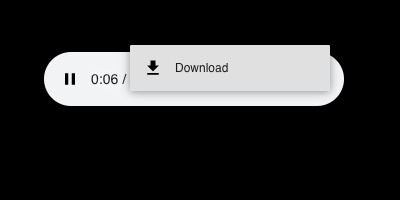
After selecting the audio option, the file will typically either download automatically or open in a new tab where you can manually trigger the download. You might need to rename the file since these services often generate generic filenames.
The main advantage of online tools for those wondering how to download audio from Facebook videos is convenience. There’s nothing to install, and the process works regardless of your operating system. However, some users have concerns about privacy and security when using online services, as you’re uploading information about the videos you’re accessing. Additionally, video availability can sometimes be limited if privacy settings restrict external access.
For those who prefer not to use online services or want more control over the process, desktop solutions offer a good alternative.
Using Audacity to Capture Audio from Facebook Videos
Audacity provides a completely different approach to obtaining audio from Facebook content. Rather than directly downloading the audio track, this method involves recording the audio as it plays through your computer. This technique has been around for years but remains effective for those learning how to download audio from Facebook videos through recording.
Audacity is a free, open-source audio editing application that’s been available for over twenty years. It works on Windows, Mac, and Linux systems, making it accessible to virtually all users. The latest versions continue to support the recording functionality that makes it useful for capturing audio from various sources, including Facebook videos.
Here’s how to use Audacity to capture audio from Facebook:
Begin by installing Audacity on your computer if you haven’t already. It’s available free from the official Audacity website. Once installed, open the application but don’t start recording yet.
Keep the Facebook video open in your web browser, but pause it at the beginning. You’ll want everything ready before you start the recording process to ensure you capture the complete audio without any gaps.
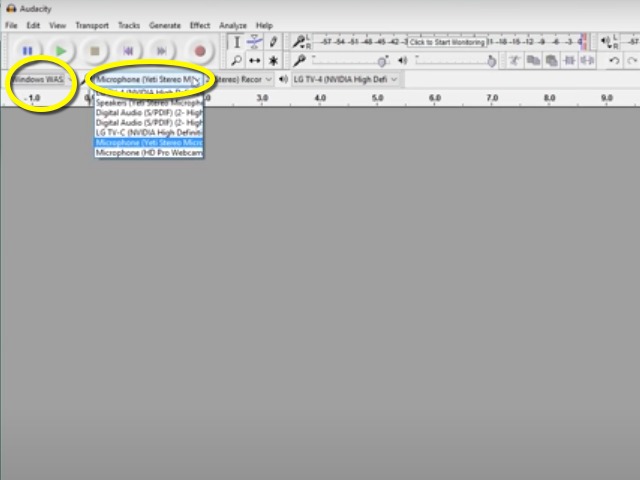
In Audacity, you’ll need to adjust some settings to enable system audio recording. The exact steps vary by operating system:
On Windows, change the audio host to “Windows WASAPI” and select your speakers or audio output device as the recording source. This allows Audacity to capture whatever audio your computer is playing.
On Mac systems, you might need additional software to enable system audio recording, or you can use alternative methods like Soundflower or BlackHole.
Once your settings are configured, you’re ready to record. Click the record button in Audacity, then immediately switch to your browser and play the Facebook video. Let the video play completely from start to finish to ensure you capture the entire audio track.
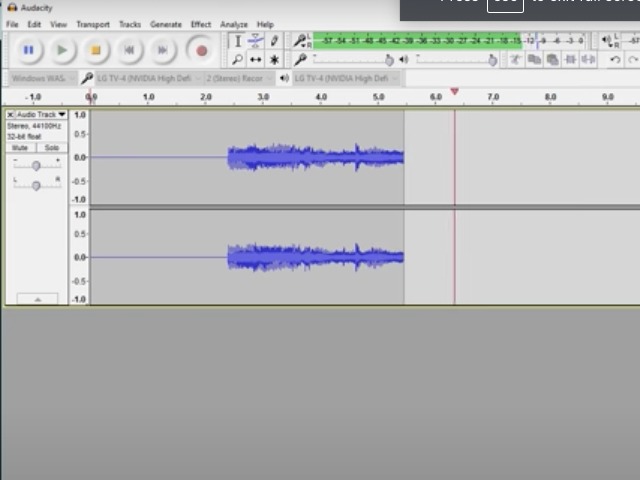
When the video ends, return to Audacity and stop the recording. You’ll now see the audio waveform displayed in the application. You can trim any silence from the beginning or end of the recording using the selection and delete tools.
Finally, export your recording as an MP3 file. Audacity may require you to install the LAME MP3 encoder separately for MP3 export, but it will guide you through this process if needed.
The recording method with Audacity has both advantages and limitations. On the positive side, it works with any audio playing through your computer, regardless of source or restrictions. However, the audio quality depends on your system’s audio output, and any notifications or other sounds during recording will be included in your capture.
Professional Approach: Using iMyFone Filme for Facebook Audio Extraction
For users who want a more professional and reliable method to download audio from Facebook videos, dedicated video editing software often provides the best solution. iMyFone Filme offers a straightforward approach to extracting audio from video files, including those downloaded from Facebook.
Filme is a video editing application designed to be accessible for beginners while still offering advanced features for more experienced users. Its audio extraction capability makes it simple to download audio from Facebook videos with just a few clicks, providing high-quality results without the potential issues of online tools or audio recording.
Filme – Best Video Editor for Beginners.Explore Your Creativity, Limitless

Check More Details | Download Now! | Check All Deals
One of the significant advantages of using Filme for this purpose is its dedicated audio detachment feature. Unlike workarounds or recording methods, this tool directly extracts the original audio track from video files, preserving the quality and avoiding any recording artifacts or quality loss.
Here’s how to use Filme to extract audio from Facebook videos:
First, you’ll need to obtain the Facebook video file. Since Facebook doesn’t provide direct download options for most videos, you might need to use a video downloader service or browser extension to save the video to your computer first. Once you have the video file locally, the process becomes straightforward.
Install and launch iMyFone Filme on your computer. The interface is designed to be intuitive, with clear labeling and logical workflow.
Import your downloaded Facebook video into Filme by clicking the “+” button in the media library or dragging and dropping the file directly into the application. The software supports a wide range of video formats, so compatibility issues are rare.
Once imported, drag the video from your media library to the timeline at the bottom of the interface. This prepares it for editing and export.
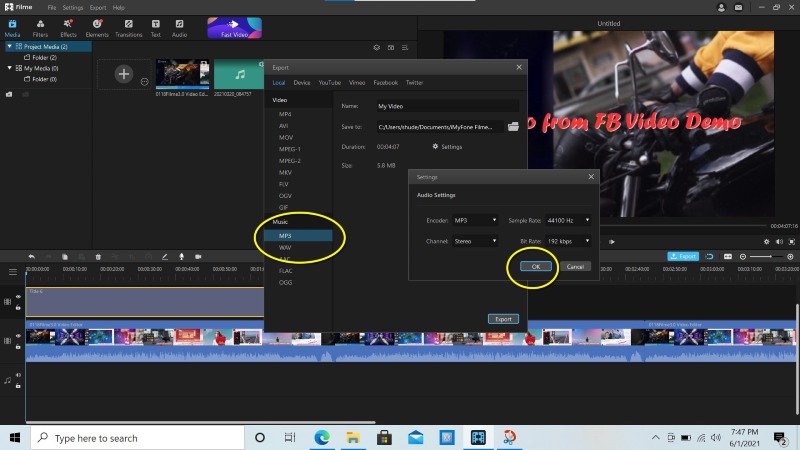
With the video in the timeline, you can now export just the audio portion. Click the export button and select MP3 as your output format instead of a video format. Filme will automatically detect that you want to extract the audio track and will process the file accordingly.
During export, you may have options to adjust audio quality settings, though the default options typically work well for most purposes. The processing time will depend on the length of your video and your computer’s performance.
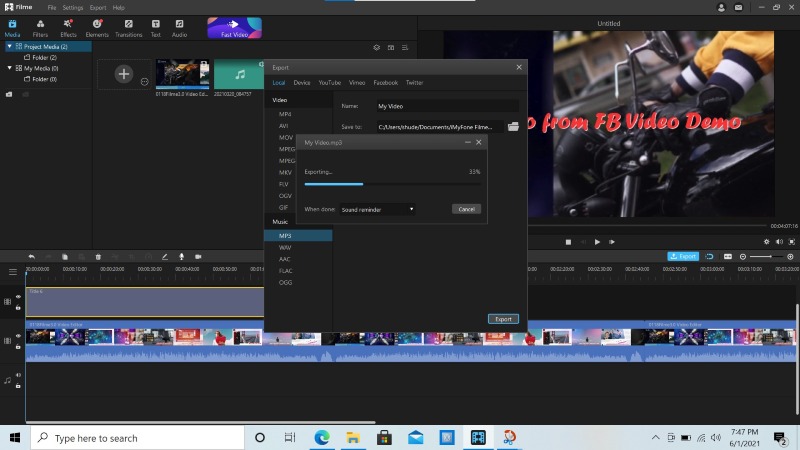
Once complete, you’ll have an MP3 file containing just the audio from your Facebook video, saved to your specified location. The quality will match the original video’s audio track, as no re-encoding or recording is involved in the process.
Beyond simple extraction, Filme offers additional audio editing capabilities that can be useful after you’ve extracted your audio. You can trim unwanted sections, adjust volume levels, apply fade-ins and fade-outs, or even combine multiple audio clips. These features make it particularly valuable if you plan to use the extracted audio for projects beyond simple listening.
Comparing the Different Methods to Download Audio from Facebook
Each method for downloading audio from Facebook videos has distinct advantages and limitations. Understanding these differences can help you choose the right approach for your specific needs and technical comfort level.
Online downloaders offer the quickest solution with no software installation required. They’re perfect for one-time use or when you’re working on a computer where you can’t install applications. However, they depend on the service remaining available and functional, and some users have privacy concerns with uploading video URLs to third-party websites.
The Audacity recording method works regardless of video restrictions or availability, since you’re capturing the audio as it plays. This can be advantageous for videos with privacy settings that prevent downloading. However, the audio quality is limited by your computer’s audio output, and the process requires real-time recording, which isn’t practical for longer videos.
Desktop software like Filme provides the highest quality results since it extracts the original audio track directly. The process is fast and doesn’t require real-time recording. Additionally, having the software installed means you’re not dependent on online services that might disappear or change their functionality. The main drawback is the initial software installation and potential cost for premium features.
Filme – Best Video Editor for Beginners.Explore Your Creativity, Limitless
Check More Details | Download Now! | Check All Deals
When considering which method to use for your needs, think about how frequently you’ll need to download audio from Facebook videos, your quality requirements, and your comfort with different types of software. For occasional use, online tools might suffice. For regular use or higher quality needs, investing time in learning a desktop solution like Filme could be worthwhile.
Important Considerations When Downloading Audio from Facebook
Before you start downloading audio from Facebook videos, there are several important factors to consider beyond just the technical process. Being aware of these aspects will help ensure you use these methods responsibly and effectively.
Copyright and legal considerations should be your first thought. Just because you can download audio from Facebook videos doesn’t always mean you should. Respect copyright laws and only download content you have permission to use, or that you’re using for personal enjoyment rather than distribution or commercial purposes. Many videos on Facebook contain copyrighted music or other protected content.
Audio quality varies significantly across Facebook videos depending on how they were originally recorded and uploaded. Live videos, for instance, often have lower audio quality than professionally produced content. The method you use to download audio from Facebook videos can also impact quality – direct extraction methods typically preserve the original quality better than recording methods.
File organization becomes important if you plan to download multiple audio files from Facebook. Develop a naming system that helps you identify content later, since default filenames from download services are often generic and unhelpful. Including the source, date, and content description in your filename can save time later.
Storage considerations might also factor into your decision. Audio files are significantly smaller than video files, but if you plan to build a large collection, the space can add up. Consider where you’ll store these files and whether you need backup systems in place.
Filme – Best Video Editor for Beginners.Explore Your Creativity, Limitless
Check More Details | Download Now! | Check All Deals
Technical issues can occasionally arise regardless of which method you choose. Videos might not process correctly due to privacy settings, regional restrictions, or changes to Facebook’s platform. Having familiarity with multiple methods ensures you can adapt when one approach isn’t working.
Advanced Audio Editing After Downloading from Facebook
Once you’ve successfully learned how to download audio from Facebook videos, you might want to edit or enhance the audio files for specific uses. Basic editing can improve the listening experience or adapt the content for different purposes.
If you’ve used Filme to extract your audio, you already have access to editing tools within the same application. You can trim silence from the beginning or end of recordings, remove unwanted sections, or adjust volume levels. These simple edits can significantly improve the usability of your downloaded audio.
For music tracks extracted from Facebook videos, you might want to normalize the volume to consistent levels, especially if you’re creating playlists from multiple sources. Many audio players include normalization features, or you can use audio editing software for more precise control.
If you’re downloading speech content like interviews or presentations, you might consider using noise reduction tools to minimize background sounds. Several free and paid applications offer this functionality, which can clean up audio recorded in less-than-ideal conditions.
Creating clips from longer audio files can make content more manageable and accessible. Instead of keeping a full hour-long presentation as one file, you might create shorter segments focusing on specific topics. This approach makes it easier to find and reference particular sections later.
Metadata editing is another useful step after downloading audio from Facebook. Adding correct artist, album, and title information to your MP3 files makes them easier to organize in music players and other applications. This is particularly valuable if you’re building a collection of audio content from various sources.
Troubleshooting Common Issues When Downloading Facebook Audio
Even with the right tools and methods, you might occasionally encounter problems when trying to download audio from Facebook videos. Understanding common issues and their solutions can save time and frustration.
One frequent problem is videos that won’t process through online downloaders. This can happen for several reasons: the video might have privacy restrictions that prevent external access, it could be part of a private group, or regional restrictions might block downloading. In these cases, the recording method with Audacity often works as a workaround since it doesn’t rely on direct access to the video file.
Quality issues can arise, particularly with the recording method. If you notice distorted or low-quality audio when using Audacity, check your computer’s audio levels to ensure you’re not overdriving the input. Reducing the system volume slightly before recording can sometimes improve results.
Compatibility problems might occur with certain video formats, though this is less common with modern tools. If you’re having trouble importing a downloaded Facebook video into editing software, try using a different downloader or format option. MP4 files with AAC audio tend to have the best compatibility across different applications.
Browser-related issues can affect online downloaders. If a service isn’t working correctly, try clearing your browser cache or using a different browser. Some downloaders work better with specific browsers, so experimentation might be needed.
Download failures can occasionally happen with longer videos due to timeouts or connection issues. If you’re consistently having trouble with a particular video, try downloading it in smaller segments if possible, or attempt the process during off-peak hours when internet traffic is lighter.
Creative Uses for Downloaded Facebook Audio
Once you’ve mastered how to download audio from Facebook videos, you might wonder what to do with all these audio files. Beyond simple listening, there are numerous creative applications for downloaded Facebook audio content.
Personal music collections can be enriched with unique live performances, cover versions, or rare tracks shared on Facebook. Many artists share exclusive content through social media that isn’t available on streaming platforms, providing unique listening experiences.
Podcast and video creators often use short audio clips from Facebook as references, commentary, or educational examples. Always ensure you have appropriate permissions or are using content under fair use guidelines when incorporating downloaded audio into creative projects.
Language learning can be enhanced by downloading conversations, interviews, or educational content in target languages. Having these as audio files allows for repeated listening and study, which is valuable for comprehension and pronunciation practice.
Audio preservation is another meaningful application. Historical speeches, family memories, or culturally significant content shared on Facebook can be preserved through audio download, ensuring access even if the original video is later removed.
Content compilation allows you to create custom playlists or mixes from various Facebook sources. You might compile all the musical performances from a particular artist or create themed collections of speeches or interviews.
Accessibility improvements can be achieved by downloading audio from educational or informational videos. Some people prefer consuming content auditorily while commuting or performing other tasks, and having the audio separate from the video enables this flexible consumption.
Maintaining Your Downloaded Audio Collection
As you build a collection of audio downloaded from Facebook videos, organization and maintenance become increasingly important. Developing good habits from the beginning will save time and frustration later.
File organization should follow a logical system that works for your needs. Some people prefer organizing by date, others by content type or source. Consistent naming conventions make files easier to locate through search functions. Including the date, source, and key content in filenames is often helpful.
Backup strategies protect your collection from data loss. Consider automated backup solutions or cloud storage for important audio files. Unlike the original Facebook videos, which might remain available online, your downloaded collection is unique and potentially irreplaceable if lost.
Quality assessment should be part of your process, especially if you’re downloading content for critical listening. Quickly spot-check files after download to ensure the quality meets your expectations and the content downloaded completely without errors.
Metadata management enhances the usability of your audio collection. Most audio files support embedded information like artist, album, year, and genre. Taking a few moments to add this information makes your collection more navigable in media players and other applications.
Regular curation keeps your collection relevant and manageable. Periodically review your downloaded audio and remove files you no longer need or want. This practice prevents storage clutter and makes it easier to find the content you truly value.
Future-Proofing Your Facebook Audio Downloads
The methods available to download audio