TOOL HUNTER

Ever wanted to make your friends laugh out loud with a silly voice message? Or maybe you’re tired of the same old robotic text-to-speech voices and want something more entertaining? Well, you’re in luck! Funny TTS (text-to-speech) technology has come a long way, and there are now tons of hilarious options to choose from. Whether you’re spicing up your Discord chats or creating funny content for Twitch, these amusing voices can take your messages to a whole new level.
In this guide, we’ll explore some of the funniest TTS voices available, show you how to use them on platforms like Discord, and introduce you to powerful tools that can generate even more entertaining audio. Get ready to discover how to create laugh-out-loud funny tts messages that will have everyone in stitches!
Table of Contents
- What Makes Funny TTS Voices So Entertaining?
- Top Hilarious Text-to-Speech Voices You Need to Try
- How to Create Funny TTS on Discord
- Beyond Discord: Professional Funny TTS Tools
- Getting Started with VoxBox for Funny TTS Creation
- Creative Ways to Use Funny TTS Voices
- Frequently Asked Questions About Funny TTS
- Tips for Creating the Best Funny TTS Content
- The Future of Funny TTS Technology
- Conclusion: Embrace the Fun of Funny TTS
What Makes Funny TTS Voices So Entertaining?
Funny text to speech technology has become incredibly popular for a simple reason – it brings joy and laughter to digital conversations. Unlike traditional robotic voices, these amusing audio generators can mimic silly accents, create absurd sound effects, or even imitate famous characters. The appeal lies in their ability to transform ordinary text into something completely unexpected and hilarious.
Many content creators use funny tts messages on platforms like Twitch to engage their audience, while friends use them in group chats to lighten the mood. The best part is that you don’t need any special skills to create these funny audio clips – just type your text and let the technology do the magic!
Top Hilarious Text-to-Speech Voices You Need to Try
If you’re looking to add some humor to your digital communications, here are some of the most entertaining funny text to speech options that have become fan favorites:
The Classic Spam Sound: Lurl
This one has become legendary in online communities. The repetitive “lurl” sound creates a comedic effect that’s perfect for trolling friends or just being silly. It’s one of those funny tts voices that never fails to get a reaction, especially when used at just the right moment in a conversation.
The command typically looks like this: /tts lurl lurl lurl lurl lurl lurl lurl lurl lurl lurl lurl lurl lurl lurl lurl lurl lurl lurl lurl lurl lurl lurl lurl lurl
Bois Bois Bois – The Crowd Pleaser
There’s something about the way this one sounds that just cracks people up. The pronunciation has a musical quality that makes it stand out from other funny tts options. It’s become particularly popular on Discord servers where users compete to create the most amusing audio experiences.
You can try it with: /tts Bois Bois Bois Bois Bois Bois Bois Bois Bois Bois Bois Bois Bois Bois Bois Bois
Beatboxing Brilliance
For those who want to showcase their musical side, this beatboxing funny text to speech option is pure gold. It transforms your text into rhythmic sounds that mimic human beatboxing, creating an entertaining experience that’s both funny and impressive. This is perfect for when you want to respond to someone with something more creative than just text.
The command pattern usually involves: /tts @@@@@@@@@@dddd@@@@dddd@@@@dddd@@@@@@@@@@@@@@@@@@@@@@@@@@@@@@@@@@@@@
The Banana Madness
This one is just pure, unadulterated silliness. The extended “bananananana” sound creates a hilarious effect that’s perfect for lighthearted moments. Many users report that this particular funny tts voice never fails to make them smile, especially when used unexpectedly in serious conversations.
Try it with: /tts bananananananabanabanabananabanannana
Motor Bike Mayhem
If you want to get someone’s attention (or annoy them just a little), this motor bike sound is perfect. It creates the illusion of a motorcycle starting up and then continuing to run, complete with the “buk buk buk” sounds that make it surprisingly realistic and amusing.
The command looks like: /tts Motor Bike Started bukbukbukbukbukbukbukbuk buk buk buk bukbukbukbukbukbukbukbuk buk buk buk

Additional Funny TTS Options Worth Exploring
The world of funny tts text doesn’t stop there. Here are some other popular choices that have gained traction among users:
The Nonsense Generator – This one creates a stream of random syllables that somehow come together to form something strangely amusing: /tts anununununununununa unauanuanaunauananuanaunauanaun
Sprinkler Sound – Perfect for summer vibes or when you’re talking about water-related topics: /tts Sprinklers go pissssspspspspspspspspspspspspspspspspspspspspspspspspspspspspspspspse
Boat Engine – Great for marine enthusiasts or when you want to create a powerful sound effect: /tts BURRRRRRRRRRRRRRRRRRRRRRRRRRRRRRRRRRR drip drip
The Attention Grabber – This weird combination of sounds is guaranteed to make people stop and listen: /tts dododobobobobgjubgjubgjubdododobobobobgjubgjubgjub
Blood Type Fun – Simple but effective, especially in medical or gaming contexts: /tts :a: :a: :a: :a: :a: :a: :a: :a: :a: :a: :a: :a: :a: :a: :a: :a: :a: :a: :a: :a: :a: :a:
How to Create Funny TTS on Discord
Discord has built-in text-to-speech functionality that makes it easy to create funny tts messages directly within the platform. The process is straightforward and doesn’t require any additional software if you’re just using the basic commands.
Getting Started with Discord TTS
First, you’ll need to have Discord installed and set up on your device. Once you’re in a server or direct message where you have permission to use TTS features, you can start creating funny audio messages immediately.
There are two main ways to activate the funny tts feature on Discord:
Method 1: The Slash CommandSimply type “/tts” followed by a space and then your message. For example: /tts This is my funny message!
Method 2: The Text CommandSome servers allow you to use TTS by typing your message after the command without the slash. It would look like: tts This is another funny message!


Important Tips for Discord TTS
Always remember to include a space between the TTS command and your actual message. Without this space, the command won’t work properly. Also, be mindful of server rules – some communities have restrictions on TTS usage to prevent spam.
The built-in Discord TTS is great for quick funny tts messages, but it does have limitations in terms of voice variety and customization options. For more advanced funny text to speech needs, you might want to explore dedicated TTS tools.
Beyond Discord: Professional Funny TTS Tools
While Discord’s built-in TTS is convenient for quick messages, dedicated funny tts tools offer significantly more options, better voice quality, and greater flexibility. These tools allow you to create funny tts messages for various platforms including Twitch, YouTube, and other social media sites.
Why Use a Dedicated Funny TTS Generator?
Professional funny text to speech software provides several advantages over basic platform-integrated options. You get access to a wider variety of voices, more natural-sounding audio, and the ability to save your creations for use across different platforms. This is particularly useful for content creators who want consistent audio quality across their videos and streams.
Many of these tools also offer additional features like voice customization, audio editing capabilities, and support for multiple languages. This means you can create truly unique funny tts content that stands out from the generic options available on most platforms.
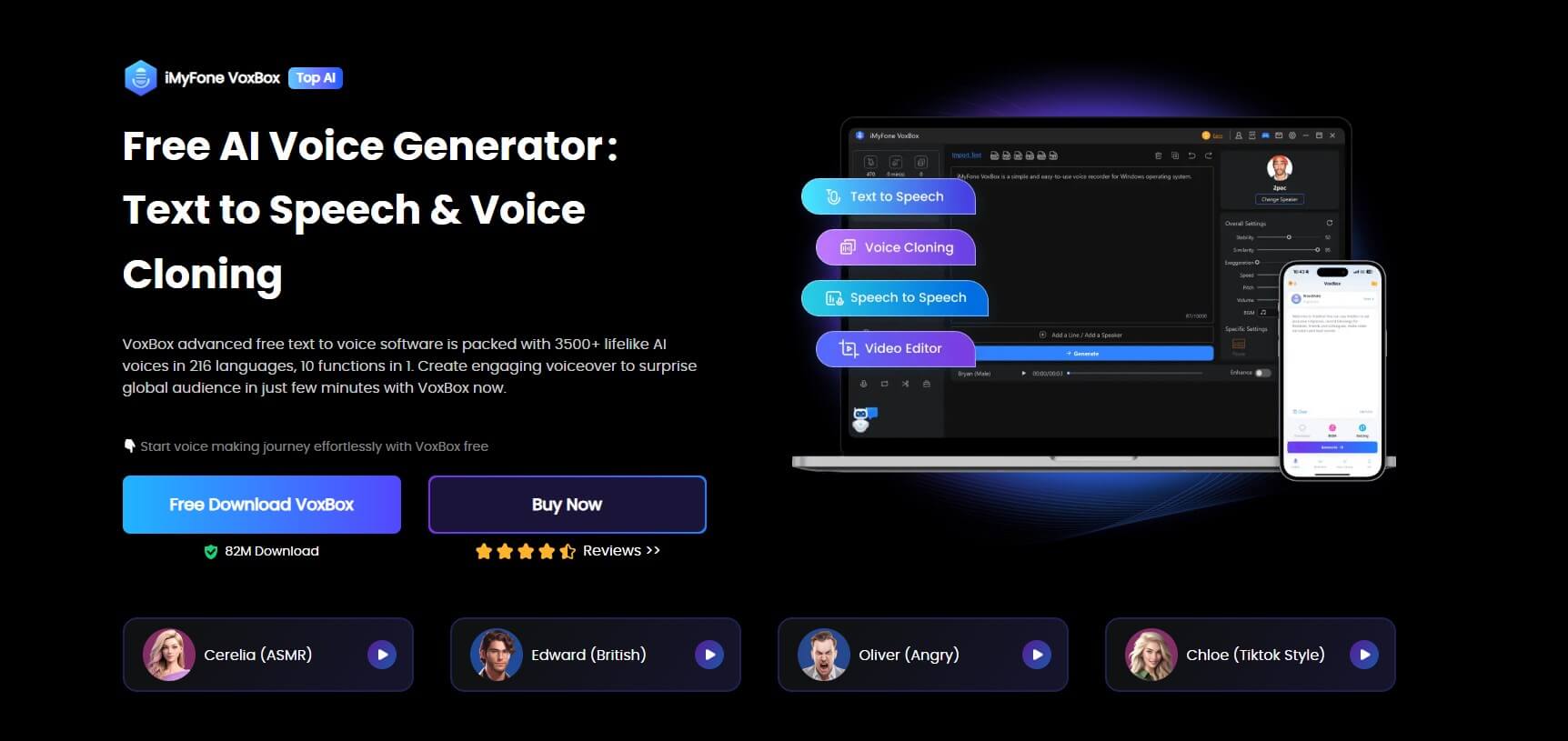
iMyFone VoxBox.Best AI Voice Generator & AI Voice Cloner: Create Custom Voices Instantly.iMyFone VoxBox is a powerful free text-to-speech software offering 3,500+ lifelike AI voices in 250+ languages, all with 10 features in one tool. Create professional voiceovers and captivate audiences worldwide in just minutes with VoxBox AI.

Check More Details | Download Now! | Check All Deals
Getting Started with VoxBox for Funny TTS Creation
If you’re ready to take your funny tts game to the next level, VoxBox provides a user-friendly platform with extensive voice options and customization features. Here’s how you can get started creating hilarious audio content:
Step-by-Step Guide to Using VoxBox
The process of creating funny tts messages with VoxBox is straightforward, even for beginners. The intuitive interface guides you through each step, making it easy to produce professional-quality funny audio in minutes.
Step 1: Download and InstallationBegin by downloading and installing the software on your computer. The installation process is quick and simple, with clear instructions to get you set up in no time.
Step 2: Voice Selection and Text InputOnce you have VoxBox open, you’ll be presented with a wide array of voice options. Browse through the available funny tts voices and select the one that best fits your needs. Then, simply type or paste the text you want to convert into speech.

Step 3: Conversion and ExportAfter entering your text, initiate the conversion process. The software will quickly transform your words into speech using the selected funny voice. You can preview the result, make adjustments if needed, and then export the final audio file to your device.
Advanced Features for Perfect Funny TTS
What sets tools like VoxBox apart are the advanced customization options that allow you to fine-tune your funny tts creations:
- Voice Parameter Adjustment: Modify speed, pitch, volume, and emphasis to create the perfect comedic effect
- Multiple Voice Options: Choose from thousands of different voices ranging from celebrities to cartoon characters
- Audio Editing Tools: Trim, combine, or enhance your audio files for professional results
- Batch Processing: Convert multiple text passages at once for efficiency
- Format Compatibility: Export your funny tts messages in various audio formats suitable for different platforms
Creative Ways to Use Funny TTS Voices
Now that you know how to create funny tts audio, let’s explore some creative applications that can enhance your digital interactions and content creation:
Entertainment and Social Media
The most obvious use for funny text to speech is entertainment. Whether you’re creating funny videos for TikTok, adding humorous elements to your YouTube content, or just messing around with friends on Discord, these voices can significantly increase engagement and entertainment value.
Many streamers use funny tts messages as part of their channel points rewards on Twitch, allowing viewers to trigger amusing audio clips during live streams. This interaction creates a more dynamic and engaging viewing experience that keeps audiences coming back.
Educational Content
Believe it or not, funny tts voices can also be valuable in educational contexts. Teachers and educators often use humorous audio to make learning materials more engaging for students. A funny voice explaining a complex concept can make the information more memorable and enjoyable to learn.
Business and Marketing
Even businesses are getting in on the funny tts trend. Creative marketing campaigns sometimes incorporate humorous text-to-speech elements to stand out from competitors and connect with audiences on a more personal level. When used appropriately, this approach can make brands seem more relatable and modern.
Personal Projects
From creating custom ringtones to producing funny voicemail messages, the possibilities for personal use of funny tts technology are endless. You can surprise family members with birthday messages in silly voices or create unique audio content for special occasions.
Frequently Asked Questions About Funny TTS
Can I use VoxBox-generated funny TTS on Discord?
Absolutely! The audio files created with VoxBox and other similar tools can be used on Discord just like any other audio file. You can either play them through your microphone using virtual audio cable software or upload them as files in your chats. Many users create libraries of their favorite funny tts messages to use across different platforms and situations.
Are there free options for creating funny TTS?
Yes, there are several free funny tts tools available, though they often come with limitations. Many online TTS services offer basic functionality for free, with premium features reserved for paid plans. Discord’s built-in TTS is completely free to use, though it offers limited voice options compared to dedicated software.
Free tools are great for occasional use or for testing out different funny text to speech options before committing to a paid solution. However, for regular use or professional content creation, investing in a comprehensive TTS tool often provides better value through enhanced features and voice quality.
What makes a TTS voice sound “funny”?
Several factors contribute to making a text-to-speech voice sound amusing. Unusual pitch patterns, exaggerated pronunciation, unexpected accents, or comedic timing can all transform an ordinary TTS voice into something hilarious. The context in which the voice is used also plays a significant role in how funny it appears to listeners.
Can I create custom funny TTS voices?
With advanced TTS tools, you often can create custom voice profiles or modify existing ones to achieve unique funny effects. Features like pitch shifting, speed adjustment, and adding audio effects allow for significant customization beyond the default voice options.
iMyFone VoxBox.Best AI Voice Generator & AI Voice Cloner: Create Custom Voices Instantly.iMyFone VoxBox is a powerful free text-to-speech software offering 3,500+ lifelike AI voices in 250+ languages, all with 10 features in one tool. Create professional voiceovers and captivate audiences worldwide in just minutes with VoxBox AI.
Check More Details | Download Now! | Check All Deals
Tips for Creating the Best Funny TTS Content
Creating truly entertaining funny tts messages involves more than just selecting a silly voice. Here are some tips to help you maximize the comedic impact of your audio creations:
Understand Your Audience
Different groups find different things funny. What works for your gaming friends on Discord might not be appropriate for a professional presentation. Consider who will be listening to your funny tts messages and tailor your approach accordingly.
Timing is Everything
In comedy, timing is crucial. The same applies to funny text to speech. Using a hilarious voice at just the right moment can amplify the comedic effect, while poor timing might fall flat. Practice delivering your funny tts messages with appropriate pauses and emphasis.
Keep it Fresh
While it might be tempting to use the same successful funny tts voice repeatedly, variety keeps things interesting. Rotate between different voices and styles to prevent your audio content from becoming predictable or stale.
Quality Matters
Even the funniest concept can be ruined by poor audio quality. Ensure your funny tts messages are clear and at an appropriate volume. Background noise or distortion can distract from the humor you’re trying to create.
Respect Platform Guidelines
Different platforms have different rules regarding audio content. Make sure your funny tts messages comply with the terms of service of whatever platform you’re using them on. What’s acceptable on a private Discord server might not be appropriate for public social media posts.
The Future of Funny TTS Technology
The world of funny text to speech is constantly evolving, with new developments making the technology more accessible and versatile than ever before. As artificial intelligence continues to advance, we can expect even more realistic and customizable funny tts options in the future.
Emerging trends include emotion-aware TTS that can convey specific feelings through voice, better integration with real-time communication platforms, and increasingly sophisticated voice cloning technology that could allow users to create funny versions of their own voices or those of famous personalities.
The growing popularity of funny tts messages on platforms like Twitch and Discord indicates that this form of entertainment isn’t just a passing trend. As the technology improves and becomes more widely available, we’ll likely see even more creative and innovative uses of humorous text-to-speech in digital communication.
Conclusion: Embrace the Fun of Funny TTS
Whether you’re looking to add some humor to your Discord chats, create engaging content for Twitch streams, or just have fun with friends, funny TTS technology offers endless possibilities for entertainment. From the basic commands available on Discord to the advanced features of dedicated software like VoxBox, there are options available for every skill level and purpose.
The key to great funny tts messages is experimentation. Don’t be afraid to try different voices, play with customization options, and test what works best for your specific needs. The more you practice, the better you’ll become at creating audio content that genuinely entertains and engages your audience.
Remember that while the technology is important, creativity is what truly brings funny tts to life. The same tool can produce completely different results depending on how it’s used, so let your imagination guide you as you explore the amusing world of text-to-speech comedy.
So why stick with boring, robotic voices when you can create something that actually makes people laugh? Dive into the world of funny TTS today and discover how a simple voice change can transform your digital communications into something truly memorable and entertaining.
Some images in this article are sourced from iMyFone.